## Day10 后端Web实战:员工管理3(删除.修改.统计)
---
#### 需求
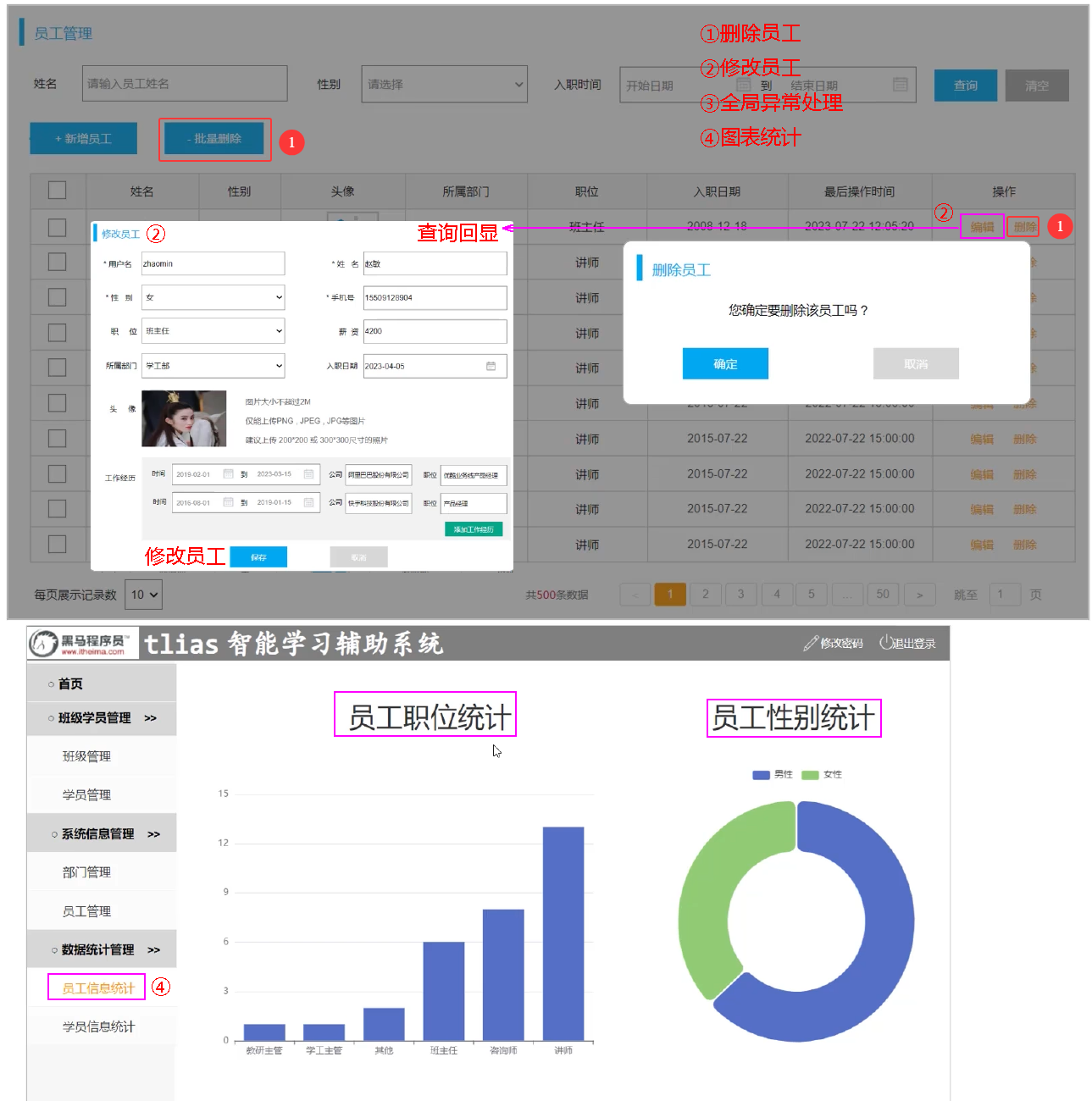 图1 删除.修改.异常.统计需求
##### 目录
* 删除员工
* 修改员工
* 异常处理
* 员工信息统计
### 1. 删除员工
#### 1.1 需求分析
图1 删除.修改.异常.统计需求
##### 目录
* 删除员工
* 修改员工
* 异常处理
* 员工信息统计
### 1. 删除员工
#### 1.1 需求分析
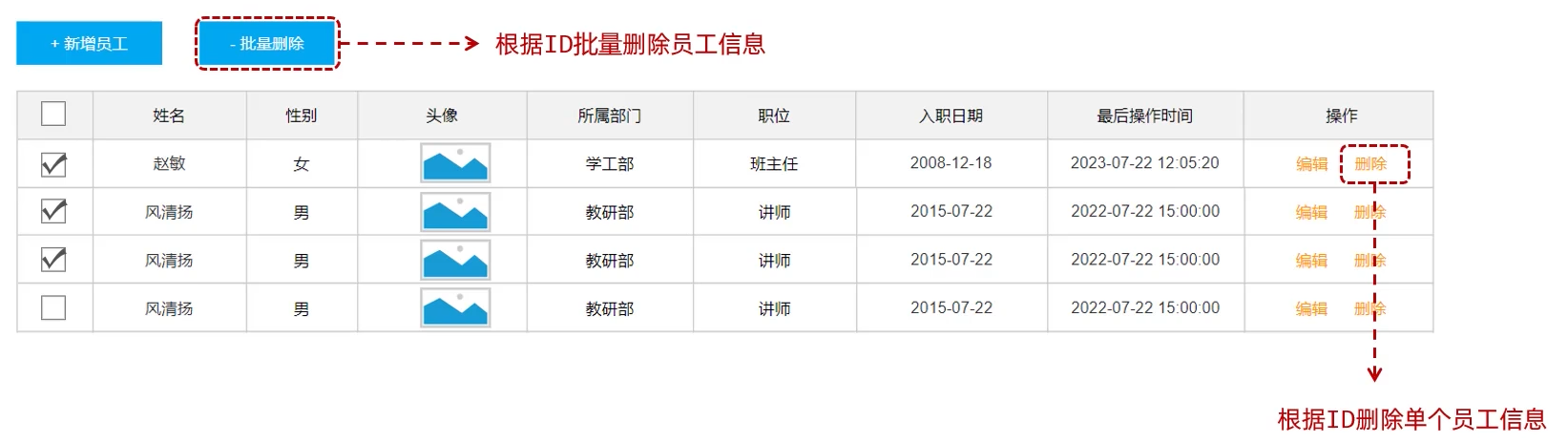 图2 删除需求分析
* 其实,删除单条数据也是一种特殊的批量删除,所以,删除员工的功能,我们只需要开发一个接口就可以了。
#### 1.2 删除员工--分层分析
图2 删除需求分析
* 其实,删除单条数据也是一种特殊的批量删除,所以,删除员工的功能,我们只需要开发一个接口就可以了。
#### 1.2 删除员工--分层分析
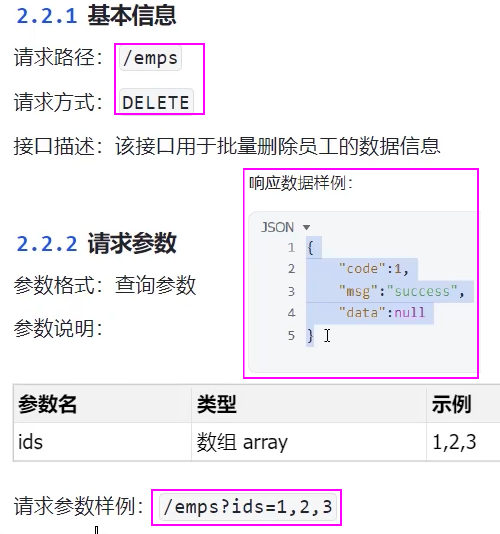 图3 删除员工--接口要求
```sql
-- 删除员工基本信息及其工作经历信息
delete from emp where id in(1,2,3);
delete from emp_expr where emp_id in (1,2,3);
```
图3 删除员工--接口要求
```sql
-- 删除员工基本信息及其工作经历信息
delete from emp where id in(1,2,3);
delete from emp_expr where emp_id in (1,2,3);
```
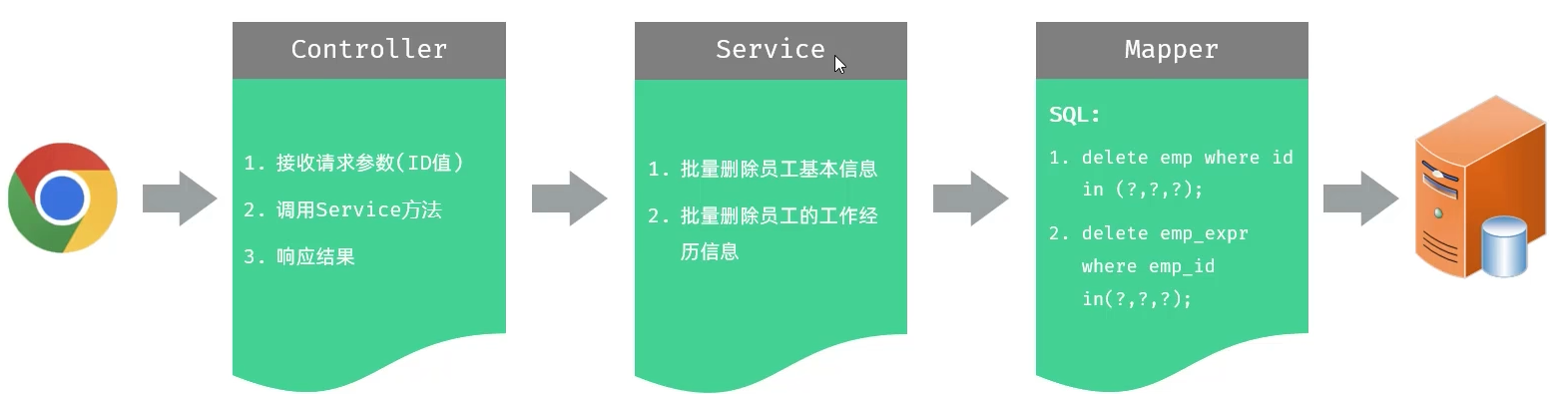 图4 删除员工--分层功能
#### 1.3 删除员工--实现
##### 删除员工-Controller接收请求参数 cn/dzj/controller/EmpController.java 添加下列方法
* 方式一:在Controller方法中通过数组来接收
```java
@DeleteMapping
public Result delete(Integer[] ids){
log.info("根据id批量删除员工:{} ", ids);
// empService.deleteByIds(ids);
return Result.success();
}
```
* 方式二:在Controller方法中通过集合来接收
```java
@DeleteMapping
public Result delete(@RequestParam List ids){
log.info("根据id批量删除员工:{} ", ids);
// empService.deleteByIds(ids);
return Result.success();
}
```
图4 删除员工--分层功能
#### 1.3 删除员工--实现
##### 删除员工-Controller接收请求参数 cn/dzj/controller/EmpController.java 添加下列方法
* 方式一:在Controller方法中通过数组来接收
```java
@DeleteMapping
public Result delete(Integer[] ids){
log.info("根据id批量删除员工:{} ", ids);
// empService.deleteByIds(ids);
return Result.success();
}
```
* 方式二:在Controller方法中通过集合来接收
```java
@DeleteMapping
public Result delete(@RequestParam List ids){
log.info("根据id批量删除员工:{} ", ids);
// empService.deleteByIds(ids);
return Result.success();
}
```
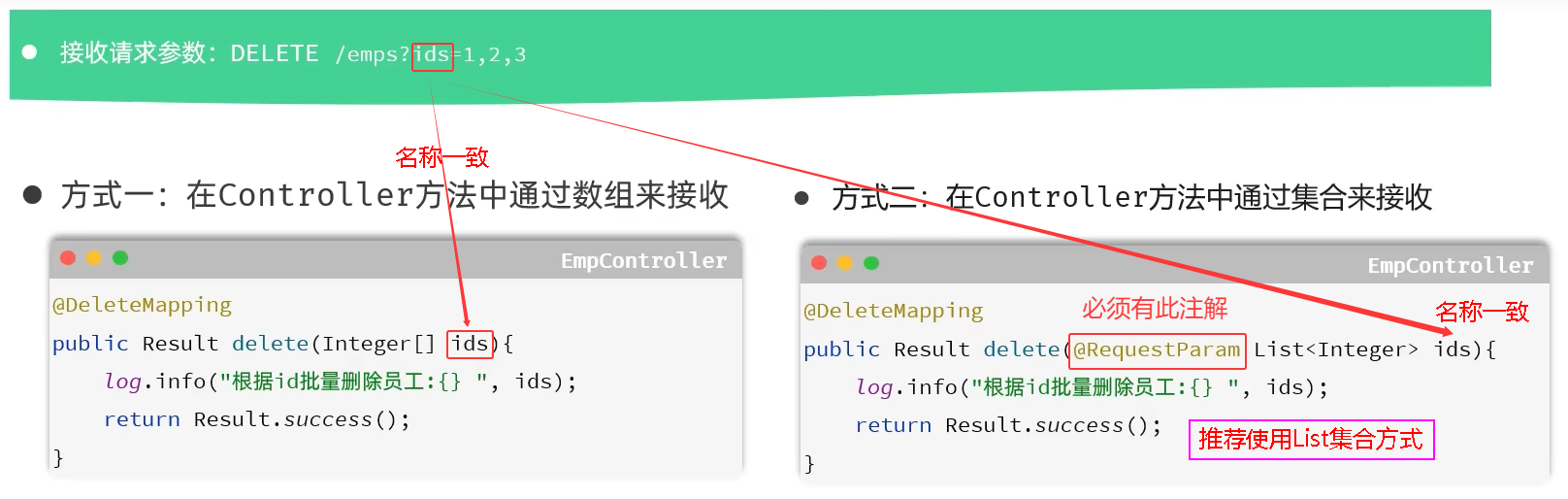 图5 删除员工--接受请求参数
##### 删除员工-Service&Mapper
##### cn/dzj/service/impl/EmpServiceImpl.java 添加下列方法
```java
@Transactional(rollbackFor = {Exception.class})
public void deleteByIds(List ids) {
//1. 根据ID删除员工基本信息
empMapper.deleteByIds(ids);
//2. 根据ID删除员工的工作经历信息
empExprMapper.deleteByEmpIds(ids);
}
```
##### cn/dzj/mapper/EmpMapper.java 添加下列方法
```java
void deleteByIds(List ids);
```
##### cn/dzj/mapper/EmpExprMapper.java 添加下列方法
```java
void deleteByEmpIds(List empIds);
```
##### src/main/resources/cn/dzj/mapper/EmpMapper.xml 添加下列代码
```xml
delete from emp where id in
#{id}
```
##### src/main/resources/cn/dzj/mapper/EmpExprMapper.xml 添加下列代码
```xml
delete from emp_expr where emp_id in
#{empId}
```
图5 删除员工--接受请求参数
##### 删除员工-Service&Mapper
##### cn/dzj/service/impl/EmpServiceImpl.java 添加下列方法
```java
@Transactional(rollbackFor = {Exception.class})
public void deleteByIds(List ids) {
//1. 根据ID删除员工基本信息
empMapper.deleteByIds(ids);
//2. 根据ID删除员工的工作经历信息
empExprMapper.deleteByEmpIds(ids);
}
```
##### cn/dzj/mapper/EmpMapper.java 添加下列方法
```java
void deleteByIds(List ids);
```
##### cn/dzj/mapper/EmpExprMapper.java 添加下列方法
```java
void deleteByEmpIds(List empIds);
```
##### src/main/resources/cn/dzj/mapper/EmpMapper.xml 添加下列代码
```xml
delete from emp where id in
#{id}
```
##### src/main/resources/cn/dzj/mapper/EmpExprMapper.xml 添加下列代码
```xml
delete from emp_expr where emp_id in
#{empId}
```
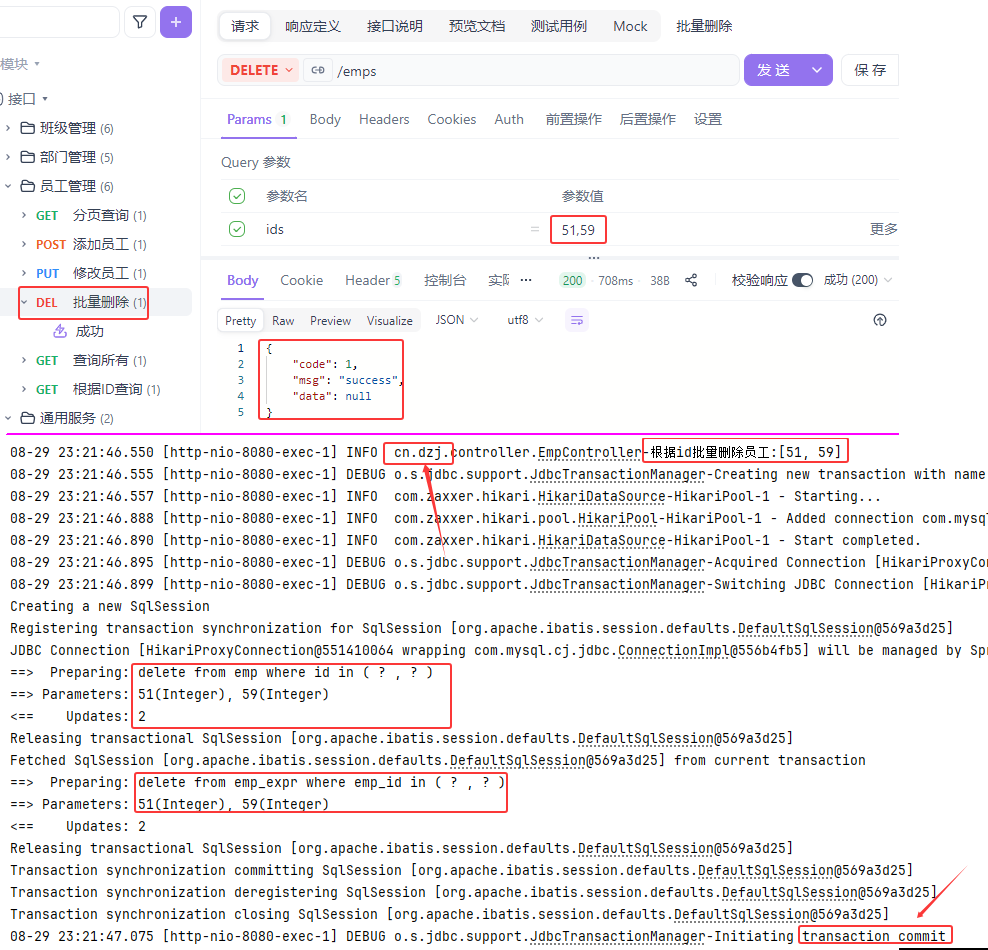 图6 员工删除测试验证1
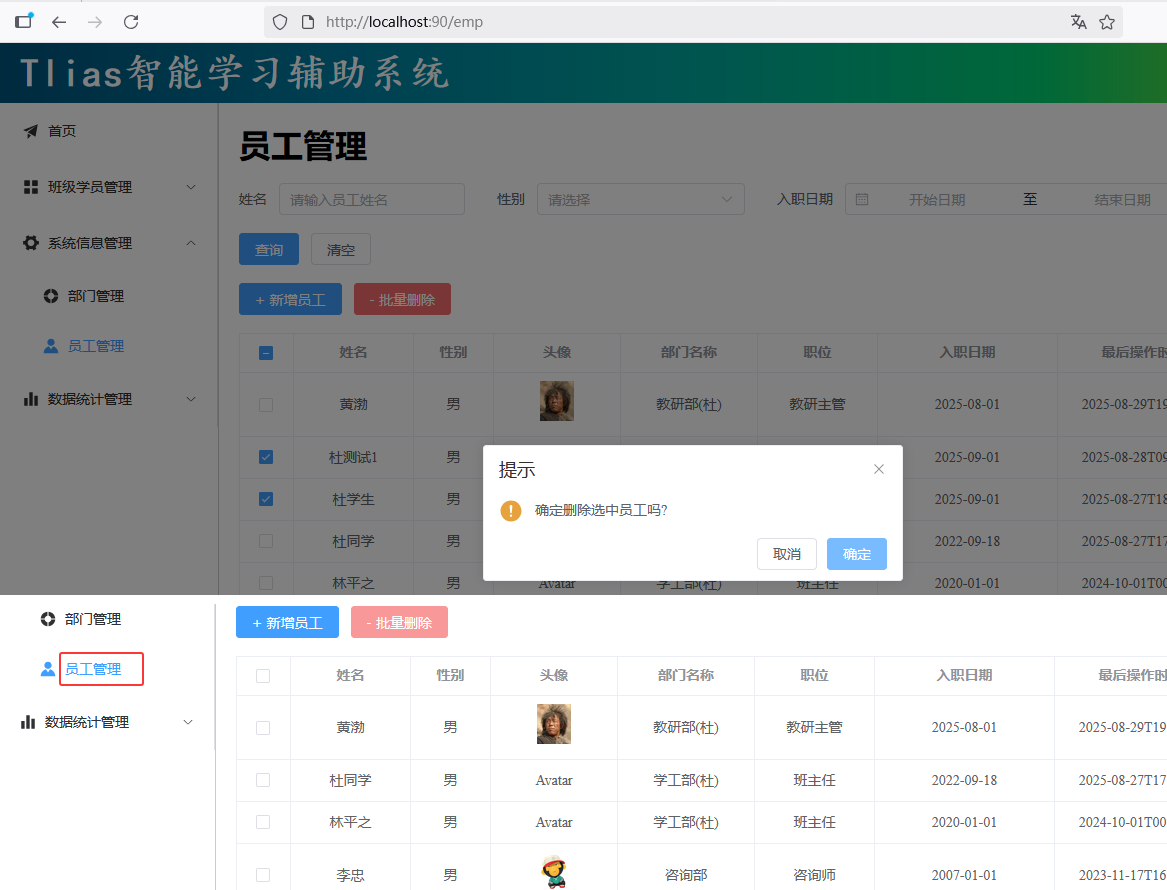 图7 员工删除测试验证2
#### 小结
图7 员工删除测试验证2
#### 小结
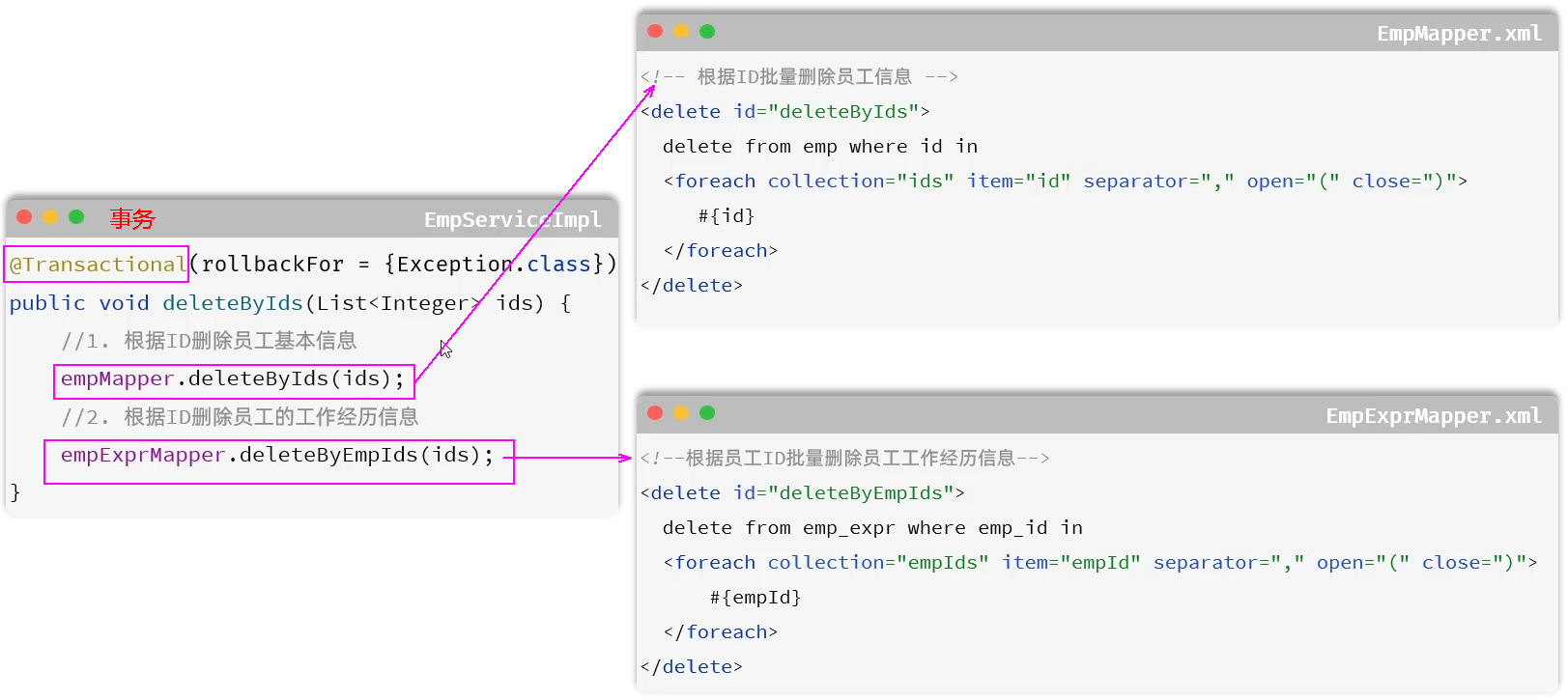 图8 删除员工小结
### 2. 修改员工
#### 需求
图8 删除员工小结
### 2. 修改员工
#### 需求
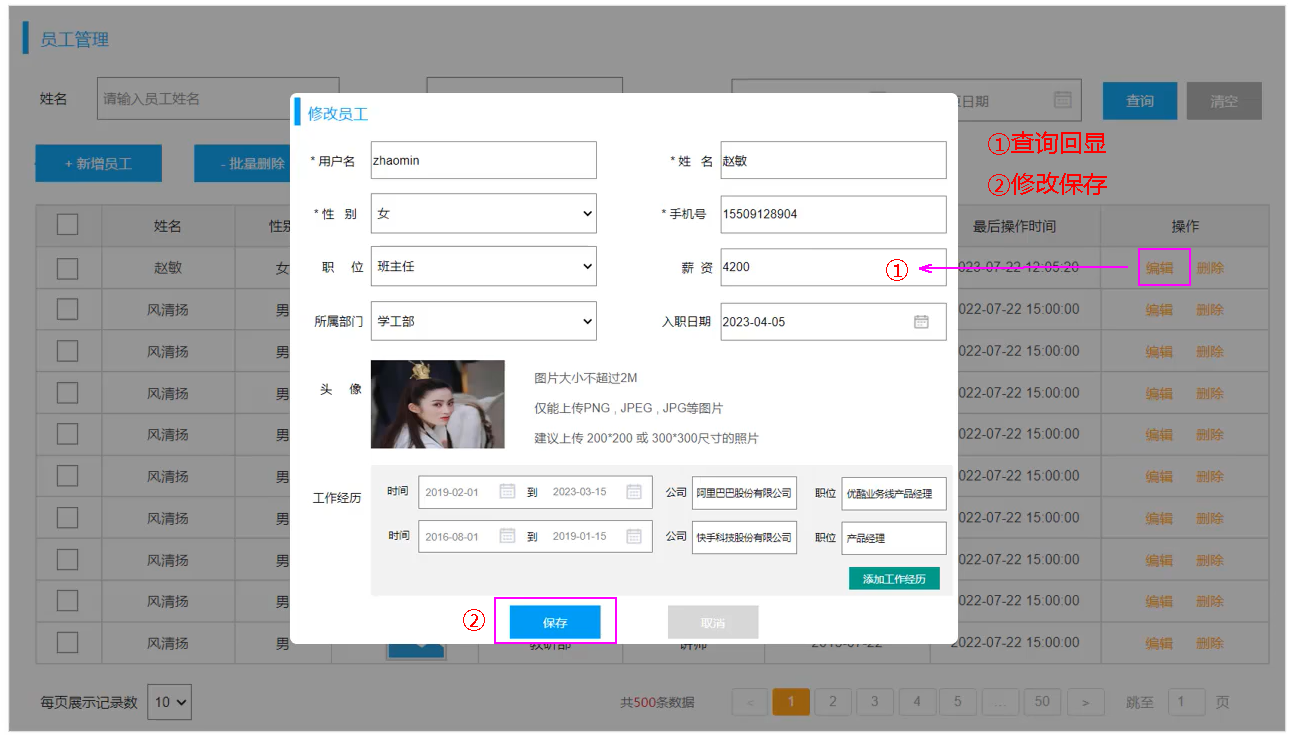 图9 修改员工需求
#### 2.1 查询回显
##### 查询回显--分层分析
图9 修改员工需求
#### 2.1 查询回显
##### 查询回显--分层分析
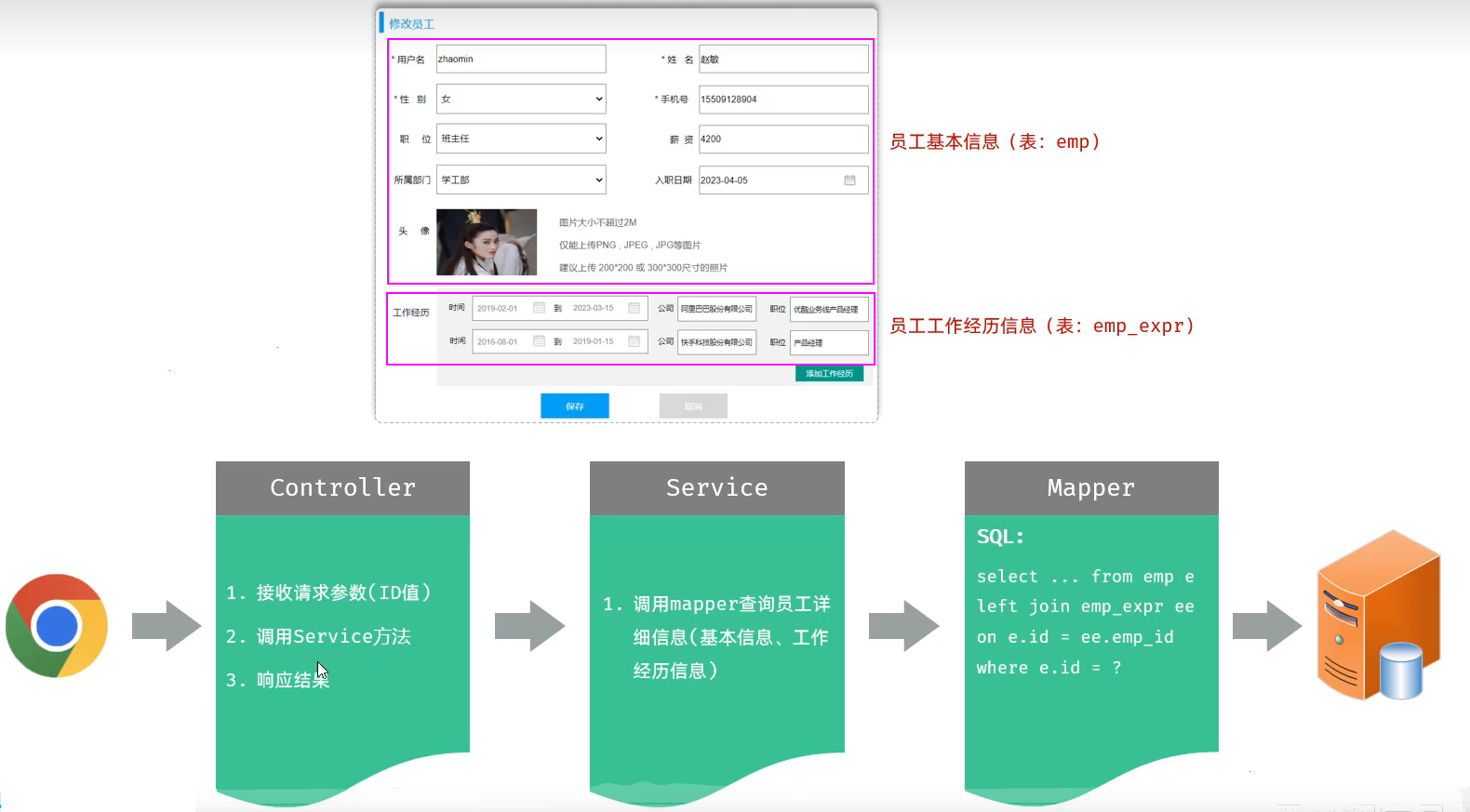 图10 查询回显--分层分析
```sql
select e.*, ee.id ee_id, ee.company ee_company, ee.job ee_job, ee.begin ee_begin, ee.end ee_end, ee.emp_id ee_empid
from emp e left join emp_expr ee on e.id =ee.emp_id where e.id = 63;
```
#### resultMap
图10 查询回显--分层分析
```sql
select e.*, ee.id ee_id, ee.company ee_company, ee.job ee_job, ee.begin ee_begin, ee.end ee_end, ee.emp_id ee_empid
from emp e left join emp_expr ee on e.id =ee.emp_id where e.id = 63;
```
#### resultMap
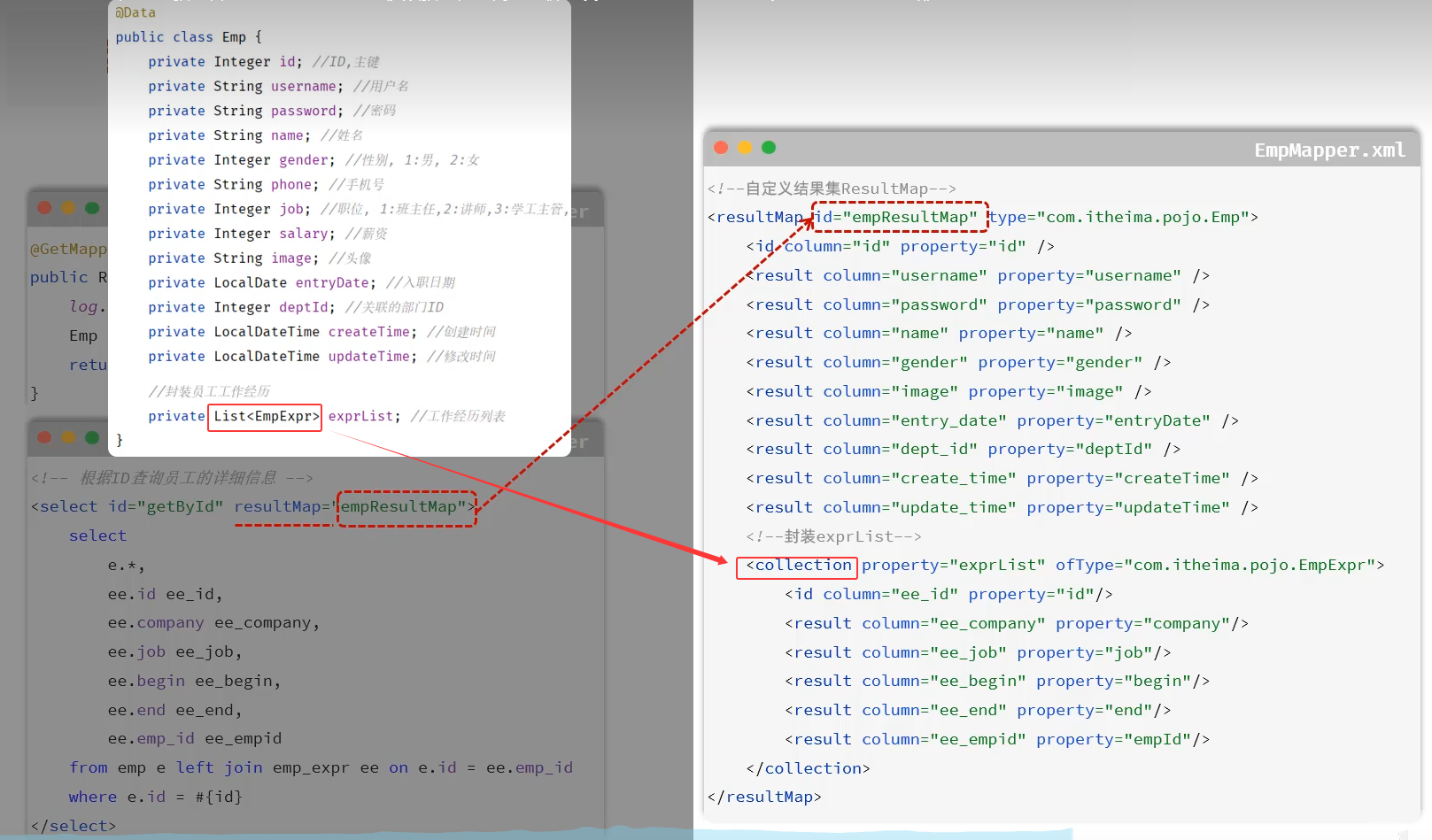 图11 resultMap
##### cn/dzj/controller/EmpController.java 添加下列方法
```java
/**
*根据ID查询员工信息
*/
@GetMapping("/{id}")
public Result getInfo(@PathVariable Integer id) {
log.info("根据ID查询员工信息:{}",id);
Emp emp = empService.getInfo(id);
return Result.success(emp);
}
```
##### cn/dzj/service/EmpService.java 添加下列方法
```java
Emp getInfo(Integer id);
```
##### cn/dzj/service/impl/EmpServiceImpl.java 添加下列方法
```java
@Override
public Emp getInfo(Integer id) {
return empMapper.getById(id);
}
```
##### cn/dzj/mapper/EmpMapper.java 添加下列方法
```java
Emp getById(Integer id);
```
##### src/main/resources/cn/dzj/mapper/EmpMapper.xml 添加getById
```xml
```
图11 resultMap
##### cn/dzj/controller/EmpController.java 添加下列方法
```java
/**
*根据ID查询员工信息
*/
@GetMapping("/{id}")
public Result getInfo(@PathVariable Integer id) {
log.info("根据ID查询员工信息:{}",id);
Emp emp = empService.getInfo(id);
return Result.success(emp);
}
```
##### cn/dzj/service/EmpService.java 添加下列方法
```java
Emp getInfo(Integer id);
```
##### cn/dzj/service/impl/EmpServiceImpl.java 添加下列方法
```java
@Override
public Emp getInfo(Integer id) {
return empMapper.getById(id);
}
```
##### cn/dzj/mapper/EmpMapper.java 添加下列方法
```java
Emp getById(Integer id);
```
##### src/main/resources/cn/dzj/mapper/EmpMapper.xml 添加getById
```xml
```
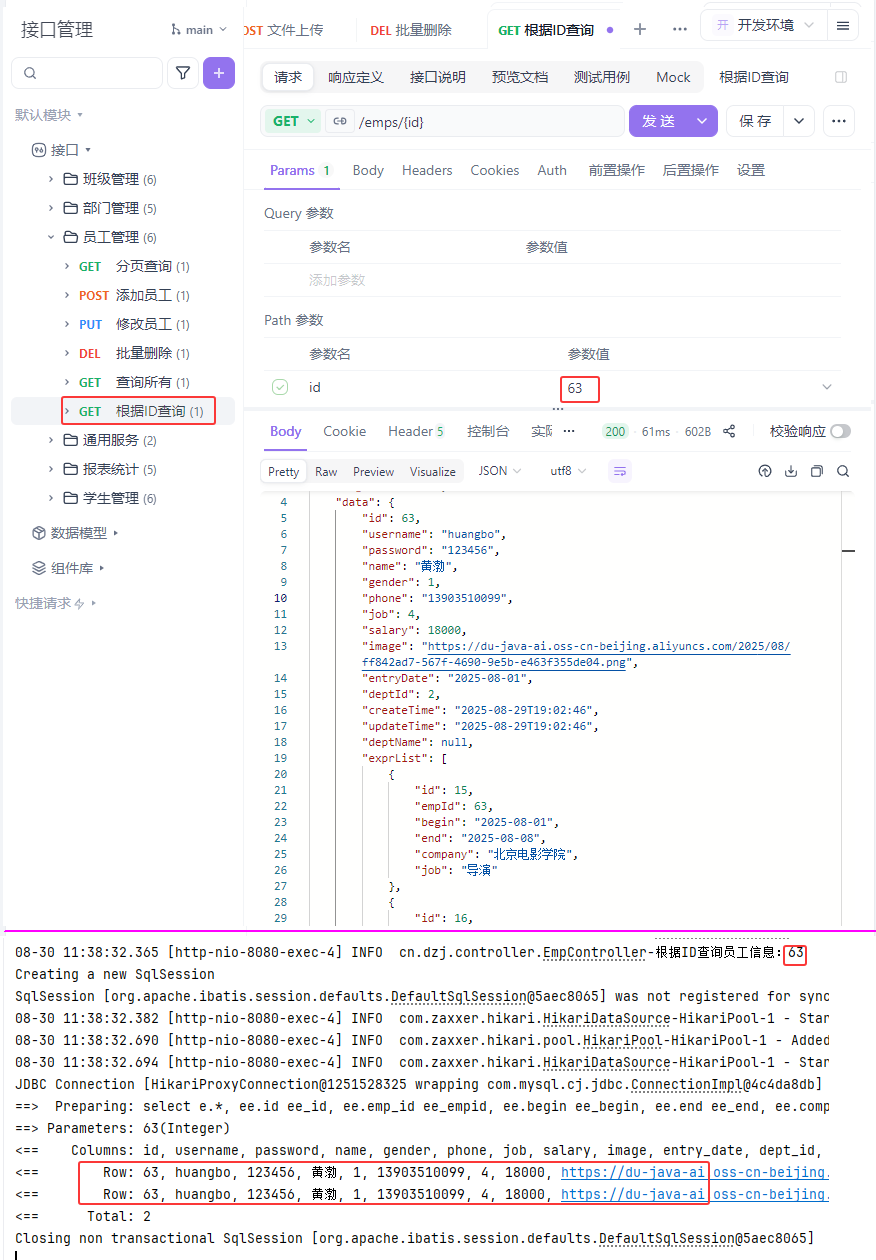 图12 查询回显验证1
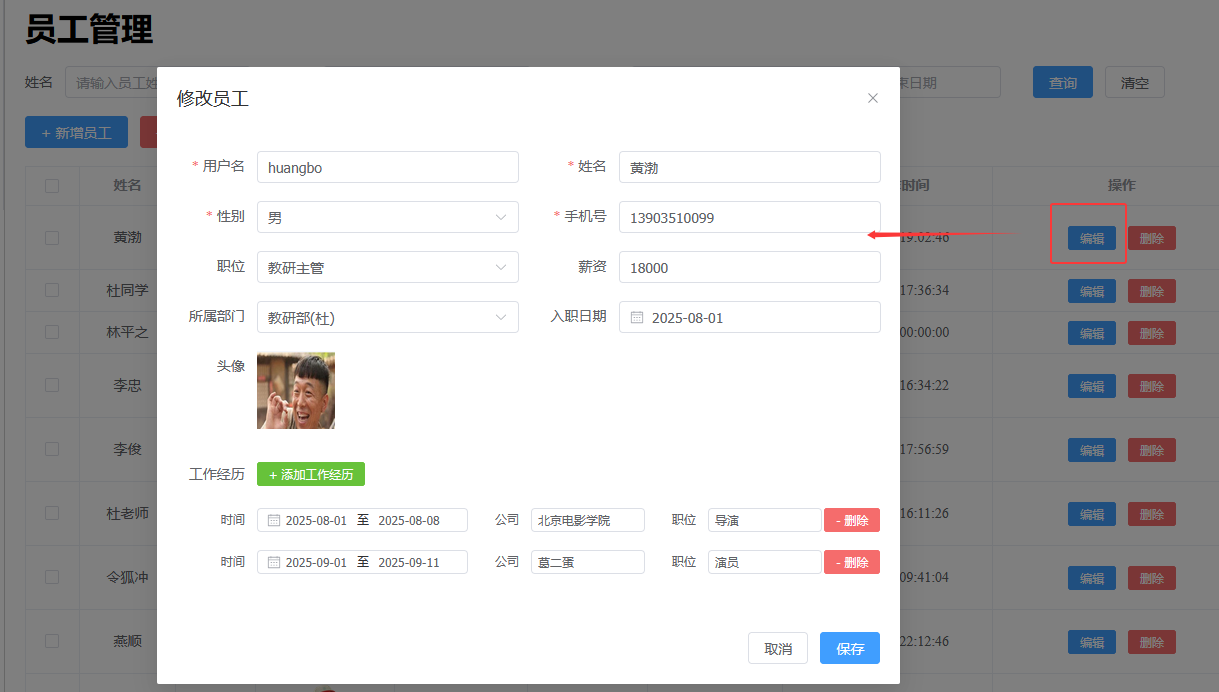 图13 查询回显验证2
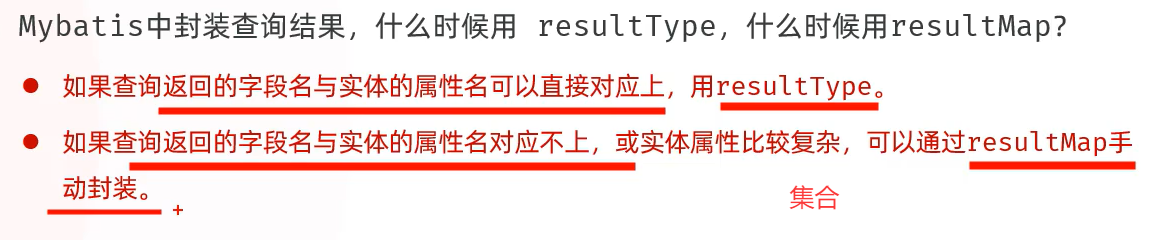 图14 resultType和resultMap小结
#### 2.2 修改数据
#### 需求分析
图14 resultType和resultMap小结
#### 2.2 修改数据
#### 需求分析
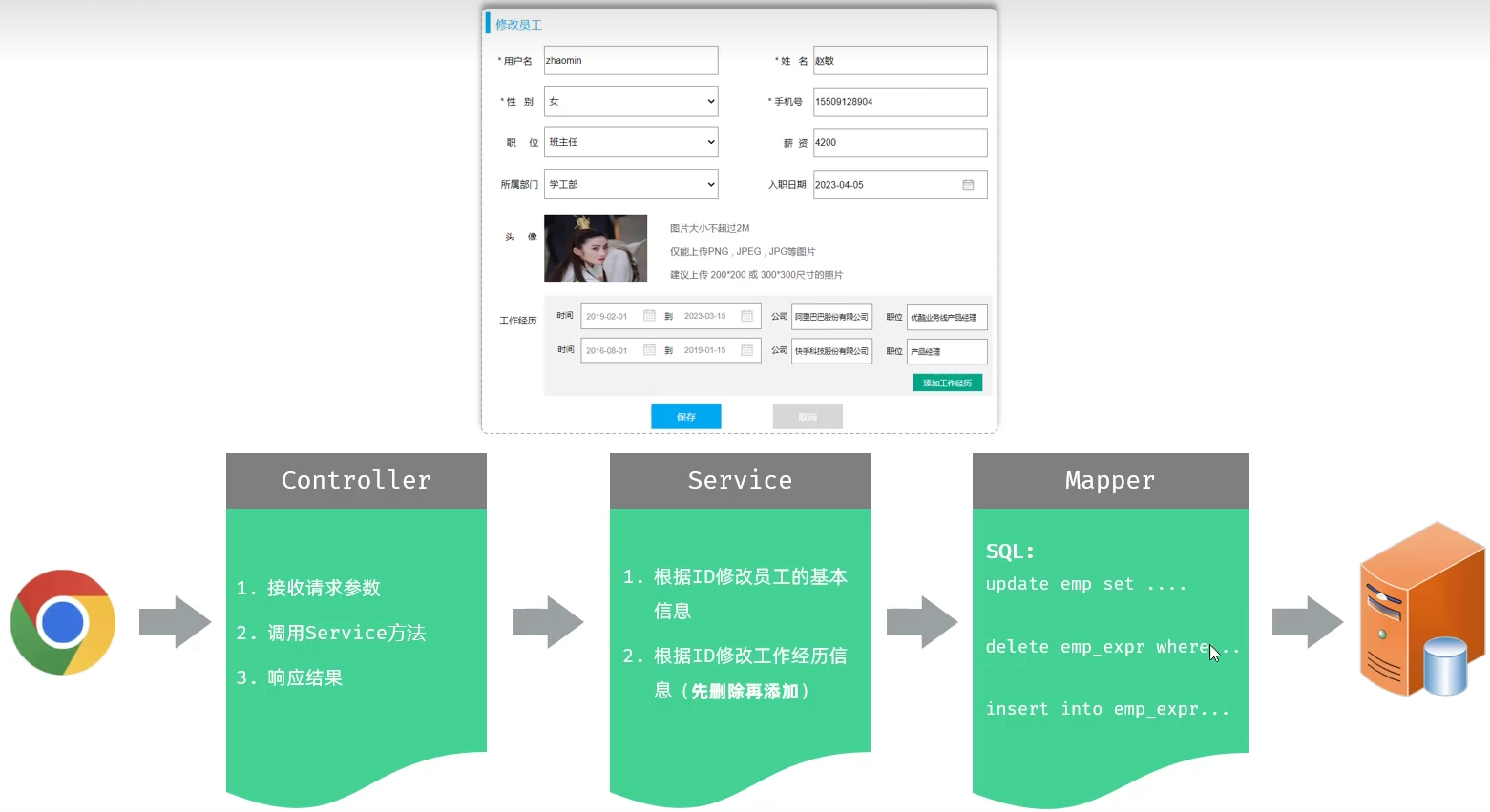 图15 修改员工需求
#### 修改员工--实现
##### cn/dzj/controller/EmpController.java 添加下列方法
```java
/**
*修改员工
*/
@PutMapping
public Result update(@RequestBody Emp emp) {
log.info("修改员工:{}", emp);
empService.update(emp);
return Result.success();
}
```
##### cn/dzj/service/EmpService.java 添加下列方法
```java
void update(Emp emp);
```
##### cn/dzj/service/impl/EmpServiceImpl.java 添加下列方法
```java
@Transactional(rollbackFor = {Exception.class})
public void update(Emp emp) {
//1,根据ID修改员工的基本信息
emp.setUpdateTime(LocalDateTime.now());
empMapper.updateById(emp);
//2,根据ID修改员工的工作经历信息
//2.1先根据员工ID删除原有的工作经历
empExprMapper.deleteByEmpIds(Arrays.asList(emp.getId()));
//2.2再添加这个员工新的工作经历
List exprList = emp.getExprList();
if (!CollectionUtils.isEmpty(exprList))
exprList.forEach(empExpr -> empExpr.setEmpId(emp.getId()));
empExprMapper.insertBatch(exprList);
}
```
##### cn/dzj/mapper/EmpMapper.java 添加下列方法
```java
void updateById(Emp emp);
```
##### src/main/resources/cn/dzj/mapper/EmpMapper.xml 添加下列方法
```xml
UPDATE emp
SET
username = #{username},
password = #{password},
name = #{name},
gender = #{gender},
phone = #{phone},
job = #{job},
salary = #{salary},
image = #{image},
entry_date = #{entryDate},
dept_id = #{deptId},
update_time = #{updateTime}
WHERE id=#{id}
```
```sql
-- 根据ID更新员工基本信息
UPDATE emp
SET
username = 'zhangsan',
password ='654321',
name='张三',
gender =1,
phone ='13800138000',
job =2,
salary =8000,
image='/path/to/new/image.jpg',
entry_date='2023-01-01',
dept_id=2,
update_time = Now()
WHERE id =5;
```
图15 修改员工需求
#### 修改员工--实现
##### cn/dzj/controller/EmpController.java 添加下列方法
```java
/**
*修改员工
*/
@PutMapping
public Result update(@RequestBody Emp emp) {
log.info("修改员工:{}", emp);
empService.update(emp);
return Result.success();
}
```
##### cn/dzj/service/EmpService.java 添加下列方法
```java
void update(Emp emp);
```
##### cn/dzj/service/impl/EmpServiceImpl.java 添加下列方法
```java
@Transactional(rollbackFor = {Exception.class})
public void update(Emp emp) {
//1,根据ID修改员工的基本信息
emp.setUpdateTime(LocalDateTime.now());
empMapper.updateById(emp);
//2,根据ID修改员工的工作经历信息
//2.1先根据员工ID删除原有的工作经历
empExprMapper.deleteByEmpIds(Arrays.asList(emp.getId()));
//2.2再添加这个员工新的工作经历
List exprList = emp.getExprList();
if (!CollectionUtils.isEmpty(exprList))
exprList.forEach(empExpr -> empExpr.setEmpId(emp.getId()));
empExprMapper.insertBatch(exprList);
}
```
##### cn/dzj/mapper/EmpMapper.java 添加下列方法
```java
void updateById(Emp emp);
```
##### src/main/resources/cn/dzj/mapper/EmpMapper.xml 添加下列方法
```xml
UPDATE emp
SET
username = #{username},
password = #{password},
name = #{name},
gender = #{gender},
phone = #{phone},
job = #{job},
salary = #{salary},
image = #{image},
entry_date = #{entryDate},
dept_id = #{deptId},
update_time = #{updateTime}
WHERE id=#{id}
```
```sql
-- 根据ID更新员工基本信息
UPDATE emp
SET
username = 'zhangsan',
password ='654321',
name='张三',
gender =1,
phone ='13800138000',
job =2,
salary =8000,
image='/path/to/new/image.jpg',
entry_date='2023-01-01',
dept_id=2,
update_time = Now()
WHERE id =5;
```
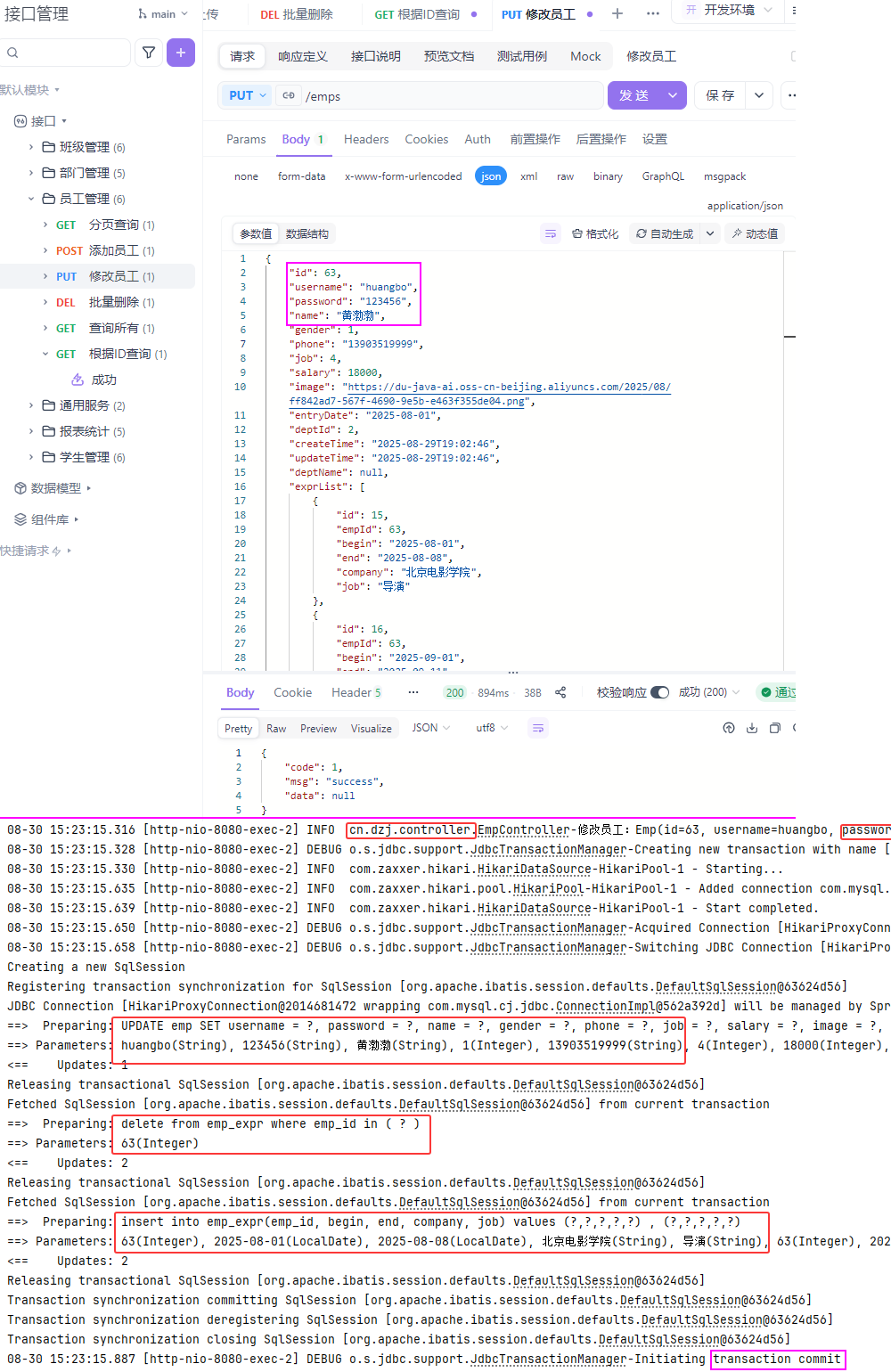 图16 修改员工测试验证1
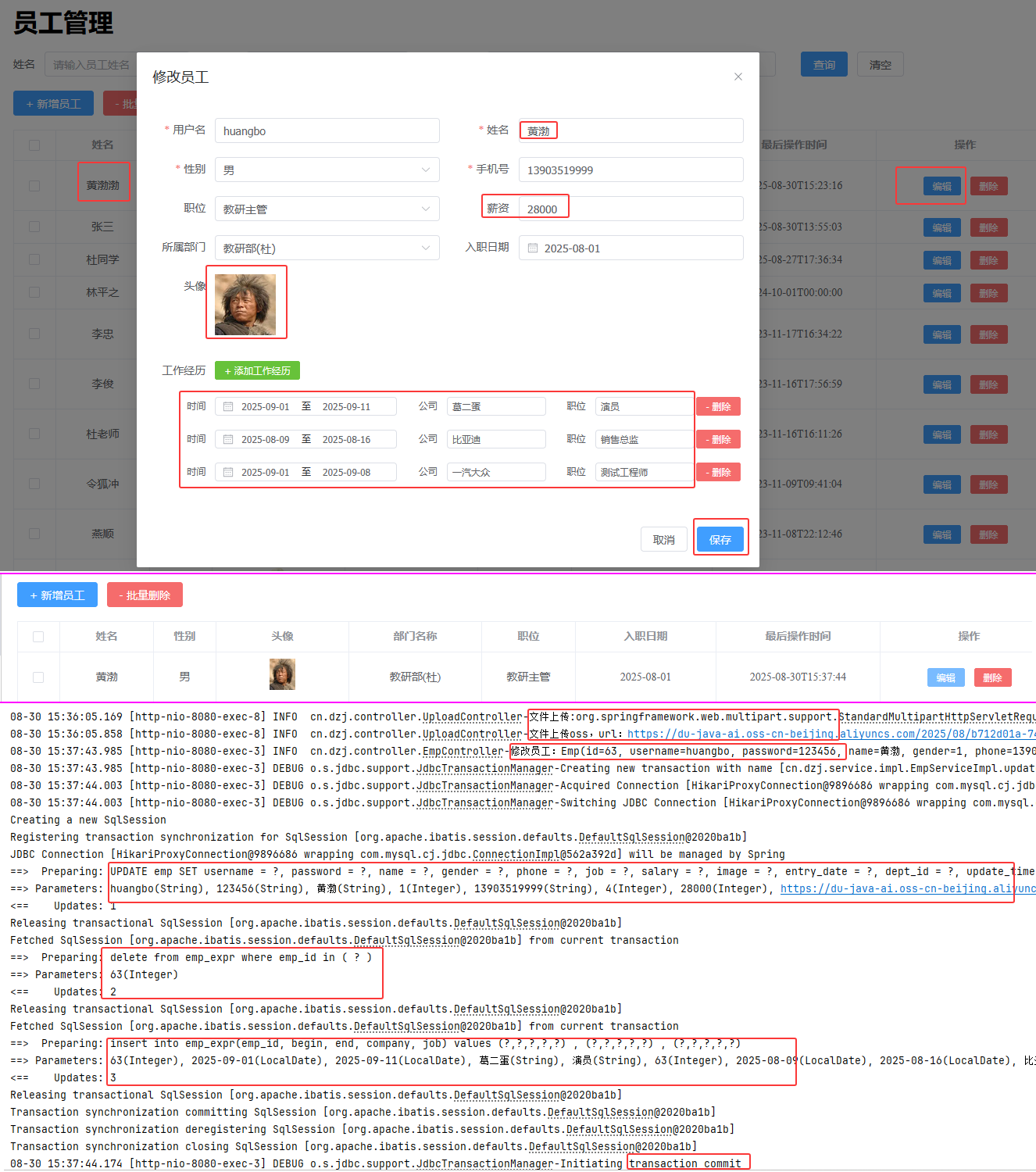 图17 修改员工测试验证2
#### 修改员工一程序优化
##### src/main/resources/cn/dzj/mapper/EmpMapper.xml 修改updateById
```xml
UPDATE emp
username = #{username},
password=#{password},
name = #{name},
gender =#{gender},
phone =#{phone},
job =#{job},
salary = #{salary},
image =#{image},
entry_date =#{entryDate},
dept_id = #{deptId},
update_time =#{updateTime}
WHERE id=#{id}
```
图17 修改员工测试验证2
#### 修改员工一程序优化
##### src/main/resources/cn/dzj/mapper/EmpMapper.xml 修改updateById
```xml
UPDATE emp
username = #{username},
password=#{password},
name = #{name},
gender =#{gender},
phone =#{phone},
job =#{job},
salary = #{salary},
image =#{image},
entry_date =#{entryDate},
dept_id = #{deptId},
update_time =#{updateTime}
WHERE id=#{id}
```
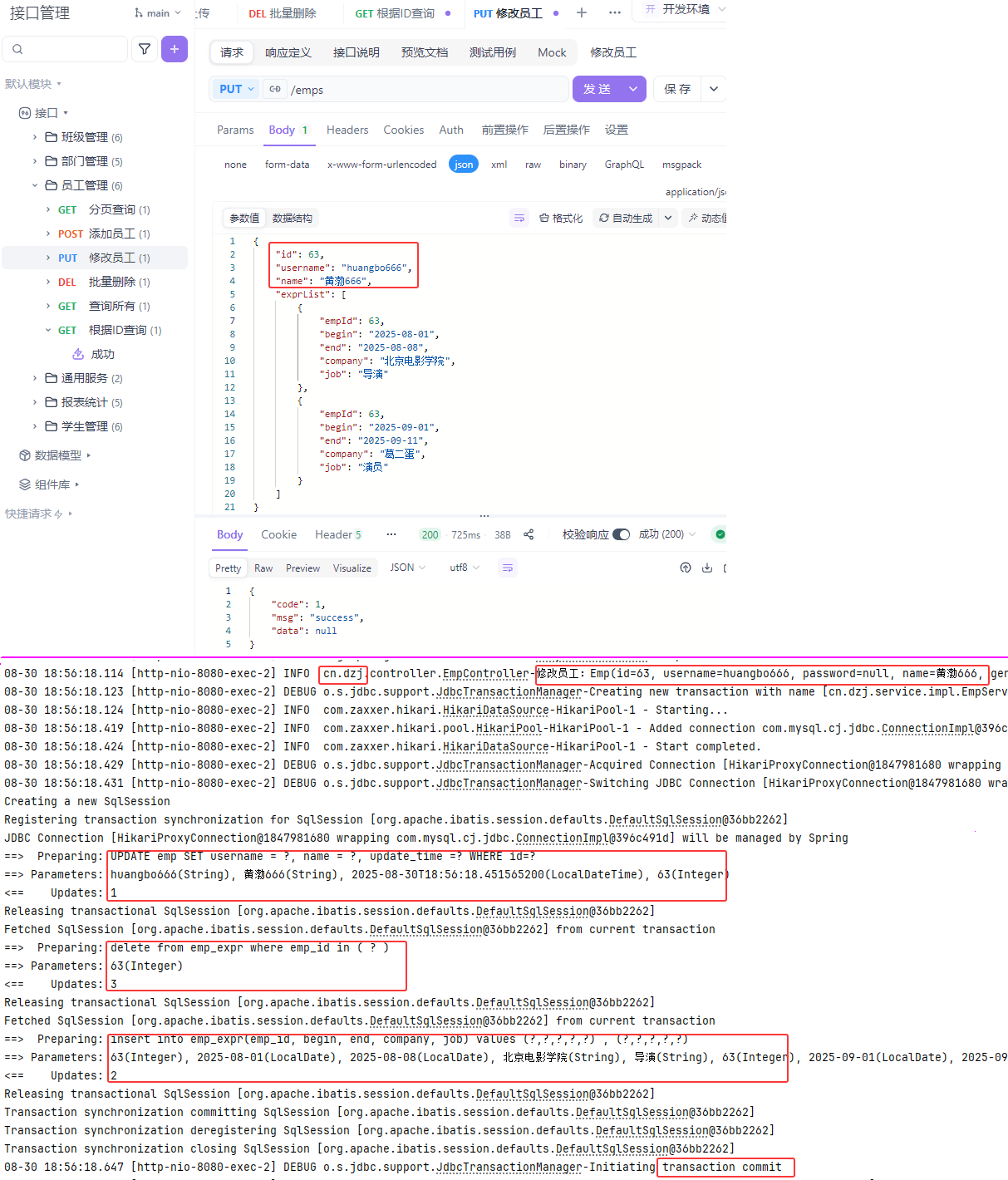 图18 修改员工一程序优化验证1
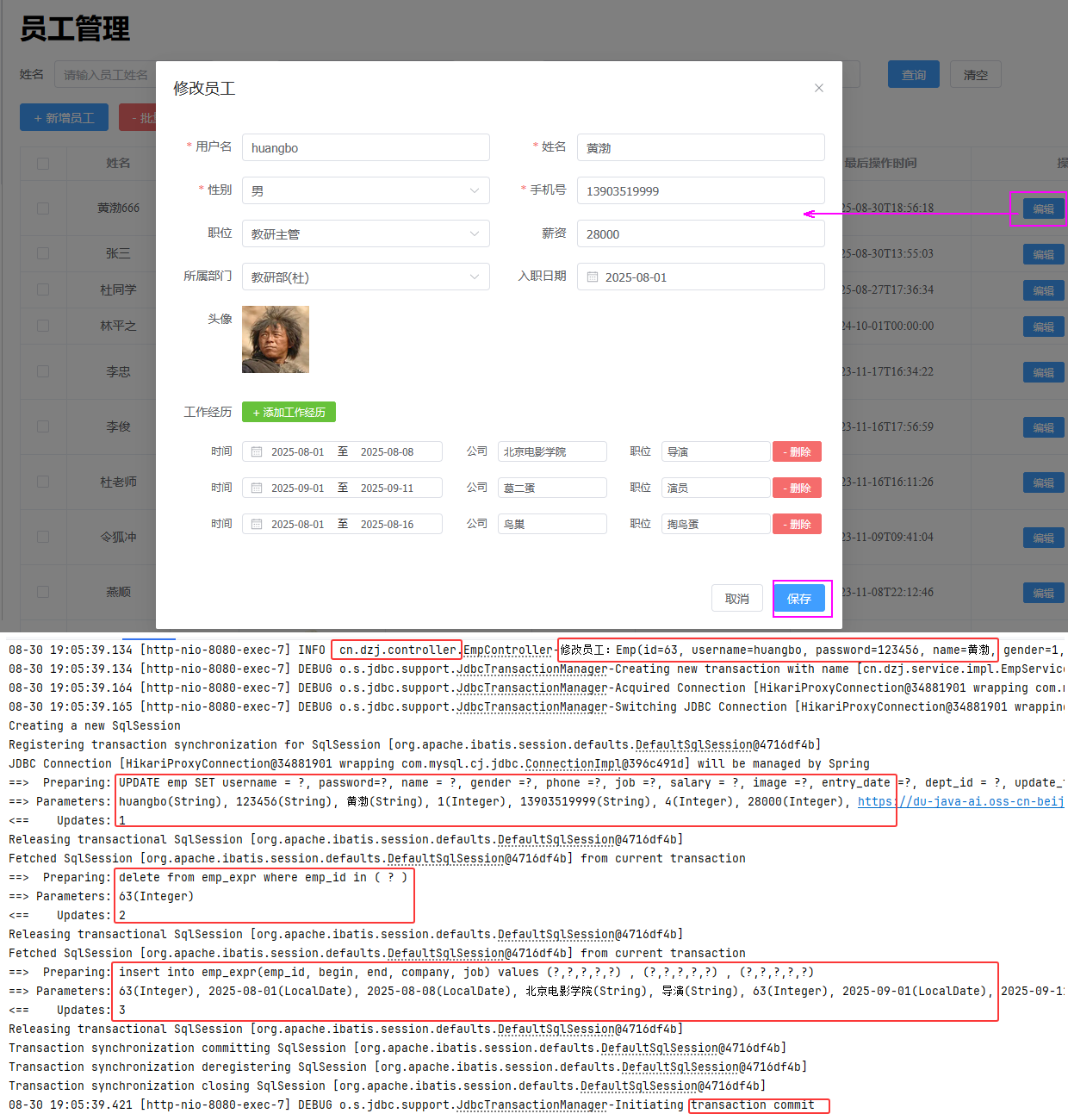 图19 修改员工一程序优化验证2
##### 小结
图19 修改员工一程序优化验证2
##### 小结
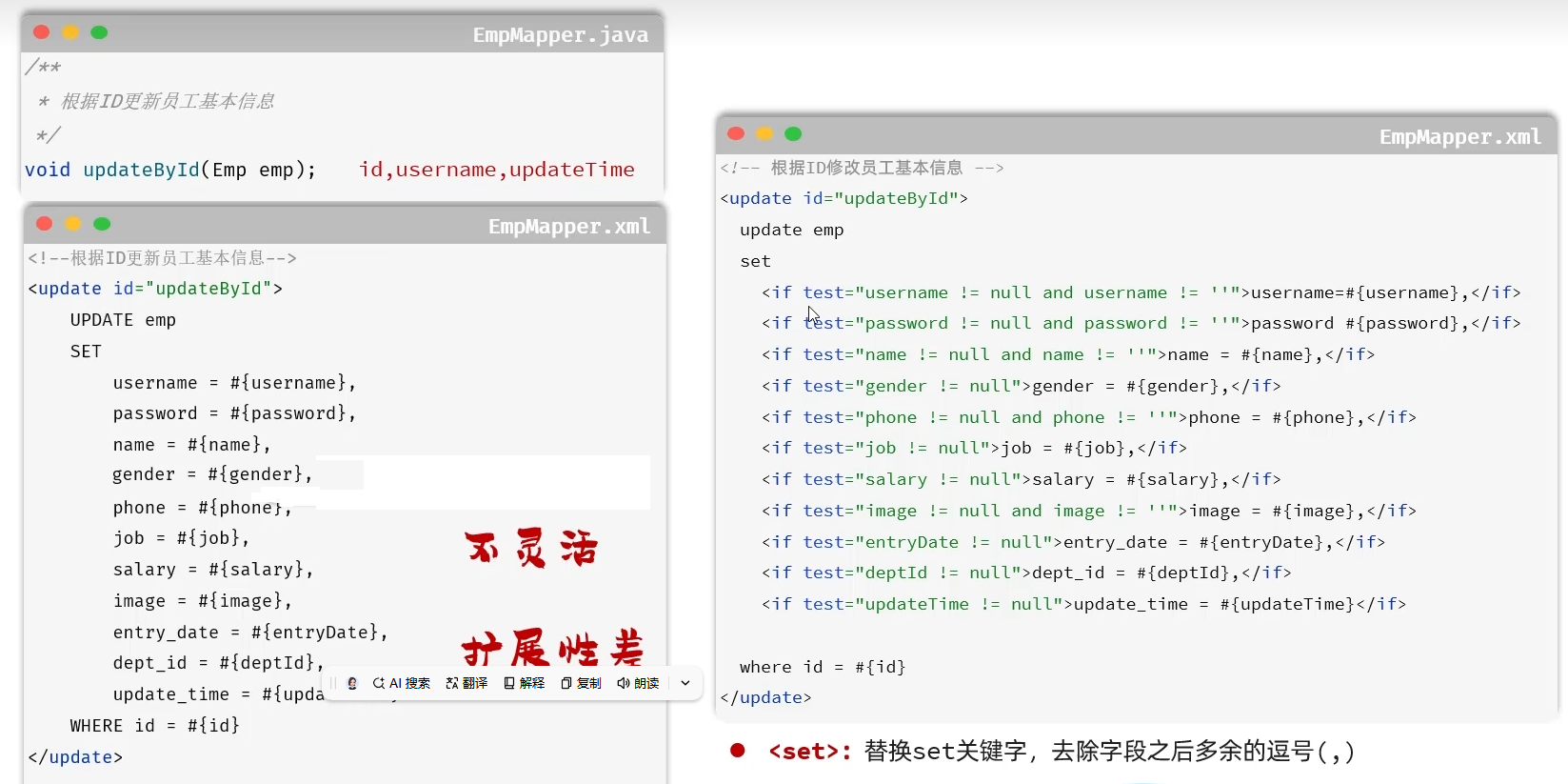 图20 修改员工一程序优化小结
### 3.异常处理
#### 问题提出
图20 修改员工一程序优化小结
### 3.异常处理
#### 问题提出
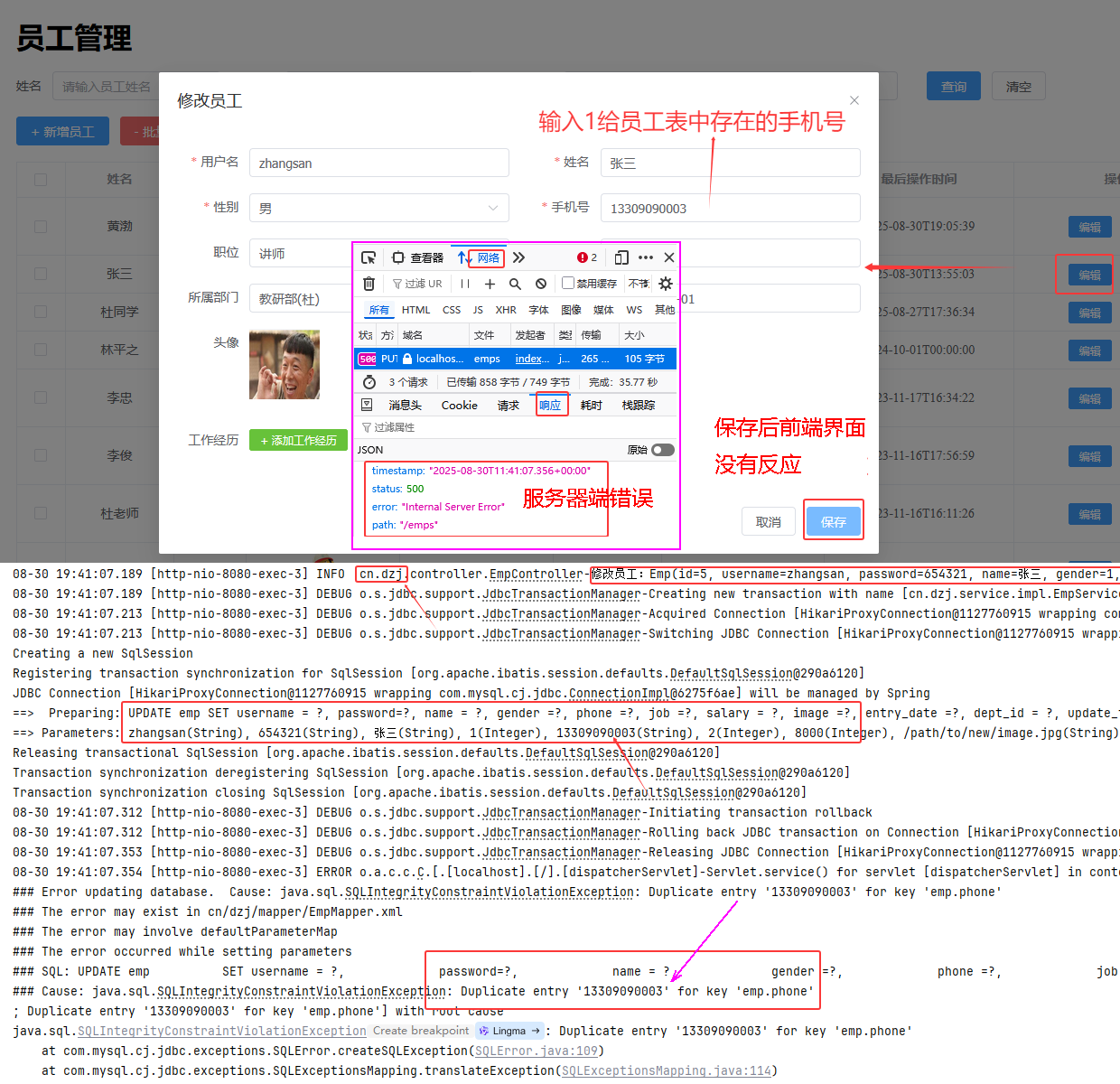 图21 问题提出
#### 全局异常处理
* 现在项目中各层出现的异常,是如何处理? 未做处理
图21 问题提出
#### 全局异常处理
* 现在项目中各层出现的异常,是如何处理? 未做处理
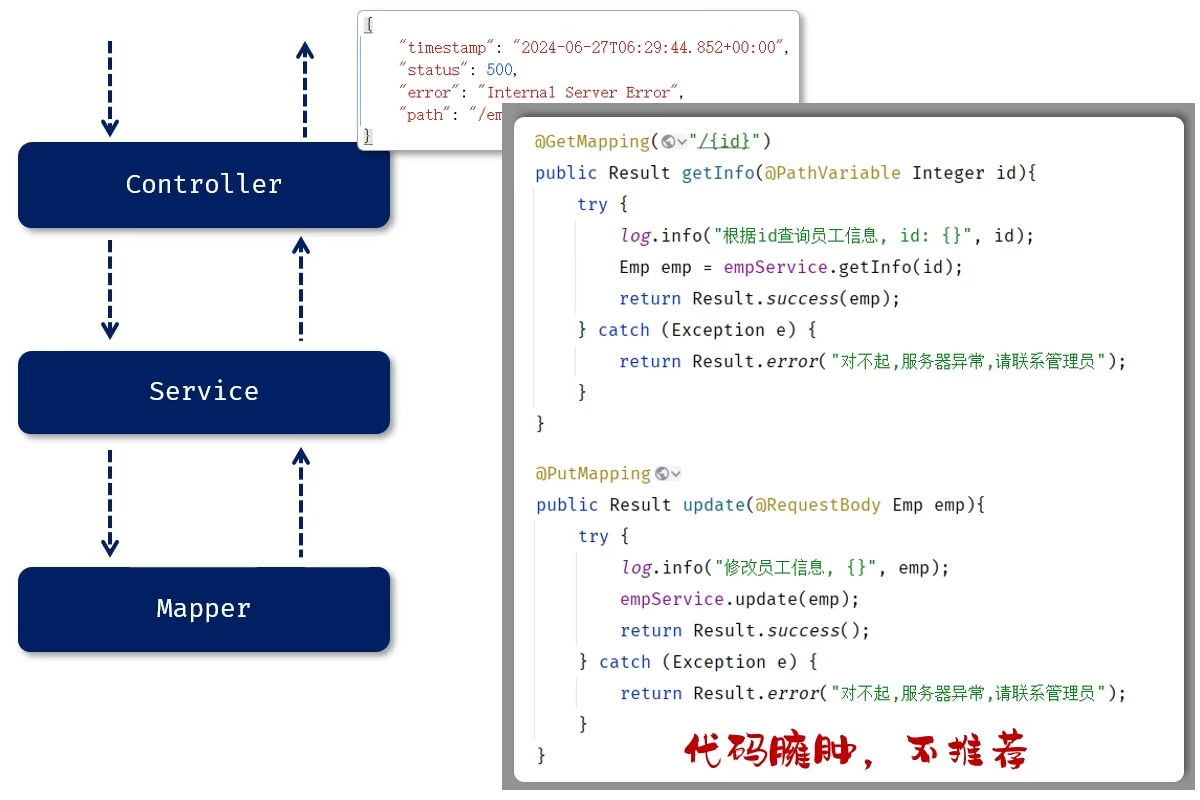 图22 出现的异常未做处理的输出和利用Try-Catch处理的繁琐
* 全局异常处理器
图22 出现的异常未做处理的输出和利用Try-Catch处理的繁琐
* 全局异常处理器
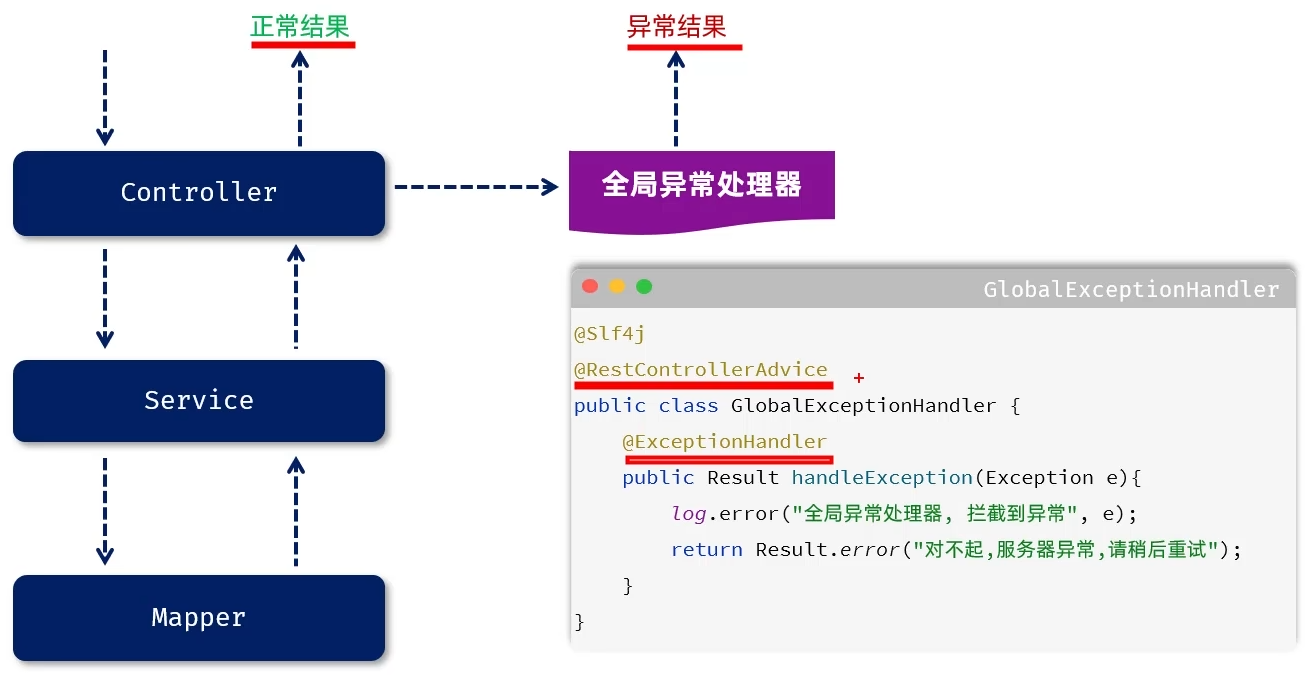 图23 全局异常处理
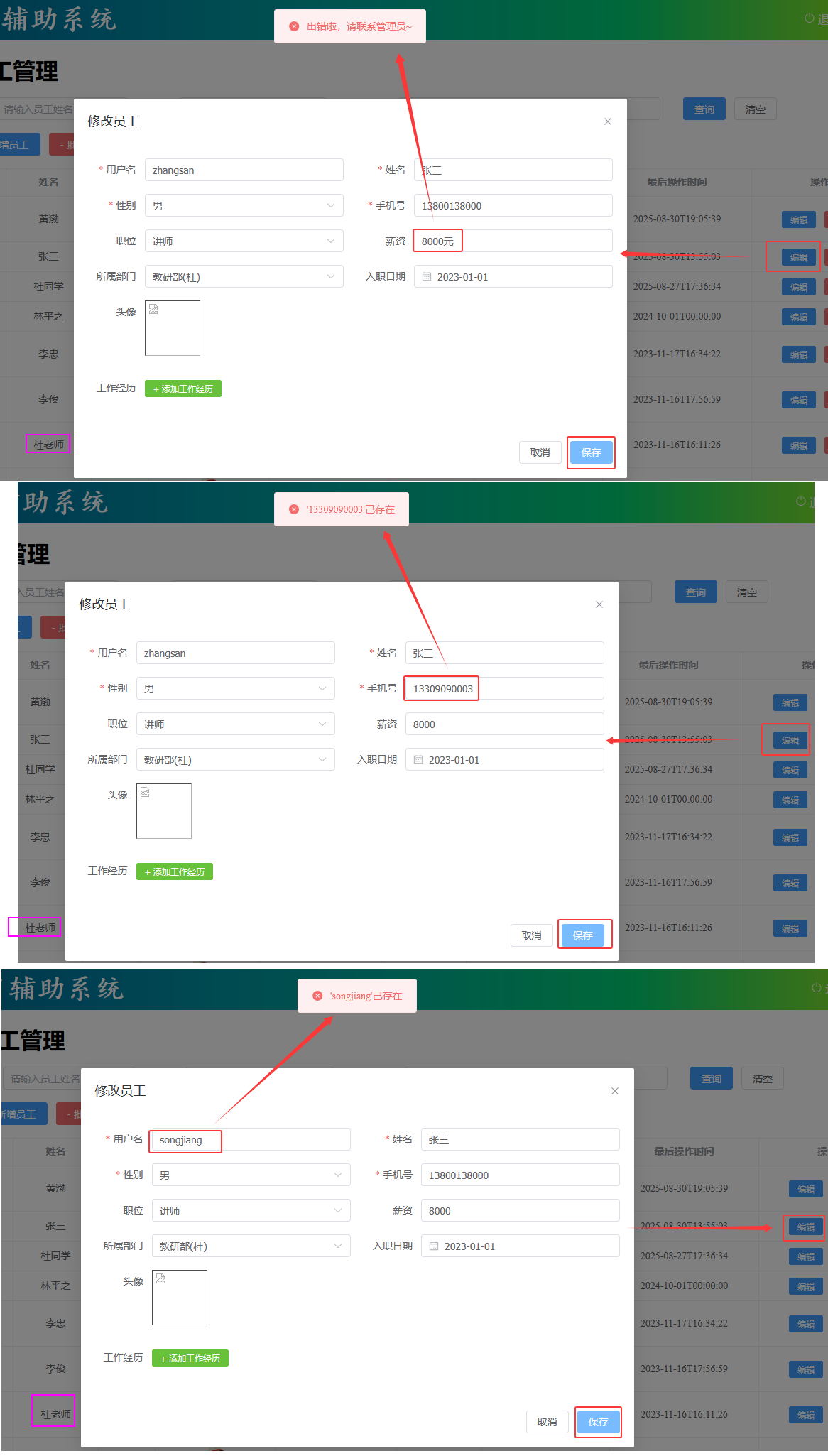 图24 全局异常处理验证
#### 全局异常处理小结
图24 全局异常处理验证
#### 全局异常处理小结
 图25 全局异常处理小结小结
### 4.员工信息统计
#### 需求
图25 全局异常处理小结小结
### 4.员工信息统计
#### 需求
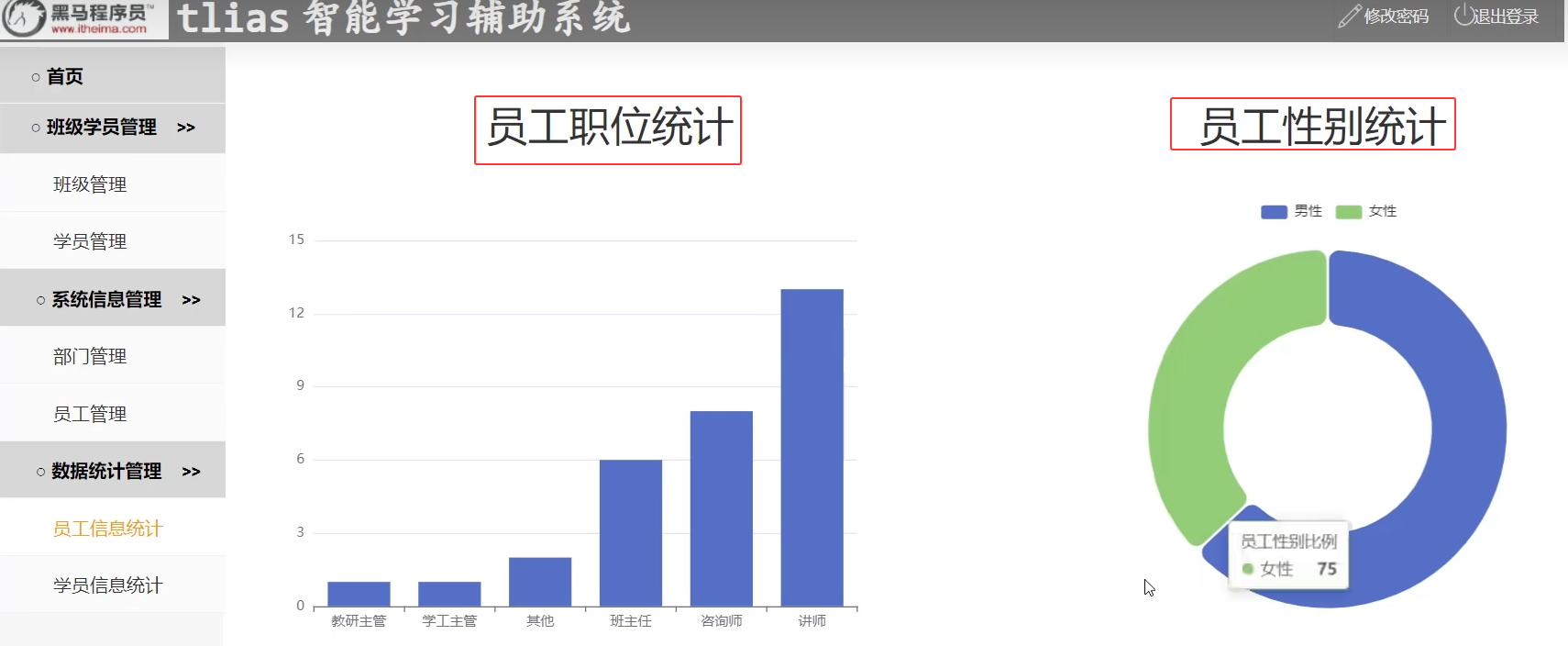 图26 员工信息统计需求
#### 4.1 职位统计
https://echarts.apache.org/zh/index.html
图26 员工信息统计需求
#### 4.1 职位统计
https://echarts.apache.org/zh/index.html
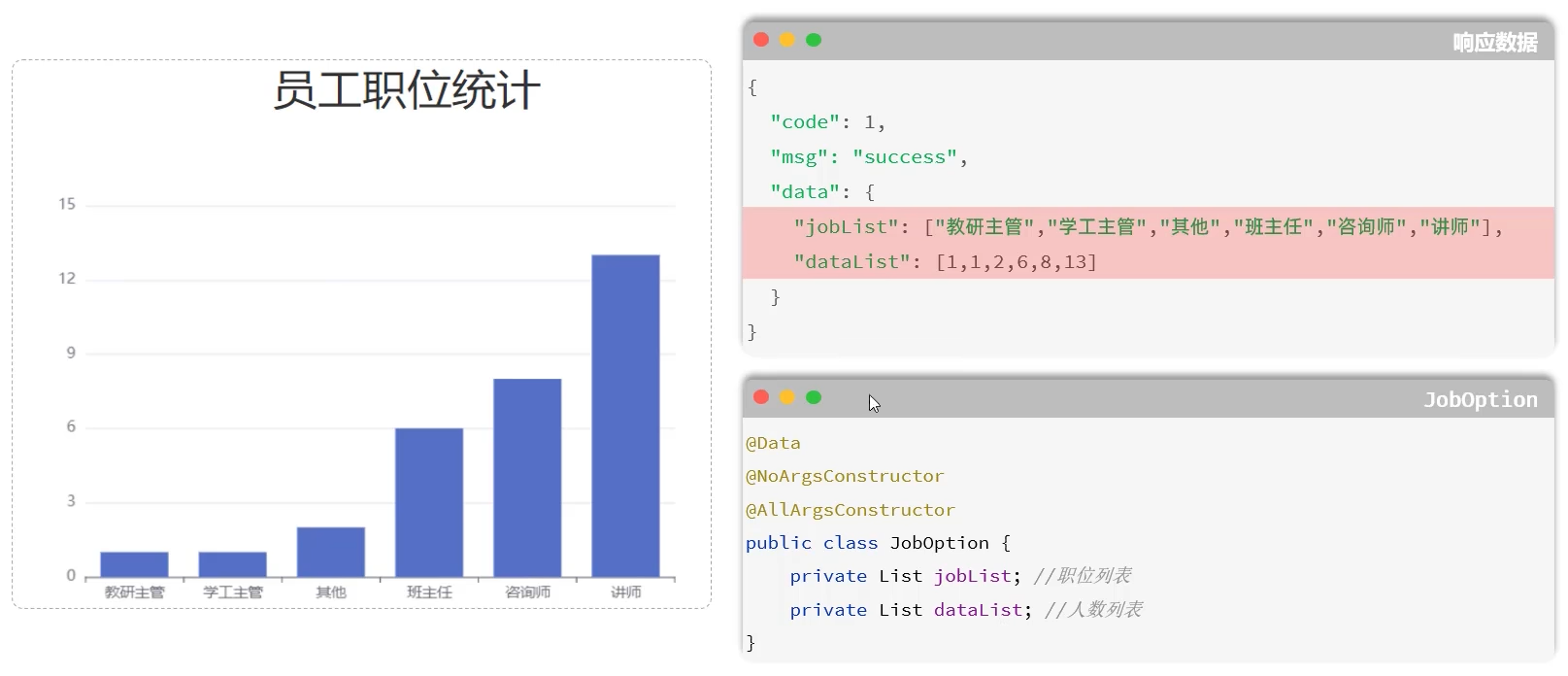 图27 职位统计
```sql
-- 统计每一种职位对应的人数
-- case函数:case 表达式 when val1 then result1 when val2 then result2....else...end
-- 仅用于等值判断
select
(case job
when 1 then '班主任'
when 2 then '讲师'
when 3 then '学工主管'
when 4 then '教研主管'
when 5 then '咨询师'
else '其他' end) pos,
count(*) num
from emp group by job order by num;
-- case函数:case when 条件表达式1 then result1 when 条件表达式2 then result2....else...end
-- 仅用于逻辑判断
select
(case
when job=1 then'班主任'
when job=2 then'讲师'
when job=3 then'学工主管'
when job=4 then'教研主管'
when job=5 then'咨询师'
else '其他' end) pos,
count(*) num
from emp group by job order by num;
```
图27 职位统计
```sql
-- 统计每一种职位对应的人数
-- case函数:case 表达式 when val1 then result1 when val2 then result2....else...end
-- 仅用于等值判断
select
(case job
when 1 then '班主任'
when 2 then '讲师'
when 3 then '学工主管'
when 4 then '教研主管'
when 5 then '咨询师'
else '其他' end) pos,
count(*) num
from emp group by job order by num;
-- case函数:case when 条件表达式1 then result1 when 条件表达式2 then result2....else...end
-- 仅用于逻辑判断
select
(case
when job=1 then'班主任'
when job=2 then'讲师'
when job=3 then'学工主管'
when job=4 then'教研主管'
when job=5 then'咨询师'
else '其他' end) pos,
count(*) num
from emp group by job order by num;
```
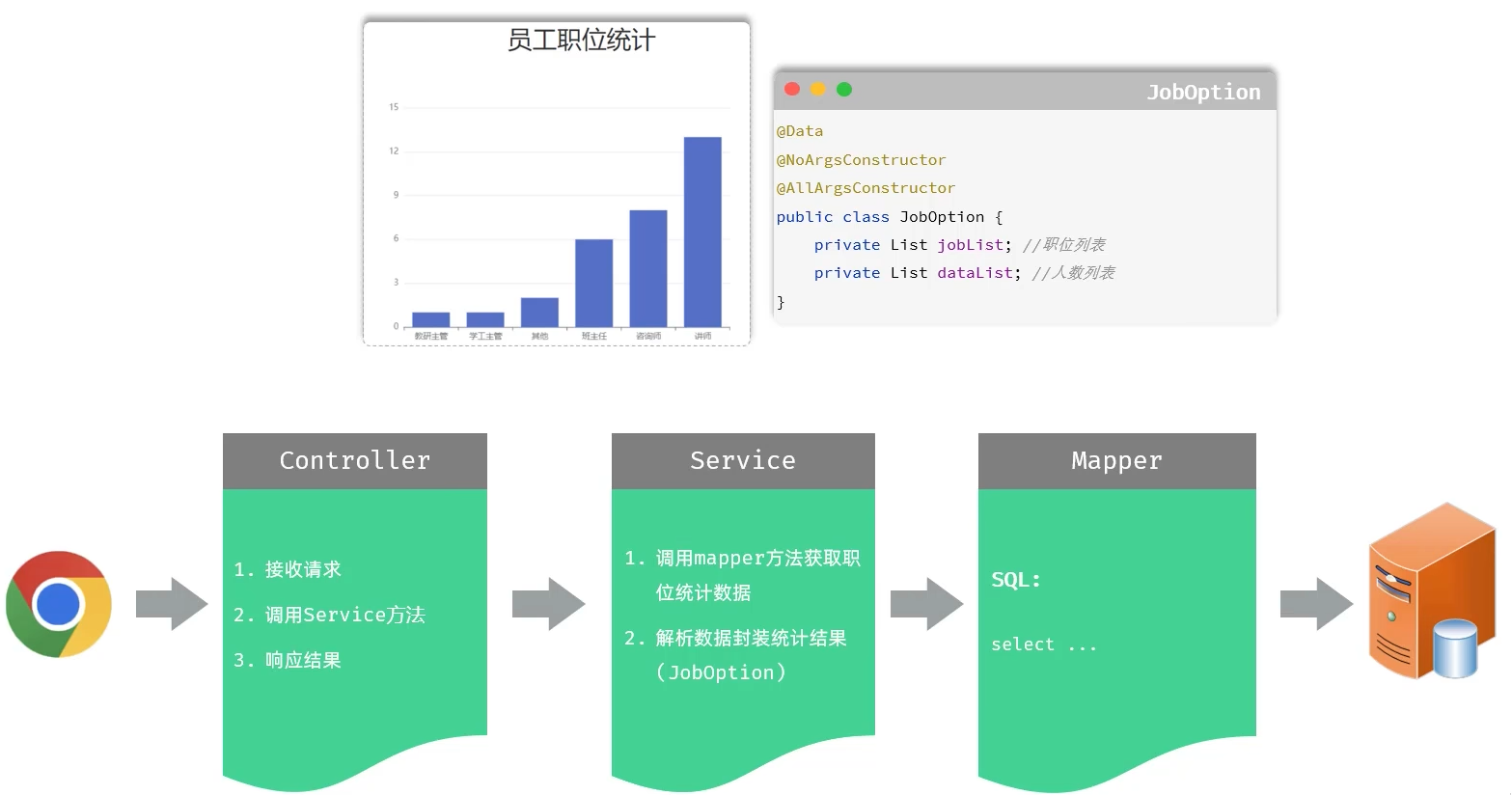 图28 职位统计分层功能
##### cn/dzj/controller/ReportController.java
```java
package cn.dzj.controller;
import cn.dzj.pojo.JobOption;
import cn.dzj.pojo.Result;
import cn.dzj.service.ReportService;
import lombok.extern.slf4j.Slf4j;
import org.springframework.beans.factory.annotation.Autowired;
import org.springframework.web.bind.annotation.GetMapping;
import org.springframework.web.bind.annotation.RequestMapping;
import org.springframework.web.bind.annotation.RestController;
@Slf4j
@RequestMapping("/report")
@RestController
public class ReportController{
@Autowired
private ReportService reportService;
/**
*统计员工职位人数
*/
@GetMapping("/empJobData")
public Result getEmpJobData() {
log.info("统计员工职位人数");
JobOption jobOption = reportService.getEmpJobData();
return Result.success(jobOption);
}
}
```
##### cn/dzj/service/ReportService.java
```java
public interface ReportService{
JobOption getEmpJobData() ;
}
```
##### cn/dzj/service/impl/ReportServiceImpl.java
```java
@Service
public class ReportServiceImpl implements ReportService {
@Autowired
EmpMapper empMapper;
public JobOption getEmpJobData() {
List> list = empMapper.countEmpJobData();
List
图28 职位统计分层功能
##### cn/dzj/controller/ReportController.java
```java
package cn.dzj.controller;
import cn.dzj.pojo.JobOption;
import cn.dzj.pojo.Result;
import cn.dzj.service.ReportService;
import lombok.extern.slf4j.Slf4j;
import org.springframework.beans.factory.annotation.Autowired;
import org.springframework.web.bind.annotation.GetMapping;
import org.springframework.web.bind.annotation.RequestMapping;
import org.springframework.web.bind.annotation.RestController;
@Slf4j
@RequestMapping("/report")
@RestController
public class ReportController{
@Autowired
private ReportService reportService;
/**
*统计员工职位人数
*/
@GetMapping("/empJobData")
public Result getEmpJobData() {
log.info("统计员工职位人数");
JobOption jobOption = reportService.getEmpJobData();
return Result.success(jobOption);
}
}
```
##### cn/dzj/service/ReportService.java
```java
public interface ReportService{
JobOption getEmpJobData() ;
}
```
##### cn/dzj/service/impl/ReportServiceImpl.java
```java
@Service
public class ReportServiceImpl implements ReportService {
@Autowired
EmpMapper empMapper;
public JobOption getEmpJobData() {
List> list = empMapper.countEmpJobData();
List