## Day09 后端Web实战:员工管理2(新增.事务.上传)
---
##### 需求
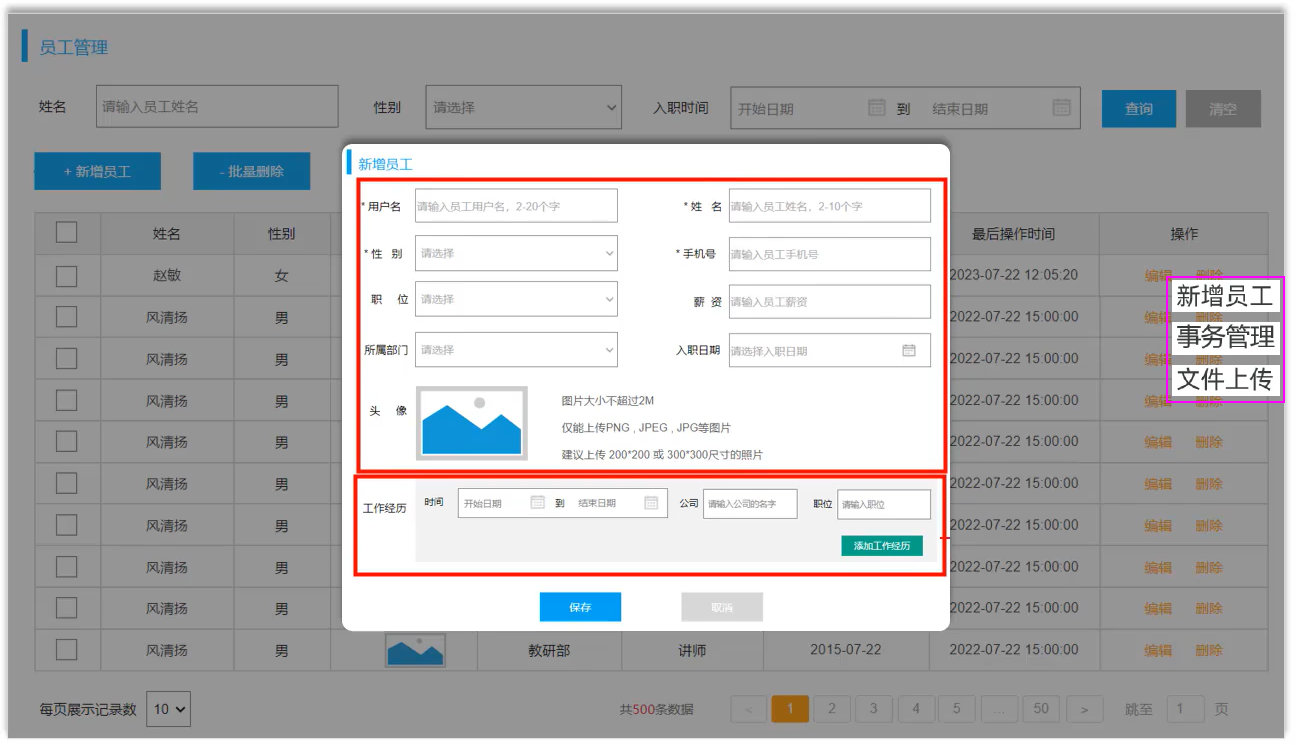 图1 员工管理(新增.事务.上传)需求
##### 目录
* 新增员工
* 事务管理
* 文件上传
### 1. 新增员工
#### ①需求
图1 员工管理(新增.事务.上传)需求
##### 目录
* 新增员工
* 事务管理
* 文件上传
### 1. 新增员工
#### ①需求
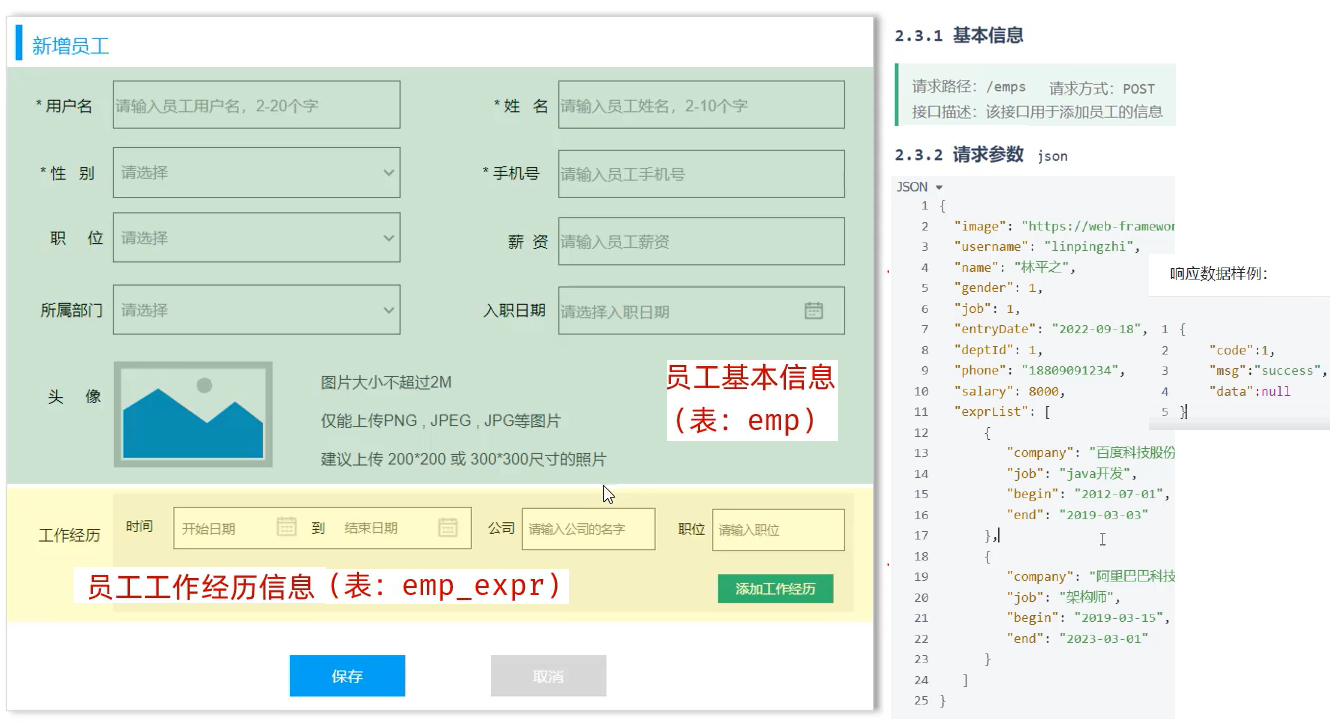 图2 新增员工需求
##### 新增员工sql语句
```sql
-- 新增员工
-- 保存员工基本信息-emp
insert into emp(username, name, gender, phone, job, salary, image, entry_date, dept_id, create_time, update_time) values
('linpingzhi','林平之',1,'13309091234',1,6000,'1.jpg','2020-01-01',1, '2024-10-01 00:00:00', '2024-10-01 00:00:00');
-- 批量保存员工工作经历信息-emp_exprx
insert into emp_expr(emp_id, begin, end, company,job) values
(37,'2020-01-01','2021-01-01','百度','java开发'),
(37,'2021-01-01','2023-01-01','字节','java开发');
```
#### ②思路
图2 新增员工需求
##### 新增员工sql语句
```sql
-- 新增员工
-- 保存员工基本信息-emp
insert into emp(username, name, gender, phone, job, salary, image, entry_date, dept_id, create_time, update_time) values
('linpingzhi','林平之',1,'13309091234',1,6000,'1.jpg','2020-01-01',1, '2024-10-01 00:00:00', '2024-10-01 00:00:00');
-- 批量保存员工工作经历信息-emp_exprx
insert into emp_expr(emp_id, begin, end, company,job) values
(37,'2020-01-01','2021-01-01','百度','java开发'),
(37,'2021-01-01','2023-01-01','字节','java开发');
```
#### ②思路
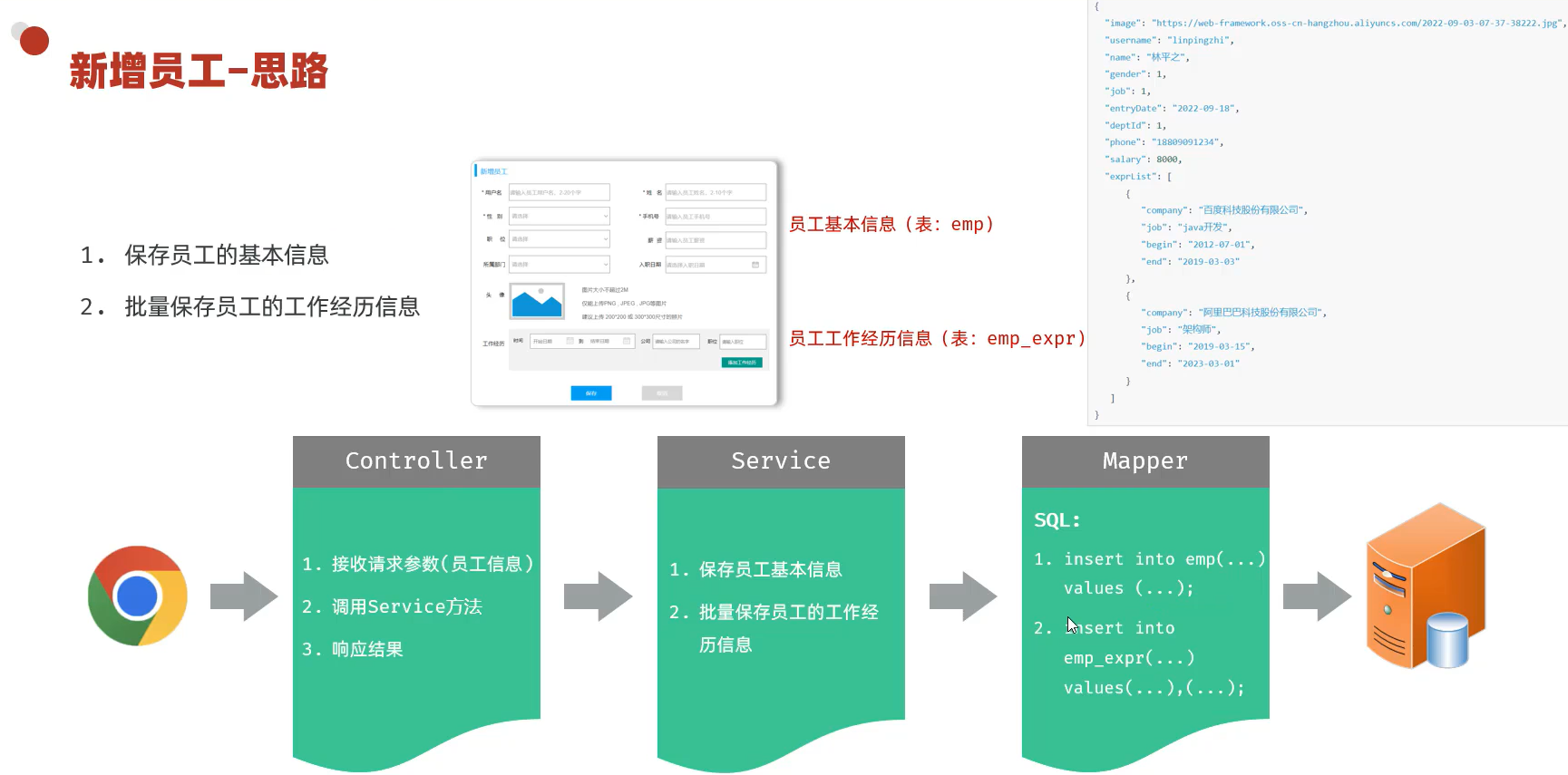 图3 思路
#### ③实现
图3 思路
#### ③实现
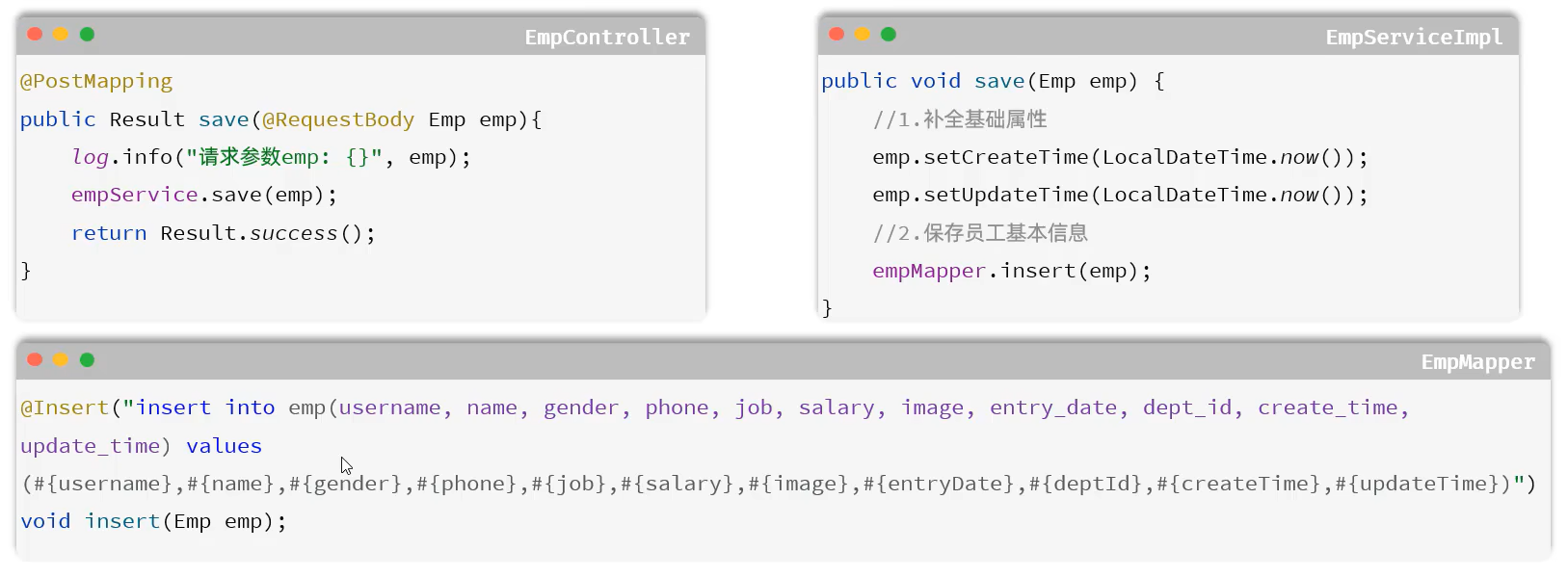 图4 保存员工基本信息
##### cn/dzj/pojo/Emp.java 添加下列1条属性
```java
//封装工作经历信息
private List exprList;
```
##### cn/dzj/controller/EmpController.java 添加下列方法
```java
/**
* 新增员工
*/
@PostMapping
public Result save(@RequestBody Emp emp){
log.info("新增员工:{}", emp);
empService.save(emp);
return Result.success();
};
```
##### cn/dzj/service/EmpService.java 添加下列1条方法名
```java
void save(Emp emp);
```
##### cn/dzj/mapper/EmpExprMapper.java 添加本接口
```java
package cn.dzj.mapper;
import cn.dzj.pojo.EmpExpr;
import org.apache.ibatis.annotations.Mapper;
import java.util.List;
/**
* 员工管理
*/
@Mapper
public interface EmpExprMapper {
/**
* 批量保存员工的工作经历信息
*/
void insertBatch(List exprList);
}
```
##### cn/dzj/service/impl/EmpServiceImpl.java 修改save中保存员工工作经历信息部分
```java
@Autowired
private EmpExprMapper empExprMapper;
@Override
public void save(Emp emp) {
//1.保存员工基本信息
emp.setCreateTime(LocalDateTime.now());
emp.setUpdateTime(LocalDateTime.now());
empMapper.insert(emp);
//2.保存员工工作经历信息
List exprList = emp.getExprList();
if (!CollectionUtils.isEmpty(exprList)){
//遍历集合,为empId赋值
exprList.forEach(empExpr-> {
empExpr.setEmpId(emp.getId());
});
empExprMapper.insertBatch(exprList);
}
}
```
##### cn/dzj/mapper/EmpMapper.java 添加@Options注解
```java
/**
*新增员工基本信息
*/
@Options(useGeneratedKeys = true, keyProperty = "id") //获取到生成的主键--主键返回
@Insert("insert into emp(username, name, gender, phone, job, salary, image, entry_date, dept_id, create_time, update_time)" +
" values (#{username},#{name},#{gender},#{phone},#{job},#{salary},#{image},#{entryDate},#{deptId},#{createTime},#{updateTime})")
void insert(Emp emp);
```
##### src/main/resources/cn/dzj/mapper/EmpExprMapper.xml
```xml
insert into emp_expr(emp_id, begin, end, company, job) values
(#{expr.empId},#{expr.begin},#{expr.end},#{expr.company},#{expr.job})
```
#### 新增员工--批量保存工作经历
图4 保存员工基本信息
##### cn/dzj/pojo/Emp.java 添加下列1条属性
```java
//封装工作经历信息
private List exprList;
```
##### cn/dzj/controller/EmpController.java 添加下列方法
```java
/**
* 新增员工
*/
@PostMapping
public Result save(@RequestBody Emp emp){
log.info("新增员工:{}", emp);
empService.save(emp);
return Result.success();
};
```
##### cn/dzj/service/EmpService.java 添加下列1条方法名
```java
void save(Emp emp);
```
##### cn/dzj/mapper/EmpExprMapper.java 添加本接口
```java
package cn.dzj.mapper;
import cn.dzj.pojo.EmpExpr;
import org.apache.ibatis.annotations.Mapper;
import java.util.List;
/**
* 员工管理
*/
@Mapper
public interface EmpExprMapper {
/**
* 批量保存员工的工作经历信息
*/
void insertBatch(List exprList);
}
```
##### cn/dzj/service/impl/EmpServiceImpl.java 修改save中保存员工工作经历信息部分
```java
@Autowired
private EmpExprMapper empExprMapper;
@Override
public void save(Emp emp) {
//1.保存员工基本信息
emp.setCreateTime(LocalDateTime.now());
emp.setUpdateTime(LocalDateTime.now());
empMapper.insert(emp);
//2.保存员工工作经历信息
List exprList = emp.getExprList();
if (!CollectionUtils.isEmpty(exprList)){
//遍历集合,为empId赋值
exprList.forEach(empExpr-> {
empExpr.setEmpId(emp.getId());
});
empExprMapper.insertBatch(exprList);
}
}
```
##### cn/dzj/mapper/EmpMapper.java 添加@Options注解
```java
/**
*新增员工基本信息
*/
@Options(useGeneratedKeys = true, keyProperty = "id") //获取到生成的主键--主键返回
@Insert("insert into emp(username, name, gender, phone, job, salary, image, entry_date, dept_id, create_time, update_time)" +
" values (#{username},#{name},#{gender},#{phone},#{job},#{salary},#{image},#{entryDate},#{deptId},#{createTime},#{updateTime})")
void insert(Emp emp);
```
##### src/main/resources/cn/dzj/mapper/EmpExprMapper.xml
```xml
insert into emp_expr(emp_id, begin, end, company, job) values
(#{expr.empId},#{expr.begin},#{expr.end},#{expr.company},#{expr.job})
```
#### 新增员工--批量保存工作经历
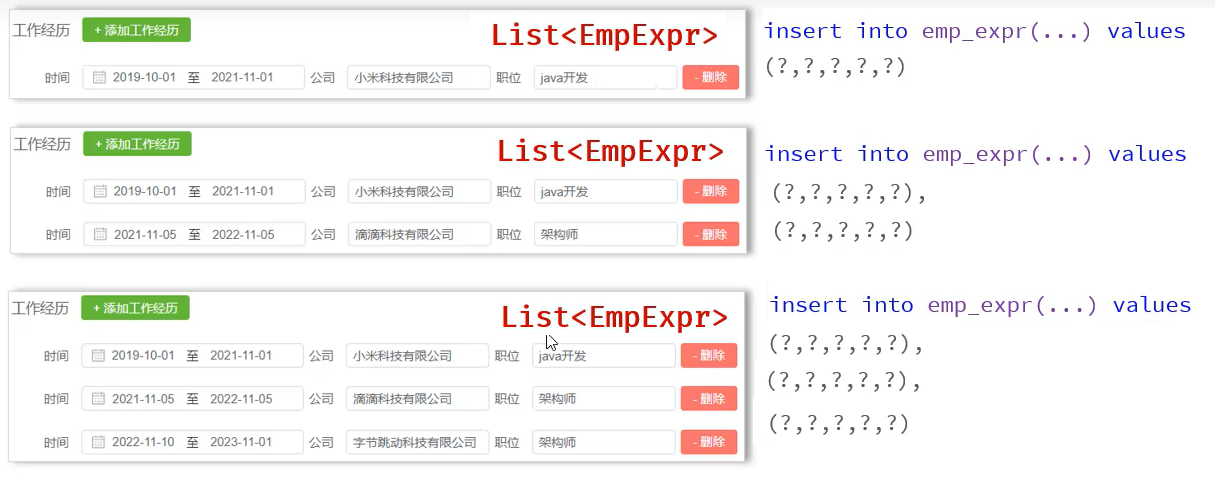 图5 批量保存工作经历
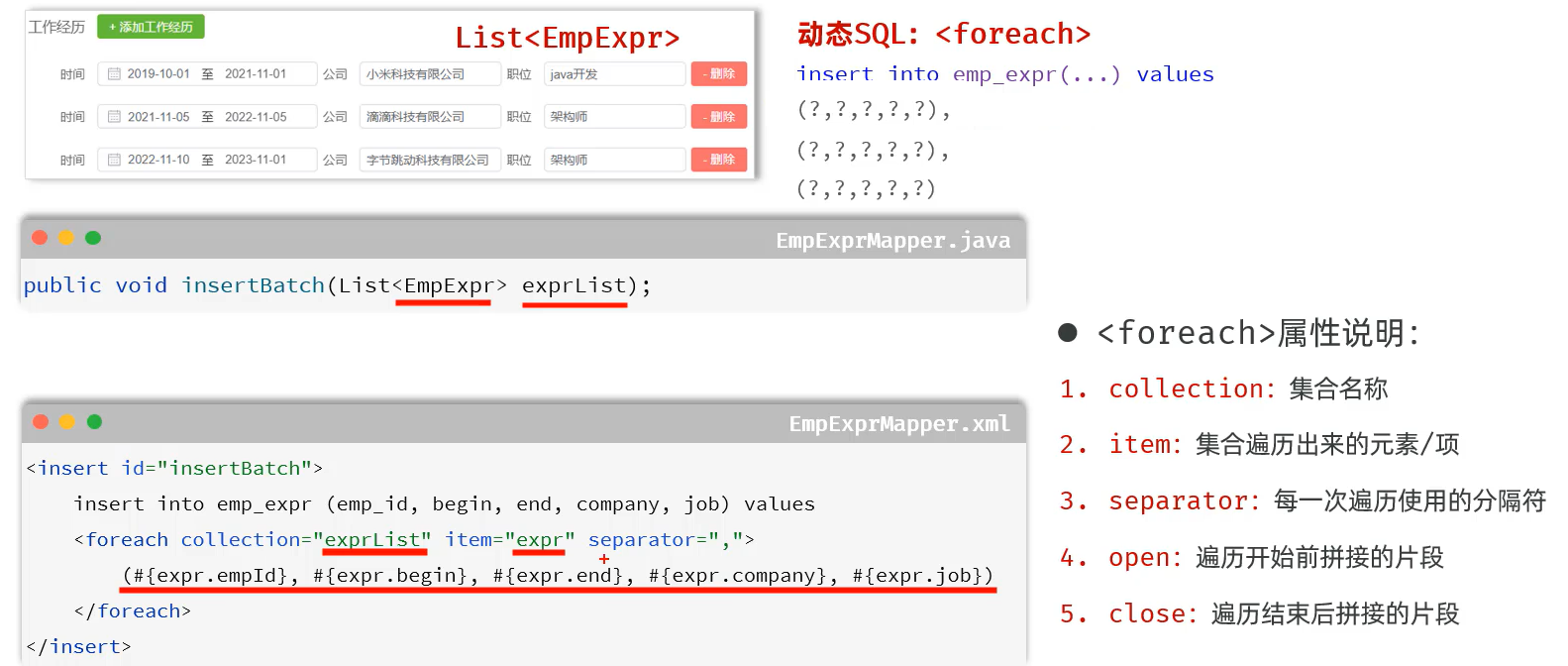 图6 批量保存工作经历
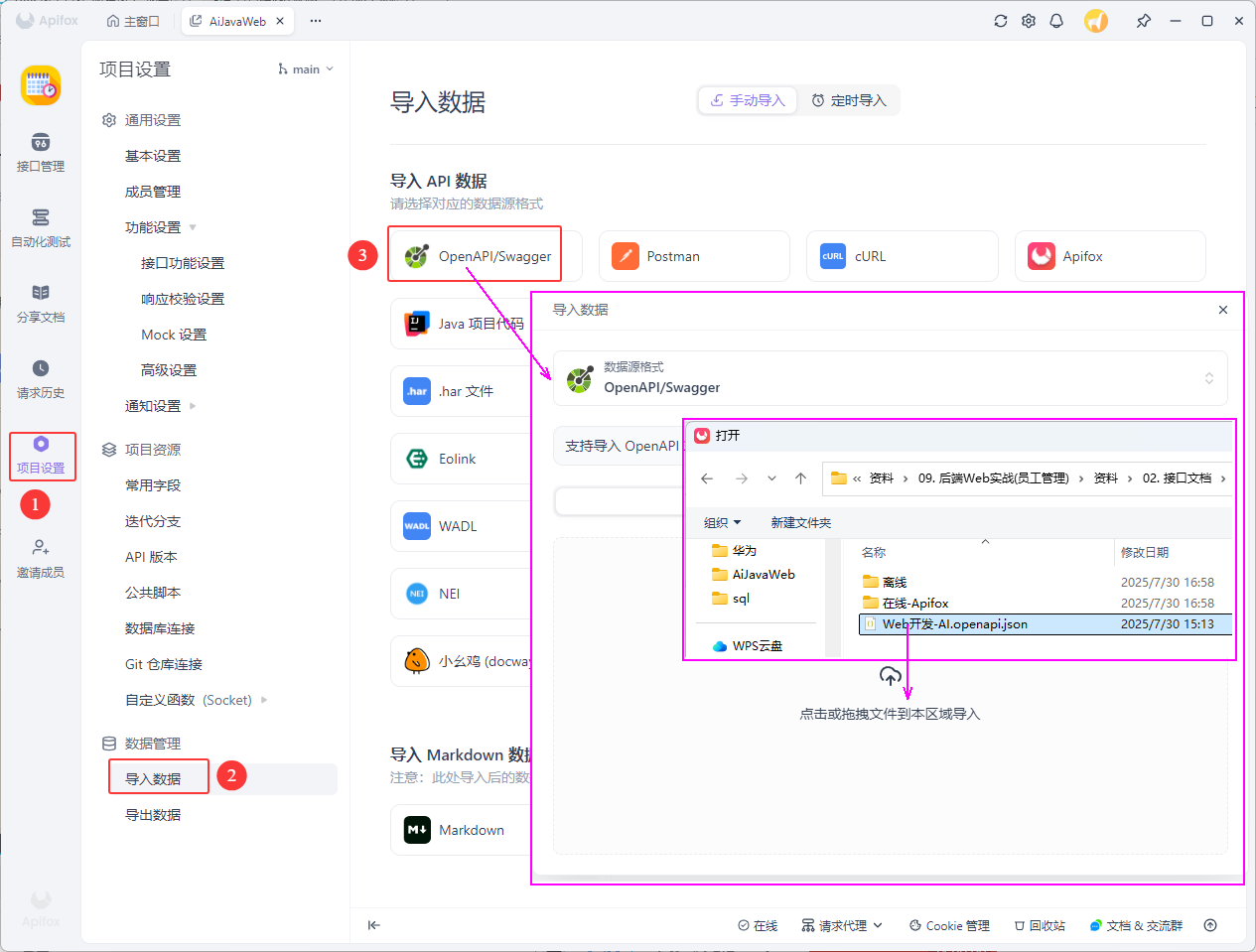 图7 ApiFx设置
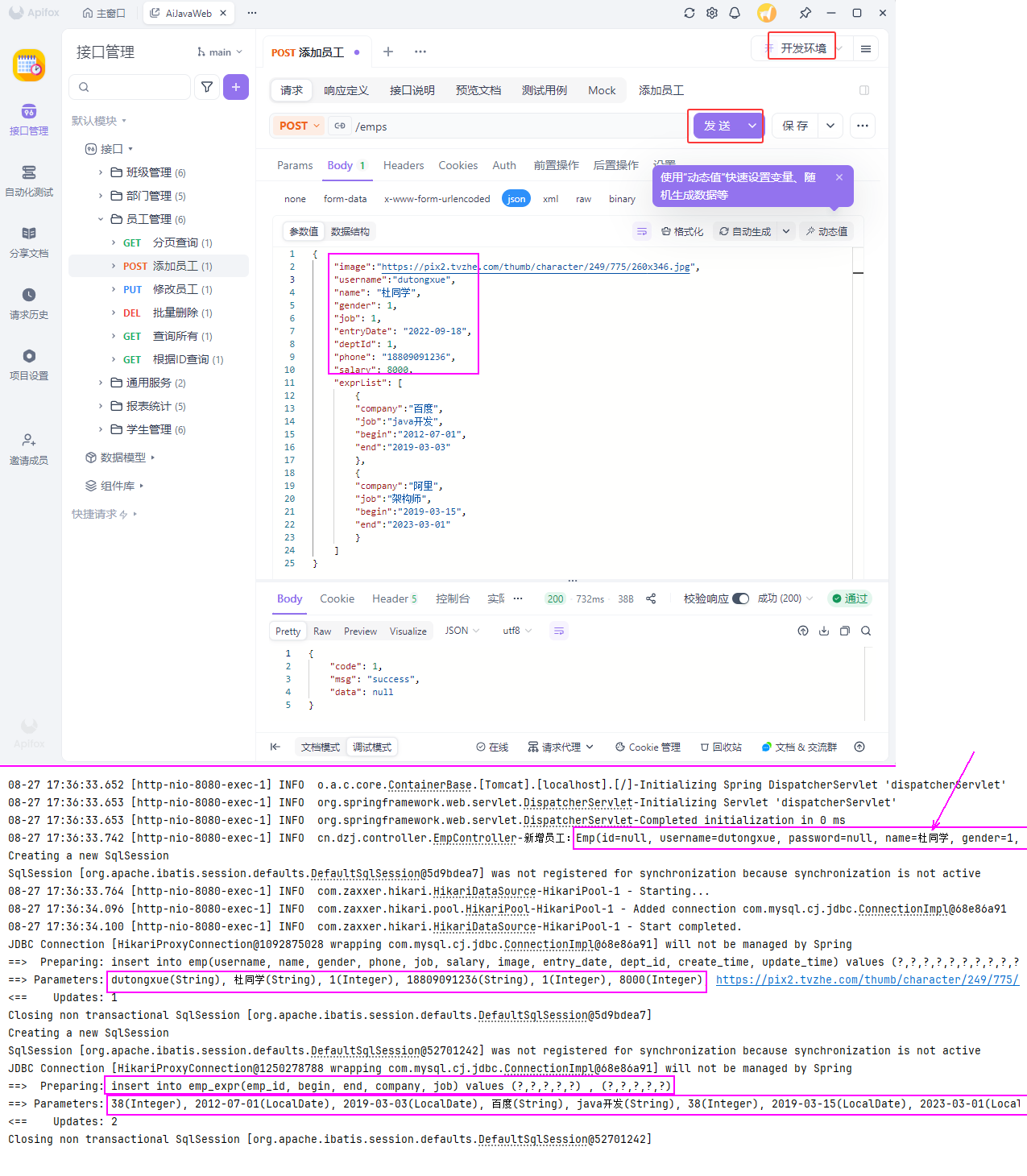 图8 运行测试验证
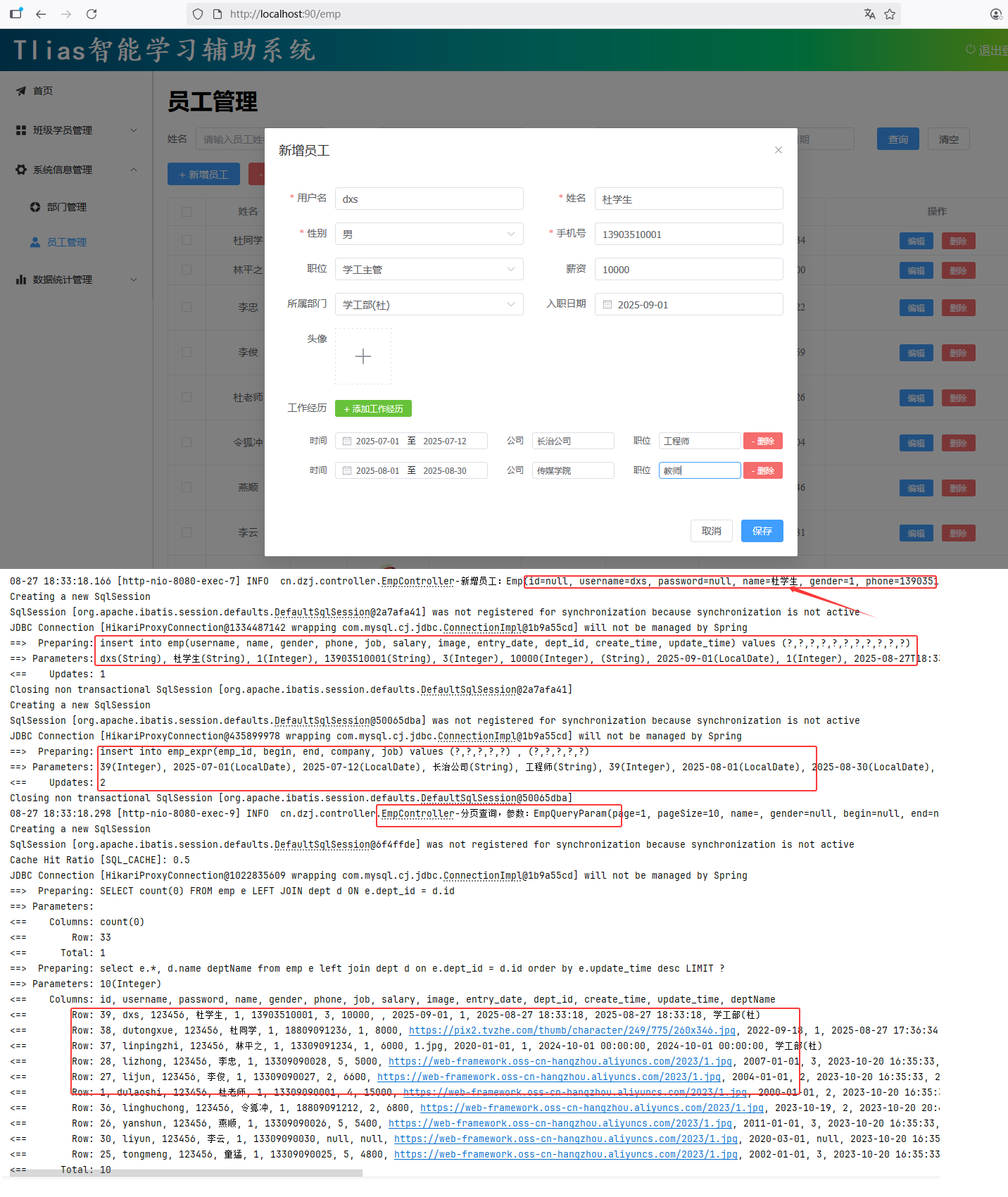 图9 运行测试验证
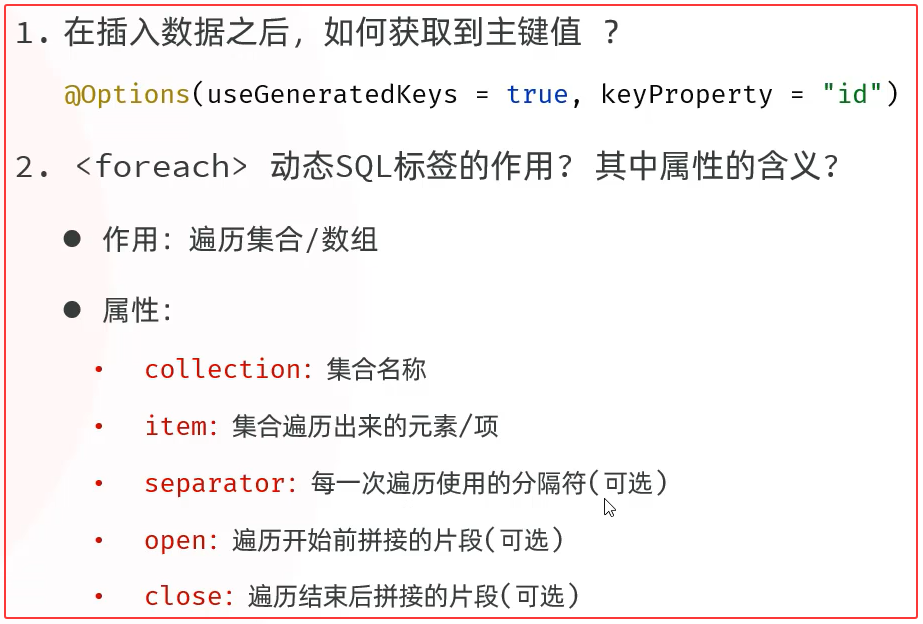 图10 批量保存工作经历小结
### 2. 事务管理
#### 问题提出
图10 批量保存工作经历小结
### 2. 事务管理
#### 问题提出
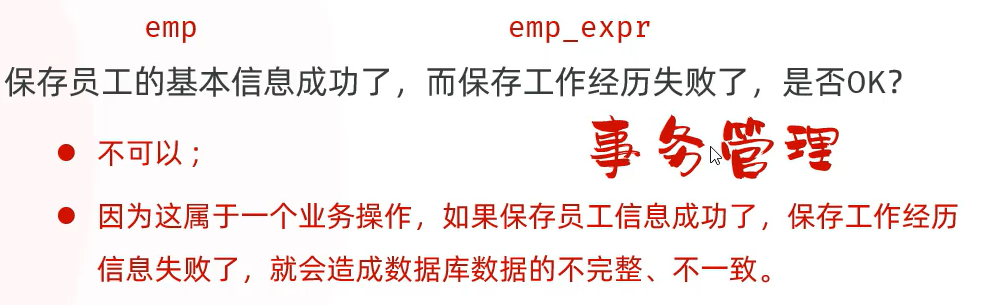 图11 事务的提出
#### 2.1 介绍&操作
##### ①介绍
* 概念:事务是一组操作的集合,它是一个不可分割的工作单位。事务会把所有的操作作为一个整体一起向系统提交或撤销操作请求,即这些操作要么同时成功,要么同时失败
图11 事务的提出
#### 2.1 介绍&操作
##### ①介绍
* 概念:事务是一组操作的集合,它是一个不可分割的工作单位。事务会把所有的操作作为一个整体一起向系统提交或撤销操作请求,即这些操作要么同时成功,要么同时失败
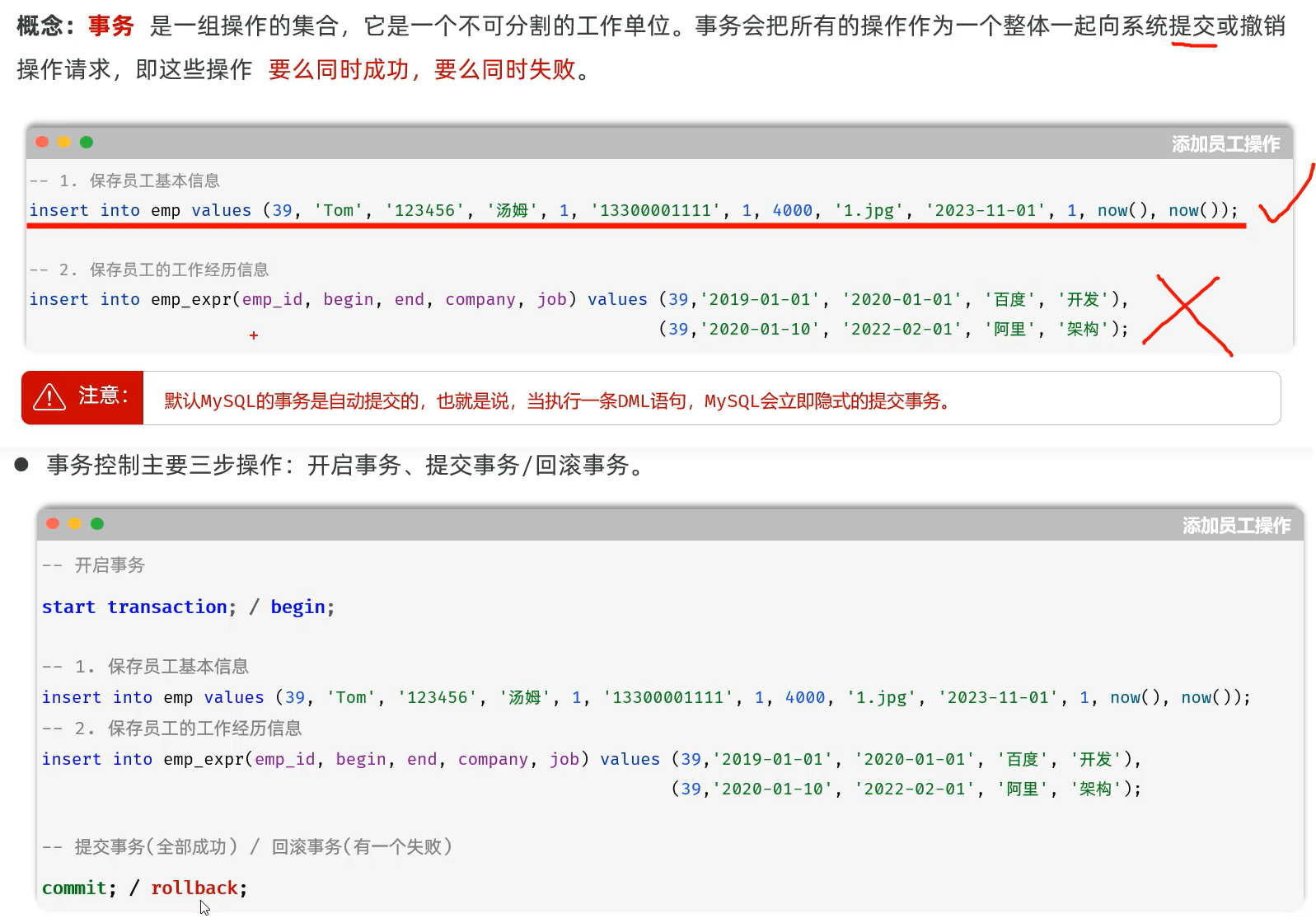 图12 事务介绍与控制
##### ②操作
```sql
-- 成功测试 -- 同时成功
-- 开启事务
start transaction ;
-- 保存员工基本信息-emp
insert into emp(id, username, name, gender, phone,job, salary, image, entry_date, dept_id, create_time, update_time)
values(48,'qiaofeng','杜乔峰', 1,'13356560011', 1,6000,'1.jpg','2020-01-01', 1,now(), now());
-- 批量保存员工工作经历信息-emp_expr
insert into emp_expr(emp_id, begin, end, company, job) values
(48,'2020-01-01','2021-01-01','百度','java开发'),
(48,'2021-01-01','2023-01-01','字节','java开发');
-- 提交事务
commit;
select * from emp;
select * from emp_expr;
```
图12 事务介绍与控制
##### ②操作
```sql
-- 成功测试 -- 同时成功
-- 开启事务
start transaction ;
-- 保存员工基本信息-emp
insert into emp(id, username, name, gender, phone,job, salary, image, entry_date, dept_id, create_time, update_time)
values(48,'qiaofeng','杜乔峰', 1,'13356560011', 1,6000,'1.jpg','2020-01-01', 1,now(), now());
-- 批量保存员工工作经历信息-emp_expr
insert into emp_expr(emp_id, begin, end, company, job) values
(48,'2020-01-01','2021-01-01','百度','java开发'),
(48,'2021-01-01','2023-01-01','字节','java开发');
-- 提交事务
commit;
select * from emp;
select * from emp_expr;
```
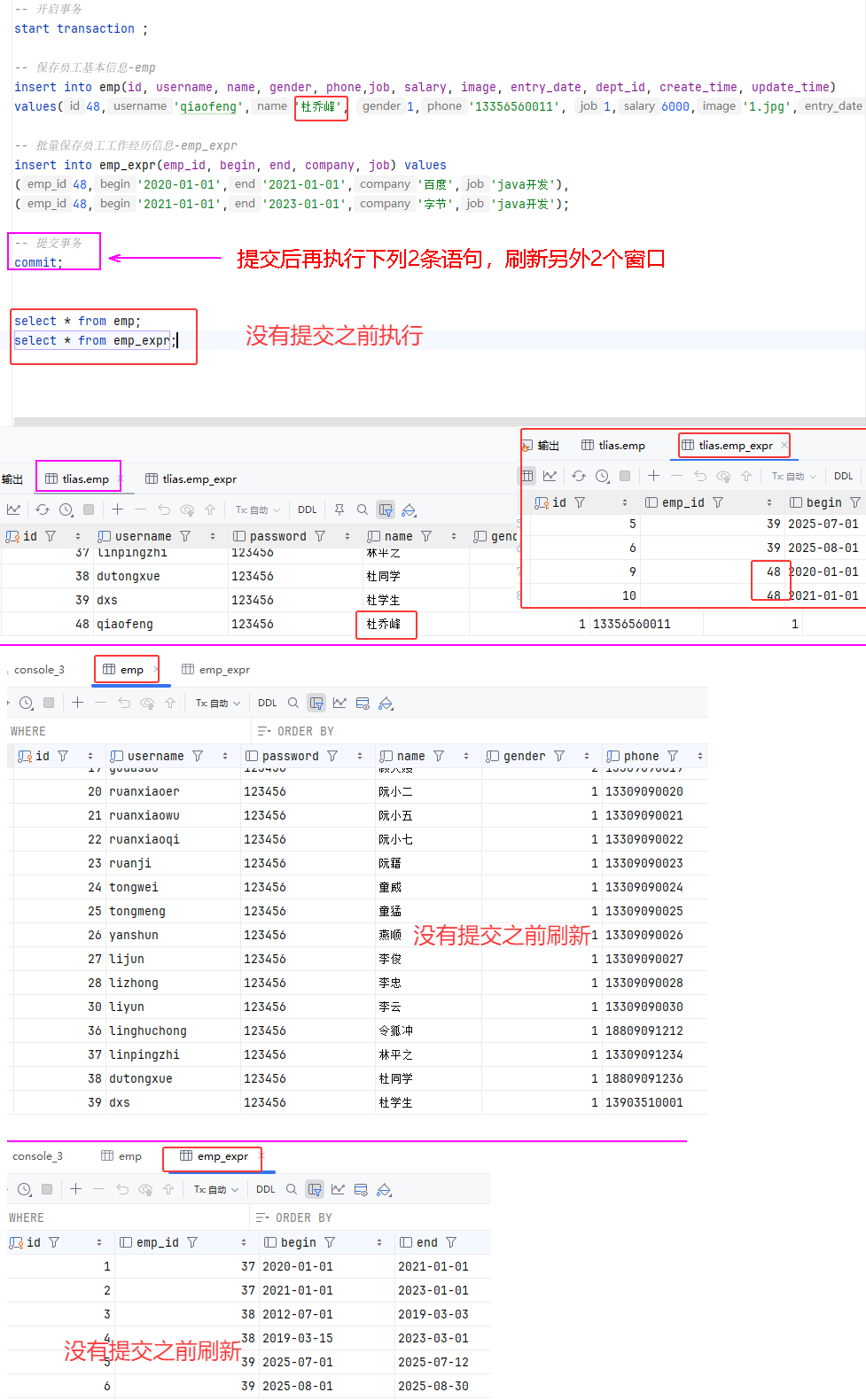 图13 成功后提交验证
```sql
-- 新增员工 -- 回滚测试
-- 开启事务
start transaction ;
-- 保存员工基本信息-emp
insert into emp(id, username, name, gender, phone,job, salary, image, entry_date, dept_id, create_time, update_time)
values(49,'duanyu','杜段誉', 1,'13356560012', 1,6000,'1.jpg','2020-01-01', 1,now(), now());
-- 批量保存员工工作经历信息-emp_expr
insert into emp_expr(emp_id, begin, end, company, job) values
(49,'2020-01-01','2021-01-01','百度','java开发')
(49,'2021-01-01','2023-01-01','字节','java开发');
-- 回滚事务
rollback ;
select * from emp;
select * from emp_expr;
```
图13 成功后提交验证
```sql
-- 新增员工 -- 回滚测试
-- 开启事务
start transaction ;
-- 保存员工基本信息-emp
insert into emp(id, username, name, gender, phone,job, salary, image, entry_date, dept_id, create_time, update_time)
values(49,'duanyu','杜段誉', 1,'13356560012', 1,6000,'1.jpg','2020-01-01', 1,now(), now());
-- 批量保存员工工作经历信息-emp_expr
insert into emp_expr(emp_id, begin, end, company, job) values
(49,'2020-01-01','2021-01-01','百度','java开发')
(49,'2021-01-01','2023-01-01','字节','java开发');
-- 回滚事务
rollback ;
select * from emp;
select * from emp_expr;
```
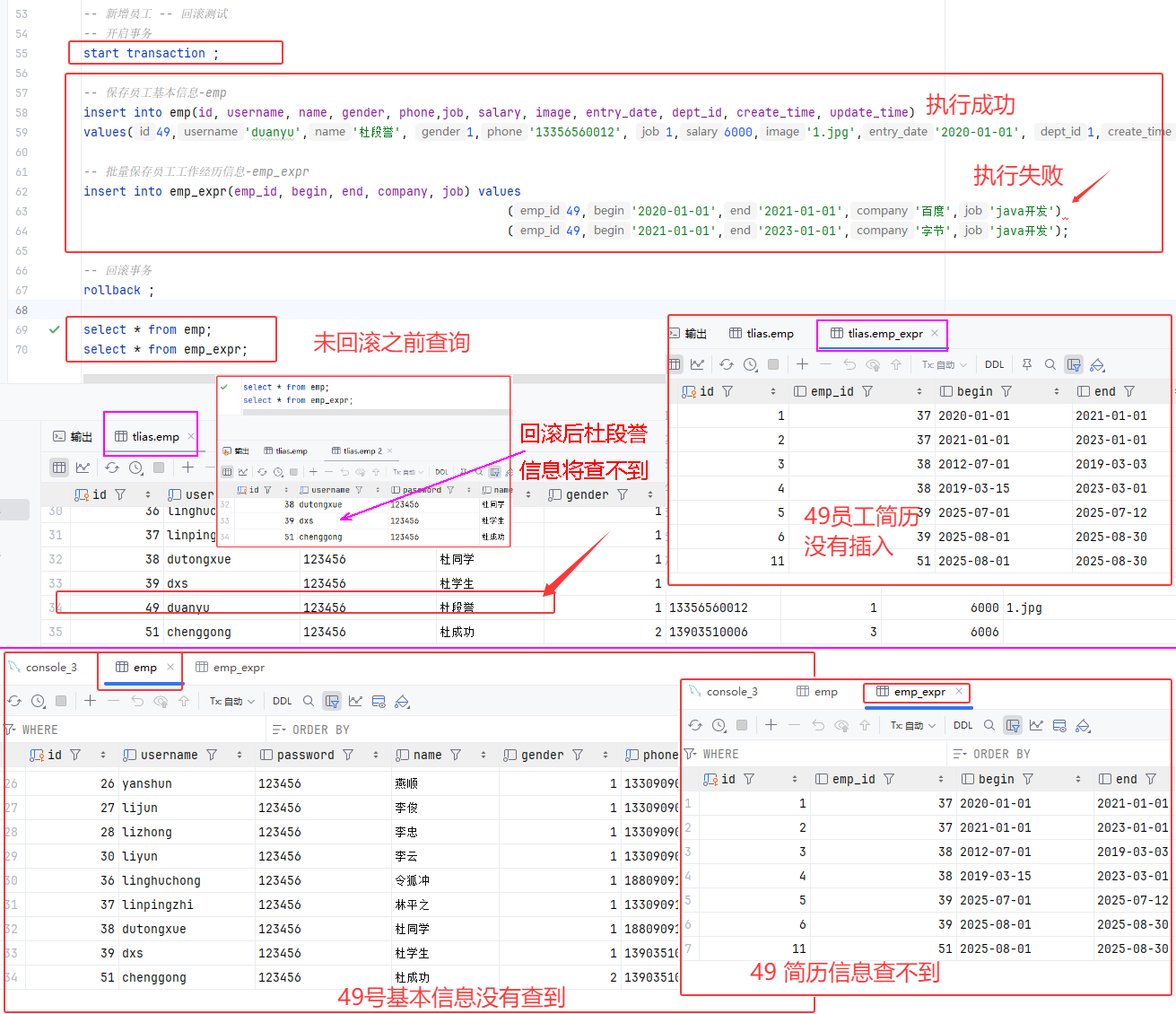 图14 回滚验证
##### 小结
图14 回滚验证
##### 小结
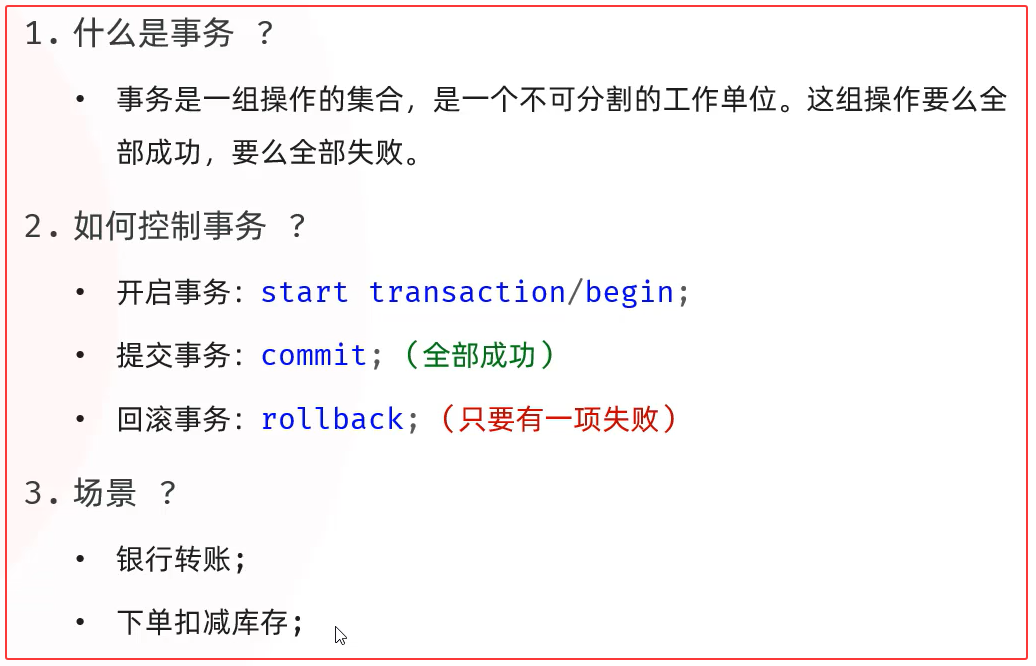 图15 事务小结
#### 2.2 Spring事务管理
#### 事务
图15 事务小结
#### 2.2 Spring事务管理
#### 事务
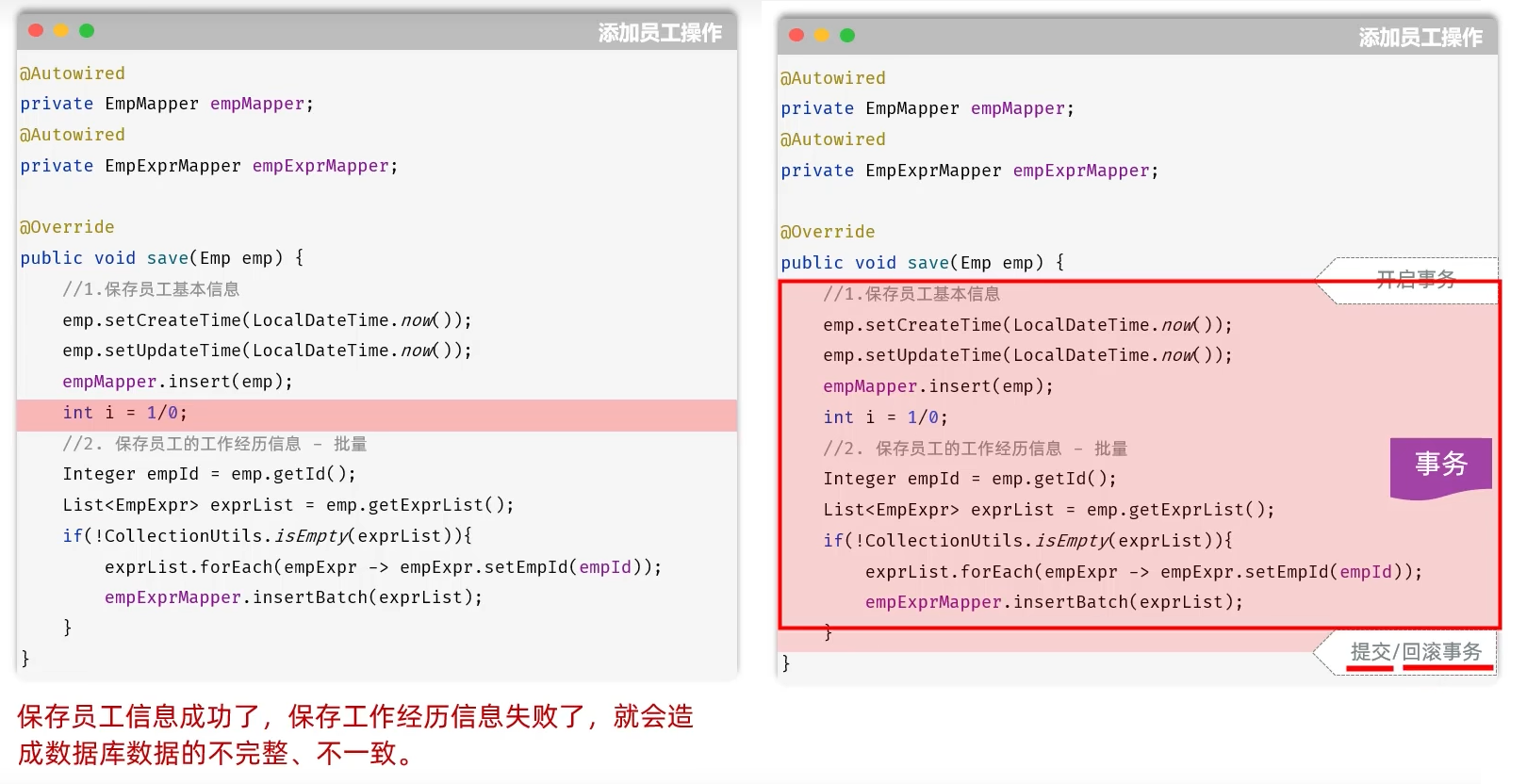 图16 Spring事务
#### ① Spring事务控制
* 注解:@Transactional
* 作用:将当前方法交给spring进行事务管理,方法执行前,开启事务;成功执行完毕,提交事务;出现异常,回滚事务
* 位置:业务(service)层的方法上、类上、接口上
图16 Spring事务
#### ① Spring事务控制
* 注解:@Transactional
* 作用:将当前方法交给spring进行事务管理,方法执行前,开启事务;成功执行完毕,提交事务;出现异常,回滚事务
* 位置:业务(service)层的方法上、类上、接口上
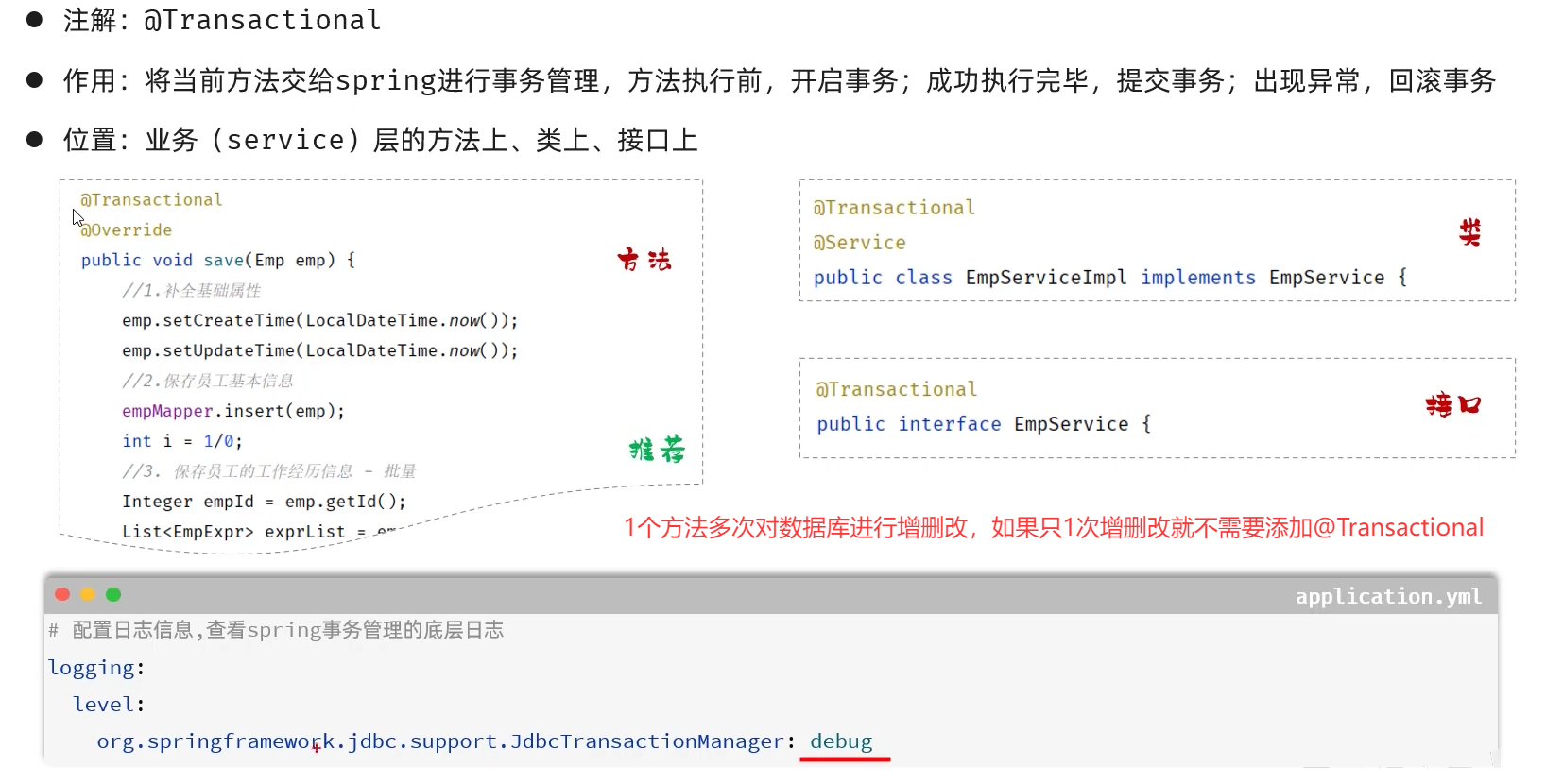 图17 Spring事务
##### cn/dzj/service/impl/EmpServiceImpl.java
```java
@Transactional
@Override
public void save(Emp emp) {
//1.保存员工基本信息
emp.setCreateTime(LocalDateTime.now());
emp.setUpdateTime(LocalDateTime.now());
empMapper.insert(emp);
int i = 1/0;
//2.保存员工工作经历信息
List exprList = emp.getExprList();
if (!CollectionUtils.isEmpty(exprList)){
//遍历集合,为empId赋值
exprList.forEach(empExpr-> {
empExpr.setEmpId(emp.getId());
});
empExprMapper.insertBatch(exprList);
}
```
##### src/main/resources/application.yml 添加如下配置
```yaml
# 配置事务管理日志级别
logging:
level:
org.springframework.jdbc.support.JdbcTransactionManager: debug
```
Grep Console 插件
图17 Spring事务
##### cn/dzj/service/impl/EmpServiceImpl.java
```java
@Transactional
@Override
public void save(Emp emp) {
//1.保存员工基本信息
emp.setCreateTime(LocalDateTime.now());
emp.setUpdateTime(LocalDateTime.now());
empMapper.insert(emp);
int i = 1/0;
//2.保存员工工作经历信息
List exprList = emp.getExprList();
if (!CollectionUtils.isEmpty(exprList)){
//遍历集合,为empId赋值
exprList.forEach(empExpr-> {
empExpr.setEmpId(emp.getId());
});
empExprMapper.insertBatch(exprList);
}
```
##### src/main/resources/application.yml 添加如下配置
```yaml
# 配置事务管理日志级别
logging:
level:
org.springframework.jdbc.support.JdbcTransactionManager: debug
```
Grep Console 插件
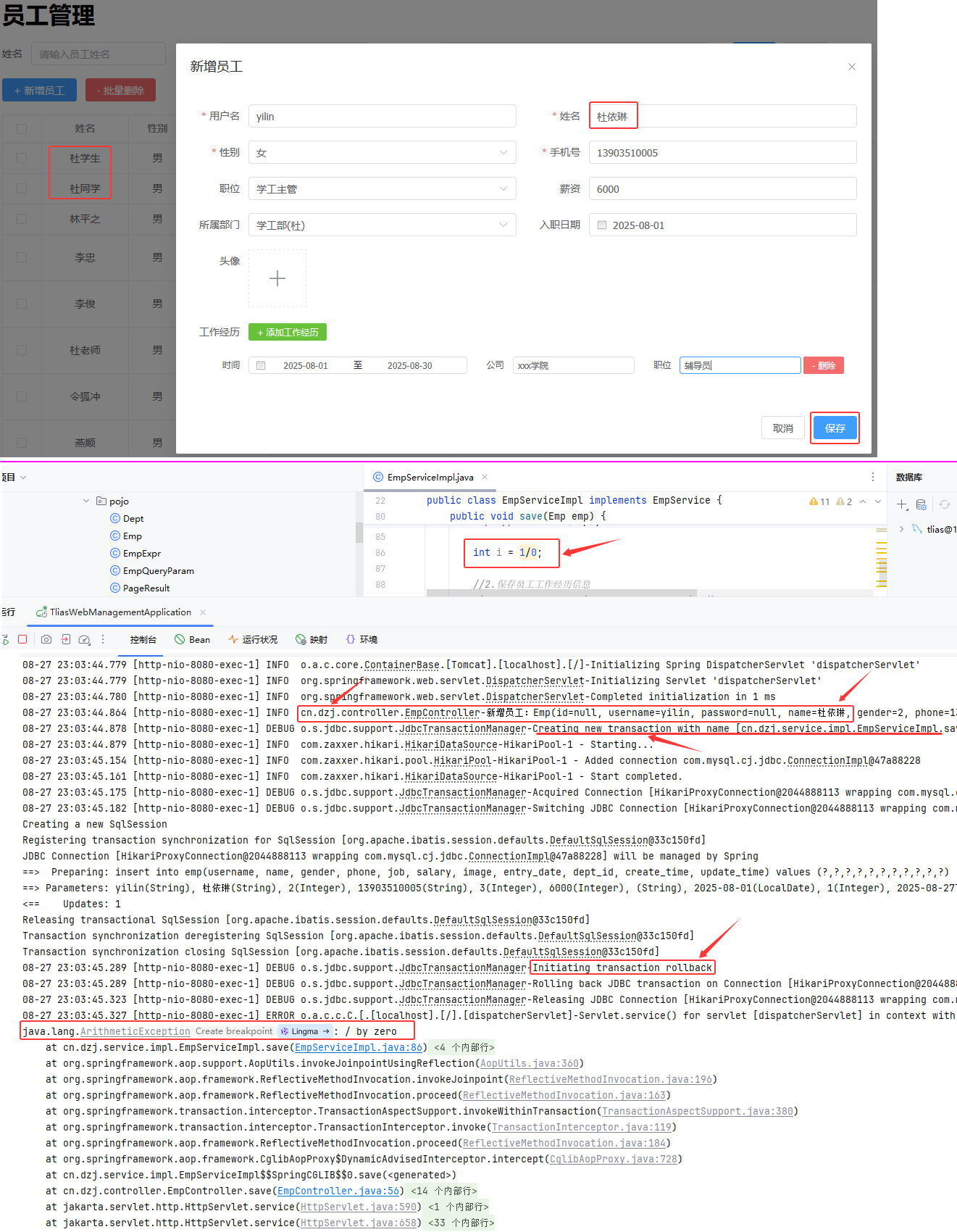 图18 Spring事务验证--回滚
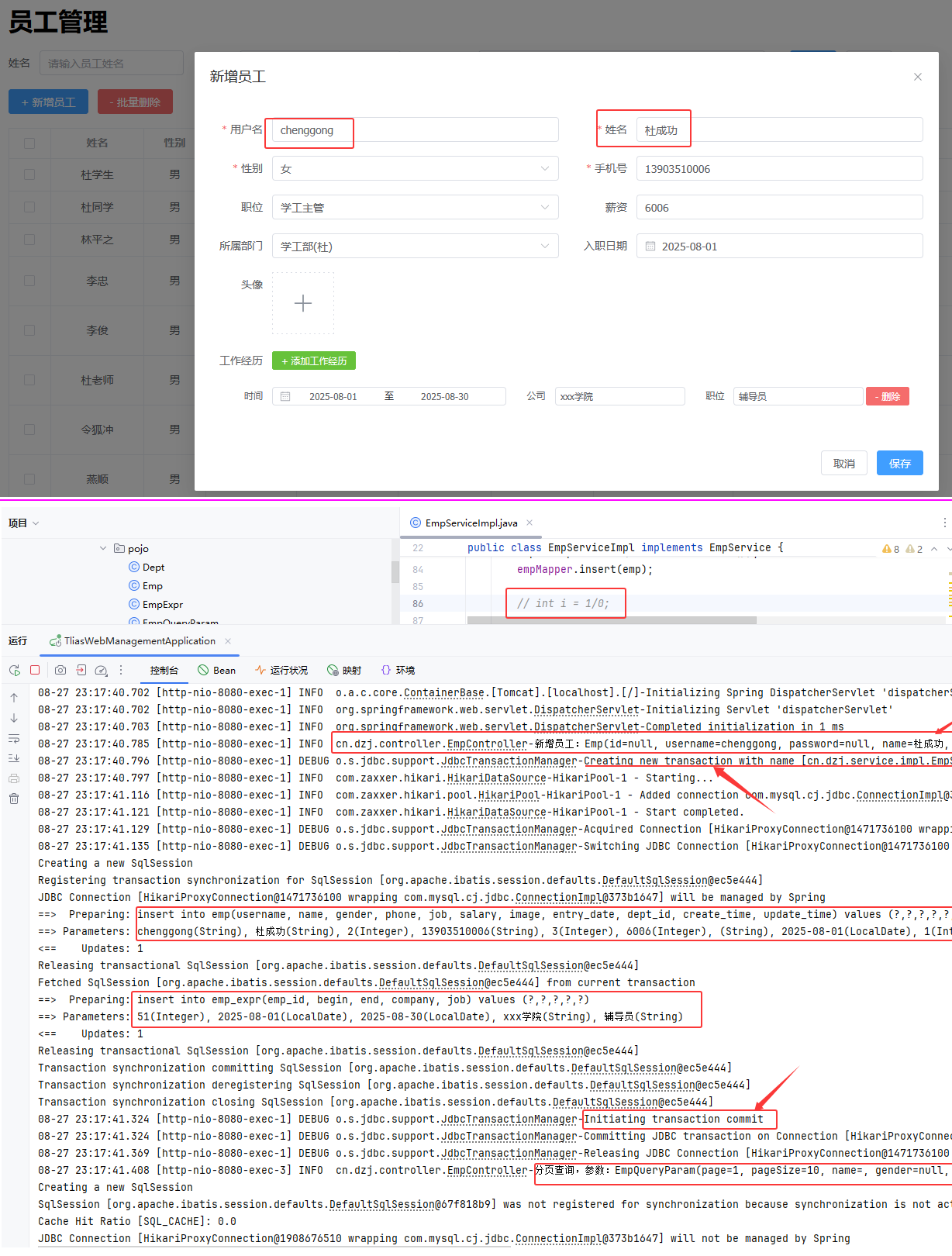 图19 Spring事务验证--提交
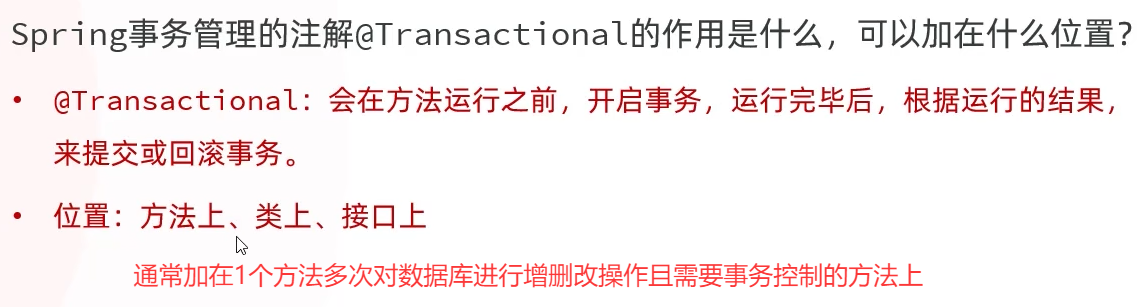 图20 Spring事务小结
#### ② 事务进阶-rollbackFor属性
图20 Spring事务小结
#### ② 事务进阶-rollbackFor属性
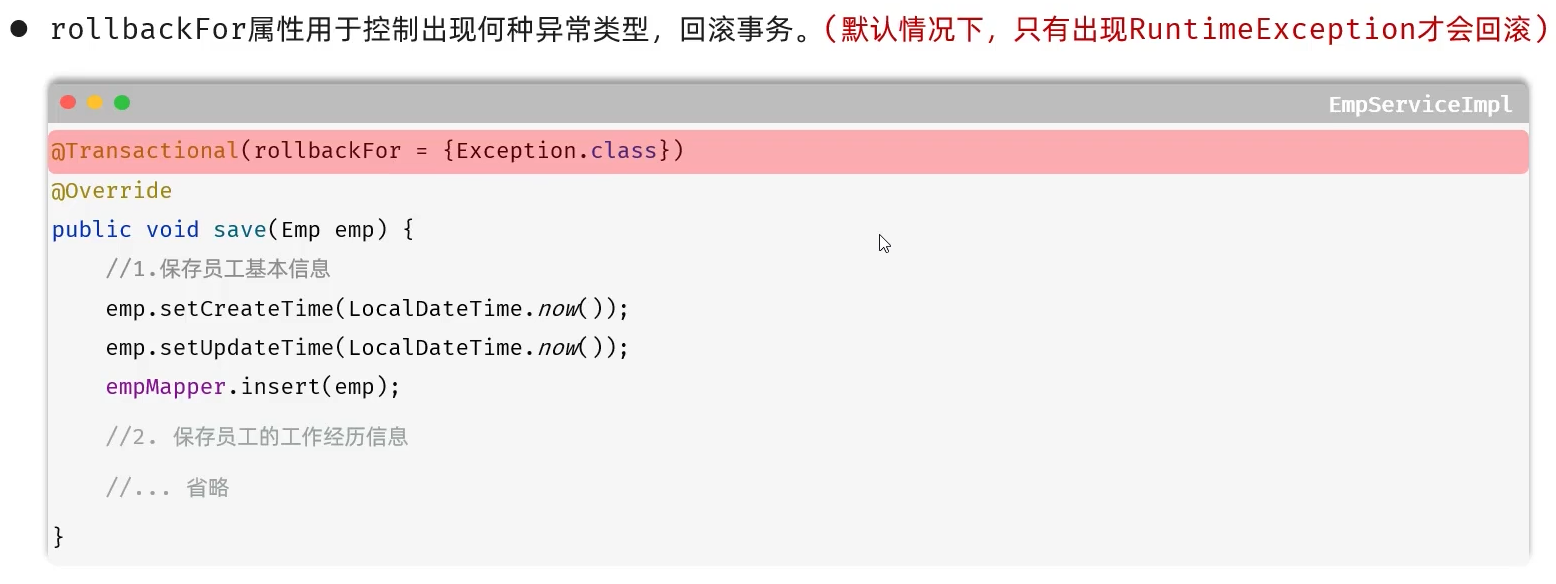 图21 事务进阶--rollbackFor属性
##### cn/dzj/controller/EmpController.java 添加 throws Exception
```java
@PostMapping
public Result save(@RequestBody Emp emp) throws Exception {
log.info("新增员工:{}", emp);
empService.save(emp);
return Result.success();
};
```
##### cn/dzj/service/EmpService.java 添加 throws Exception
```java
void save(Emp emp) throws Exception;
```
##### cn/dzj/service/impl/EmpServiceImpl.java throw new Exception("出错啦~~~");
```java
@Transactional //(rollbackFor={Exception.class})
//事务管理-默认出现运行时异常RuntimeException才会回滚 //Spring事务控制
@Override
public void save(Emp emp) throws Exception {
//1.保存员工基本信息
emp.setCreateTime(LocalDateTime.now());
emp.setUpdateTime(LocalDateTime.now());
empMapper.insert(emp);
// int i = 1/0;
if (true){
throw new Exception("出错啦~~~");
}
//2.保存员工工作经历信息
List exprList = emp.getExprList();
if (!CollectionUtils.isEmpty(exprList)){
//遍历集合,为empId赋值
exprList.forEach(empExpr-> {
empExpr.setEmpId(emp.getId());
});
empExprMapper.insertBatch(exprList);
}
}
```
图21 事务进阶--rollbackFor属性
##### cn/dzj/controller/EmpController.java 添加 throws Exception
```java
@PostMapping
public Result save(@RequestBody Emp emp) throws Exception {
log.info("新增员工:{}", emp);
empService.save(emp);
return Result.success();
};
```
##### cn/dzj/service/EmpService.java 添加 throws Exception
```java
void save(Emp emp) throws Exception;
```
##### cn/dzj/service/impl/EmpServiceImpl.java throw new Exception("出错啦~~~");
```java
@Transactional //(rollbackFor={Exception.class})
//事务管理-默认出现运行时异常RuntimeException才会回滚 //Spring事务控制
@Override
public void save(Emp emp) throws Exception {
//1.保存员工基本信息
emp.setCreateTime(LocalDateTime.now());
emp.setUpdateTime(LocalDateTime.now());
empMapper.insert(emp);
// int i = 1/0;
if (true){
throw new Exception("出错啦~~~");
}
//2.保存员工工作经历信息
List exprList = emp.getExprList();
if (!CollectionUtils.isEmpty(exprList)){
//遍历集合,为empId赋值
exprList.forEach(empExpr-> {
empExpr.setEmpId(emp.getId());
});
empExprMapper.insertBatch(exprList);
}
}
```
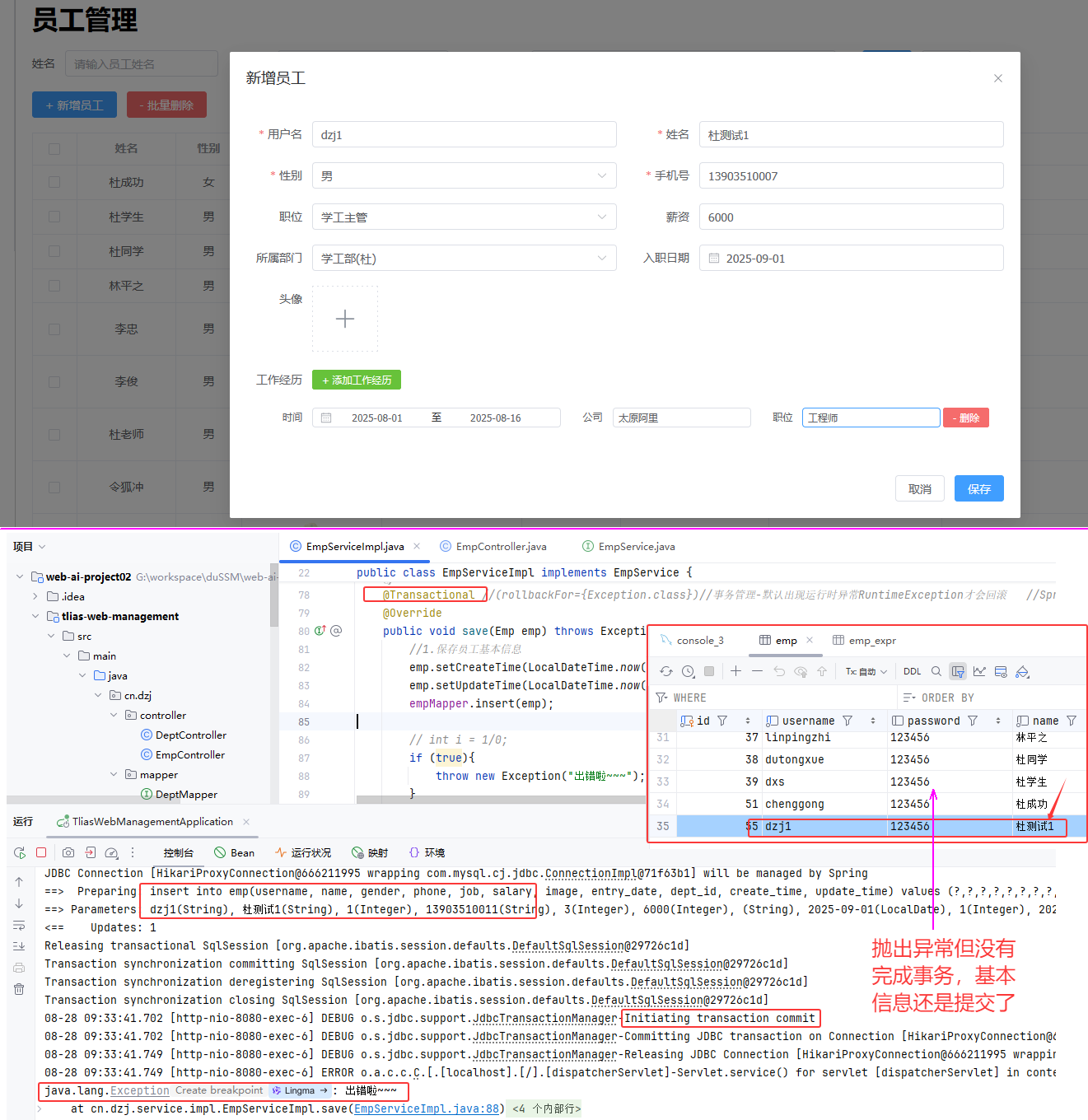 图22 Spring事务rollbackFor属性验证
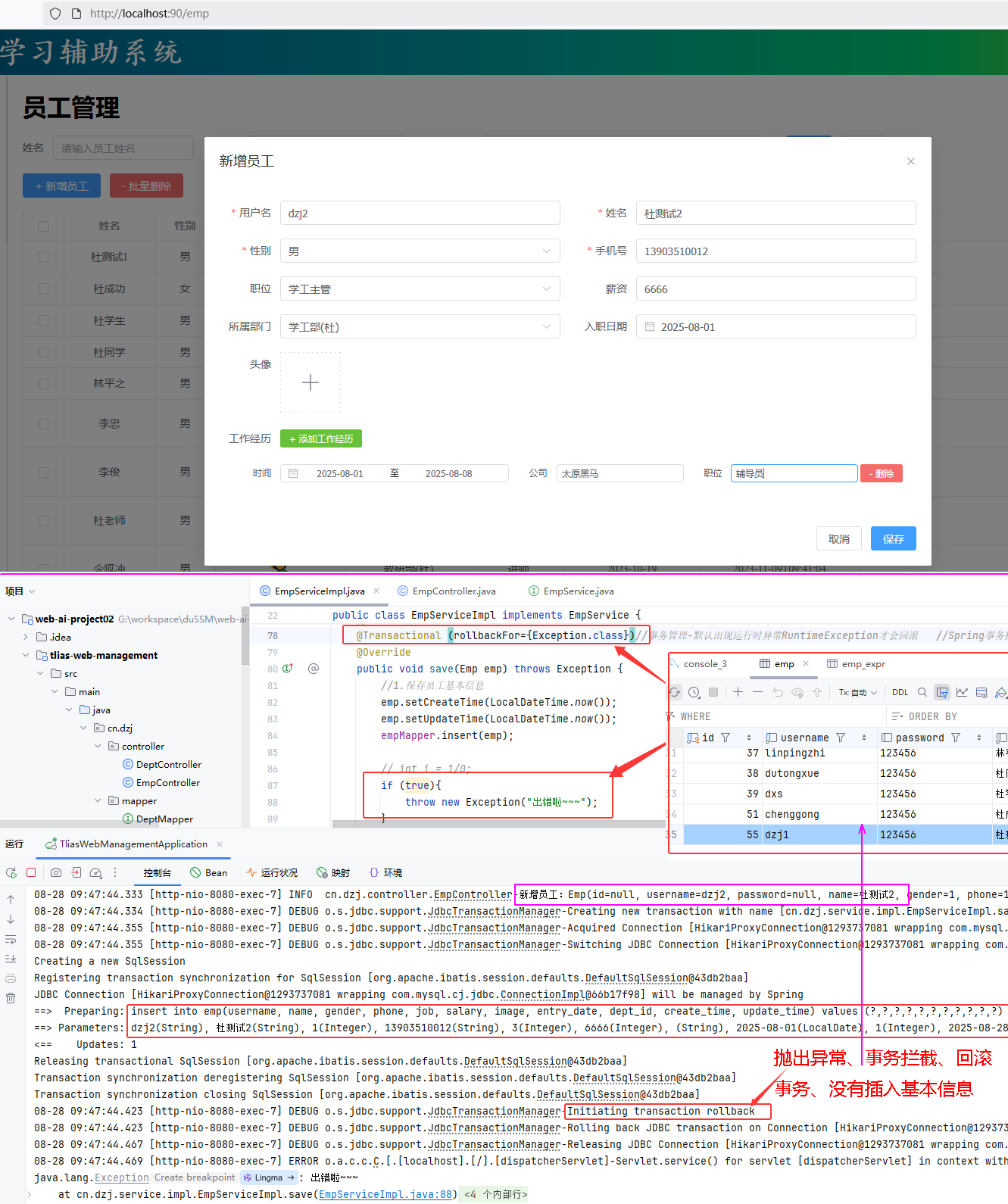 图23 Spring事务rollbackFor属性验证
#### ③ 事务传播行为
* 事务传播行为:指的就是当一个事务方法被另一个事务方法调用时,这个事务方法应该如何进行事务控制。
| **属性值** | **含义** |
| ------------- | ------------------------------------------------------------ |
| REQUIRED | 【默认值】需要事务,有则加入,无则创建新事务 |
| REQUIRES_NEW | 需要新事务,无论有无,总是创建新事务 |
| SUPPORTS | 支持事务,有则加入,无则在无事务状态中运行 |
| NOT_SUPPORTED | 不支持事务,在无事务状态下运行,如果当前存在已有事务,则挂起当前事务 |
| MANDATORY | 必须有事务,否则抛异常 |
| NEVER | 必须没事务,否则抛异常 |
| . . . | |
图23 Spring事务rollbackFor属性验证
#### ③ 事务传播行为
* 事务传播行为:指的就是当一个事务方法被另一个事务方法调用时,这个事务方法应该如何进行事务控制。
| **属性值** | **含义** |
| ------------- | ------------------------------------------------------------ |
| REQUIRED | 【默认值】需要事务,有则加入,无则创建新事务 |
| REQUIRES_NEW | 需要新事务,无论有无,总是创建新事务 |
| SUPPORTS | 支持事务,有则加入,无则在无事务状态中运行 |
| NOT_SUPPORTED | 不支持事务,在无事务状态下运行,如果当前存在已有事务,则挂起当前事务 |
| MANDATORY | 必须有事务,否则抛异常 |
| NEVER | 必须没事务,否则抛异常 |
| . . . | |
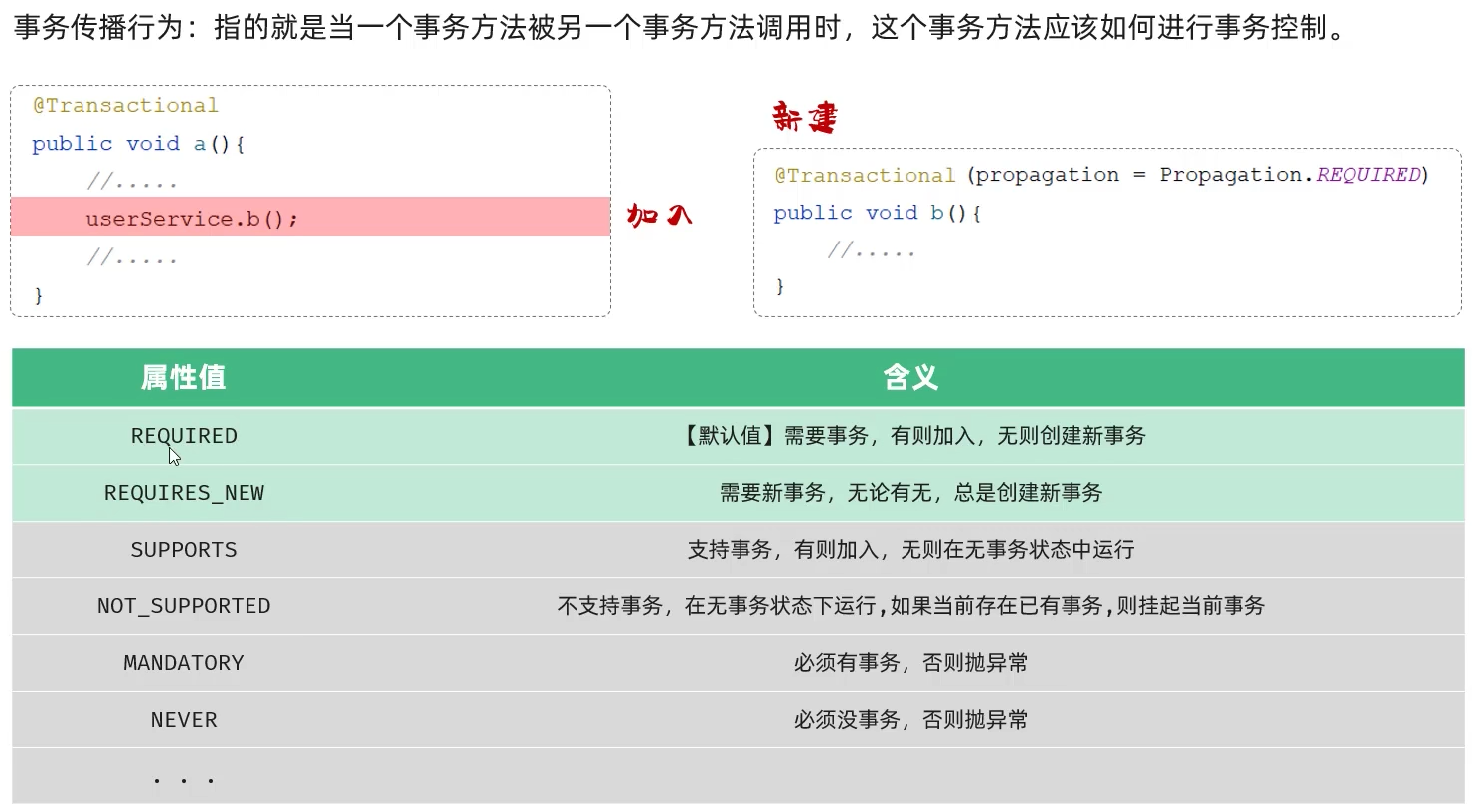 图24 事务传播行为
#### 事务传播案例
图24 事务传播行为
#### 事务传播案例
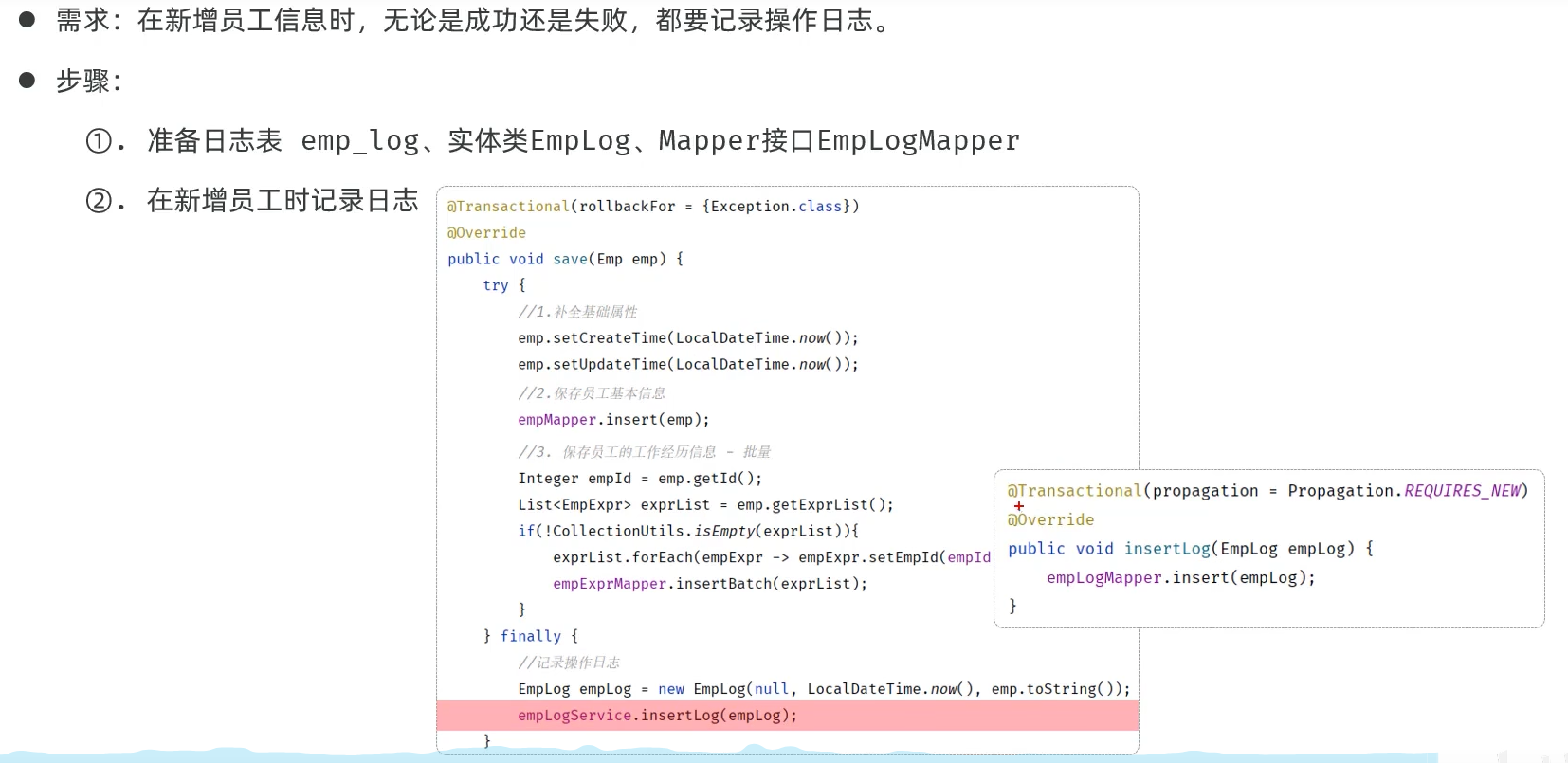 图25 案例
#####
```sql
-- 创建员工日志表
create table emp_log(
id int unsigned primary key auto_increment comment 'ID, 主键',
operate_time datetime comment '操作时间',
info varchar(2000) comment '日志信息'
) comment '员工日志表';
```
##### ccn/dzj/pojo/EmpLog.java
```java
@Data
@NoArgsConstructor
@AllArgsConstructor
public class EmpLog {
private Integer id; //ID
private LocalDateTime operateTime; //操作时间
private String info; //详细信息
}
```
##### cn/dzj/mapper/EmpLogMapper.java
```java
@Mapper
public interface EmpLogMapper {
@Insert("insert into emp_log (operate_time, info) values (#{operateTime}, #{info})")
public void insert(EmpLog empLog);
}
```
##### cn/dzj/service/EmpLogService.java
```java
package cn.dzj.service;
import cn.dzj.pojo.EmpLog;
public interface EmpLogService {
void insertLog(EmpLog empLog);
}
```
##### cn/dzj/service/impl/EmpLogServiceImpl.java
```java
package cn.dzj.service.impl;
import cn.dzj.mapper.EmpLogMapper;
import cn.dzj.pojo.EmpLog;
import cn.dzj.service.EmpLogService;
import org.springframework.beans.factory.annotation.Autowired;
import org.springframework.stereotype.Service;
@Service
public class EmpLogServiceImpl implements EmpLogService {
@Autowired
private EmpLogMapper empLogMapper;
@Override
public void insertLog(EmpLog empLog) {
empLogMapper.insert(empLog);
}
}
```
##### cn/dzj/service/impl/EmpServiceImpl.java修改save方法,去掉 throws Exception; 等
```java
@Transactional //(rollbackFor={Exception.class})//事务管理-默认出现运行时异常RuntimeException才会回滚 //Spring事务控制
@Override
public void save(Emp emp) { // throws Exception {
try{
//1.保存员工基本信息
emp.setCreateTime(LocalDateTime.now());
emp.setUpdateTime(LocalDateTime.now());
empMapper.insert(emp);
// int i = 1/0;
// if (true){
// throw new Exception("出错啦~~~");
// }
//2.保存员工工作经历信息
List exprList = emp.getExprList();
if (!CollectionUtils.isEmpty(exprList)){
//遍历集合,为empId赋值
exprList.forEach(empExpr-> {
empExpr.setEmpId(emp.getId());
});
empExprMapper.insertBatch(exprList);
}
} finally {
//记录操作日志
EmpLog empLog =new EmpLog(null,LocalDateTime.now(),"新增员工:"+emp);
empLogService.insertLog(empLog);
}
}
```
图25 案例
#####
```sql
-- 创建员工日志表
create table emp_log(
id int unsigned primary key auto_increment comment 'ID, 主键',
operate_time datetime comment '操作时间',
info varchar(2000) comment '日志信息'
) comment '员工日志表';
```
##### ccn/dzj/pojo/EmpLog.java
```java
@Data
@NoArgsConstructor
@AllArgsConstructor
public class EmpLog {
private Integer id; //ID
private LocalDateTime operateTime; //操作时间
private String info; //详细信息
}
```
##### cn/dzj/mapper/EmpLogMapper.java
```java
@Mapper
public interface EmpLogMapper {
@Insert("insert into emp_log (operate_time, info) values (#{operateTime}, #{info})")
public void insert(EmpLog empLog);
}
```
##### cn/dzj/service/EmpLogService.java
```java
package cn.dzj.service;
import cn.dzj.pojo.EmpLog;
public interface EmpLogService {
void insertLog(EmpLog empLog);
}
```
##### cn/dzj/service/impl/EmpLogServiceImpl.java
```java
package cn.dzj.service.impl;
import cn.dzj.mapper.EmpLogMapper;
import cn.dzj.pojo.EmpLog;
import cn.dzj.service.EmpLogService;
import org.springframework.beans.factory.annotation.Autowired;
import org.springframework.stereotype.Service;
@Service
public class EmpLogServiceImpl implements EmpLogService {
@Autowired
private EmpLogMapper empLogMapper;
@Override
public void insertLog(EmpLog empLog) {
empLogMapper.insert(empLog);
}
}
```
##### cn/dzj/service/impl/EmpServiceImpl.java修改save方法,去掉 throws Exception; 等
```java
@Transactional //(rollbackFor={Exception.class})//事务管理-默认出现运行时异常RuntimeException才会回滚 //Spring事务控制
@Override
public void save(Emp emp) { // throws Exception {
try{
//1.保存员工基本信息
emp.setCreateTime(LocalDateTime.now());
emp.setUpdateTime(LocalDateTime.now());
empMapper.insert(emp);
// int i = 1/0;
// if (true){
// throw new Exception("出错啦~~~");
// }
//2.保存员工工作经历信息
List exprList = emp.getExprList();
if (!CollectionUtils.isEmpty(exprList)){
//遍历集合,为empId赋值
exprList.forEach(empExpr-> {
empExpr.setEmpId(emp.getId());
});
empExprMapper.insertBatch(exprList);
}
} finally {
//记录操作日志
EmpLog empLog =new EmpLog(null,LocalDateTime.now(),"新增员工:"+emp);
empLogService.insertLog(empLog);
}
}
```
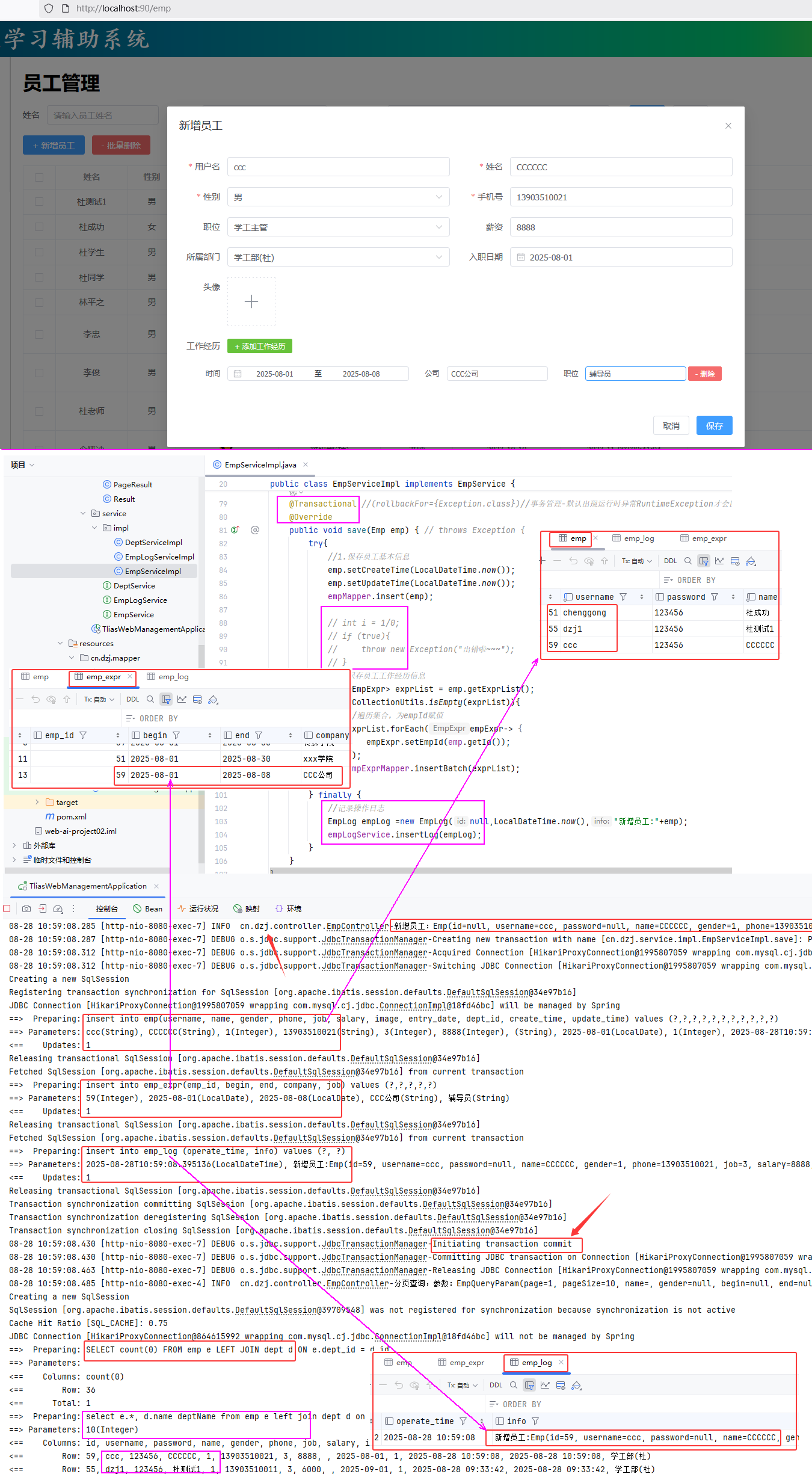 图26 Spring事务propagation属性--加入验证
##### cn/dzj/service/impl/EmpLogServiceImpl.java 添加@Transactional(propagation = Propagation.REQUIRES_NEW )
```java
@Service
public class EmpLogServiceImpl implements EmpLogService {
@Autowired
private EmpLogMapper empLogMapper;
@Transactional(propagation = Propagation.REQUIRES_NEW )
@Override
public void insertLog(EmpLog empLog) {
empLogMapper.insert(empLog);
}
}
```
##### cn/dzj/service/impl/EmpLogServiceImpl.java 修改
```java
int i = 1/0;
```
图26 Spring事务propagation属性--加入验证
##### cn/dzj/service/impl/EmpLogServiceImpl.java 添加@Transactional(propagation = Propagation.REQUIRES_NEW )
```java
@Service
public class EmpLogServiceImpl implements EmpLogService {
@Autowired
private EmpLogMapper empLogMapper;
@Transactional(propagation = Propagation.REQUIRES_NEW )
@Override
public void insertLog(EmpLog empLog) {
empLogMapper.insert(empLog);
}
}
```
##### cn/dzj/service/impl/EmpLogServiceImpl.java 修改
```java
int i = 1/0;
```
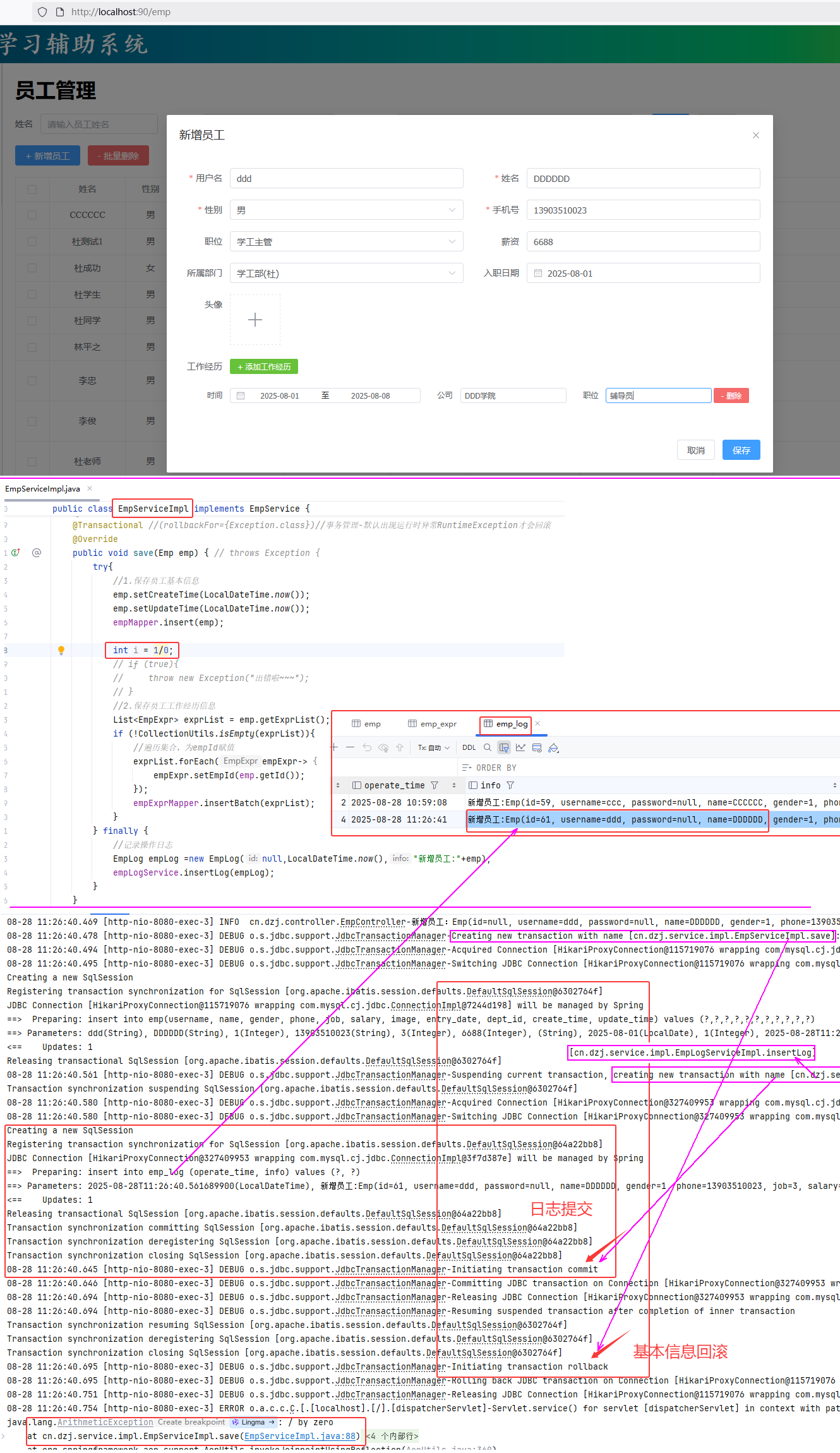 图27 Spring事务propagation属性--新建验证
##### 小结
图27 Spring事务propagation属性--新建验证
##### 小结
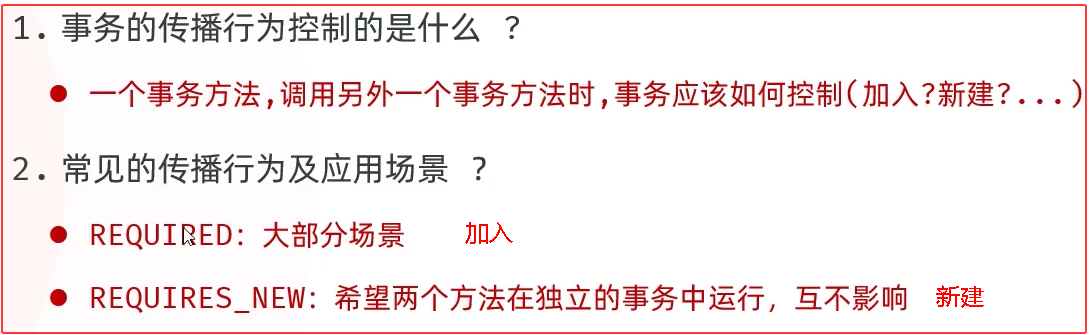 图28 事务传播行为小结
#### 2.3 四大特性
* 事务是不可分割的最小单元,要么全部成功,要么全部失败
* 事务完成时,必须使所有的数据都保持一致状态
* 数据库系统提供的隔离机制,保证事务在不受外部并发操作影响的独立环境下运行
* 事务一旦提交或回滚,它对数据库中的数据的改变就是永久的
图28 事务传播行为小结
#### 2.3 四大特性
* 事务是不可分割的最小单元,要么全部成功,要么全部失败
* 事务完成时,必须使所有的数据都保持一致状态
* 数据库系统提供的隔离机制,保证事务在不受外部并发操作影响的独立环境下运行
* 事务一旦提交或回滚,它对数据库中的数据的改变就是永久的
 图29 事务控制的四大特性
### 3.文件上传
##### 3.0 问题的提出
图29 事务控制的四大特性
### 3.文件上传
##### 3.0 问题的提出
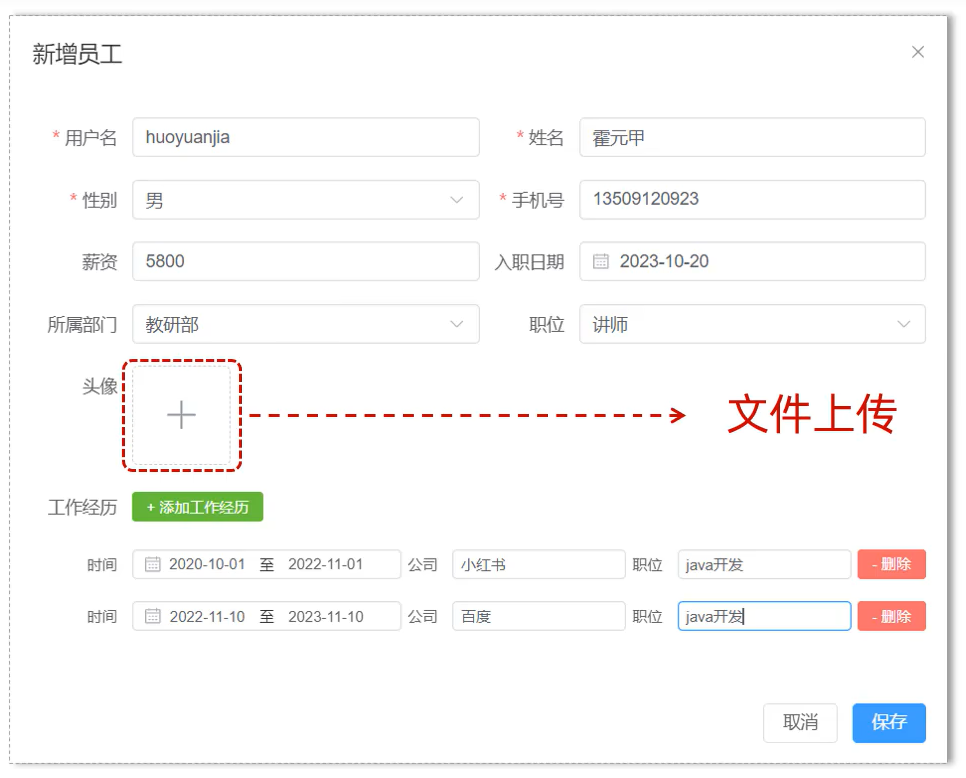 图30 问题
#### 3.1 简介
* 文件上传:是指将本地图片、视频、音频等文件上传到服务器,供其他用户浏览或下载的过程。
* 文件上传在项目中应用非常广泛,我们经常发微博、发微信朋友圈都用到了文件上传功能。
图30 问题
#### 3.1 简介
* 文件上传:是指将本地图片、视频、音频等文件上传到服务器,供其他用户浏览或下载的过程。
* 文件上传在项目中应用非常广泛,我们经常发微博、发微信朋友圈都用到了文件上传功能。
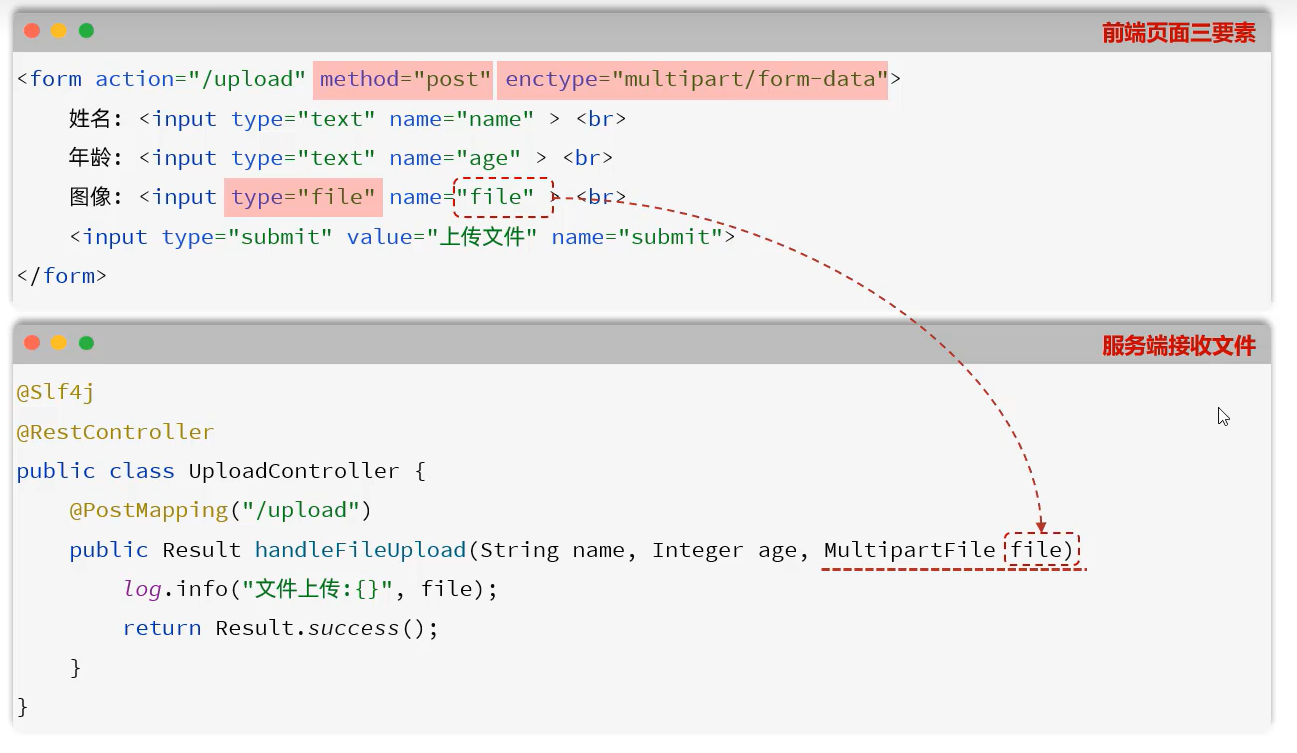 图31 文件上传的前端三要素和Spring后端接受
##### 中国梦.txt
```txt
杜老师《中国梦》
党的十八大闭幕不久,习近平总书记在参观国家博物馆《复兴之路》展览时,首次提出并阐述“中国梦”
十年来,从提出中国梦,到强调不忘初心、牢记使命,再到谋划以中国式现代化全面推进中华民族伟大复兴,中国共产党人把光荣梦想书写在自己的旗帜上,团结带领中国人民为实现这个光荣梦想而不懈奋斗。
十年来,从提出中国梦,到强调不忘初心、牢记使命,再到谋划以中国式现代化全面推进中华民族伟大复兴,中国共产党人把光荣梦想书写在自己的旗帜上,团结带领中国人民为实现这个光荣梦想而不懈奋斗。
十年来,从提出中国梦,到强调不忘初心、牢记使命,再到谋划以中国式现代化全面推进中华民族伟大复兴,中国共产党人把光荣梦想书写在自己的旗帜上,团结带领中国人民为实现这个光荣梦想而不懈奋斗。
十年来,从提出中国梦,到强调不忘初心、牢记使命,再到谋划以中国式现代化全面推进中华民族伟大复兴,中国共产党人把光荣梦想书写在自己的旗帜上,团结带领中国人民为实现这个光荣梦想而不懈奋斗。
十年来,从提出中国梦,到强调不忘初心、牢记使命,再到谋划以中国式现代化全面推进中华民族伟大复兴,中国共产党人把光荣梦想书写在自己的旗帜上,团结带领中国人民为实现这个光荣梦想而不懈奋斗。
党的十八大闭幕不久,习近平总书记在参观国家博物馆《复兴之路》展览时,首次提出并阐述“中国梦”。
```
##### src/main/resources/static/upload.html
```html
上传文件
```
图31 文件上传的前端三要素和Spring后端接受
##### 中国梦.txt
```txt
杜老师《中国梦》
党的十八大闭幕不久,习近平总书记在参观国家博物馆《复兴之路》展览时,首次提出并阐述“中国梦”
十年来,从提出中国梦,到强调不忘初心、牢记使命,再到谋划以中国式现代化全面推进中华民族伟大复兴,中国共产党人把光荣梦想书写在自己的旗帜上,团结带领中国人民为实现这个光荣梦想而不懈奋斗。
十年来,从提出中国梦,到强调不忘初心、牢记使命,再到谋划以中国式现代化全面推进中华民族伟大复兴,中国共产党人把光荣梦想书写在自己的旗帜上,团结带领中国人民为实现这个光荣梦想而不懈奋斗。
十年来,从提出中国梦,到强调不忘初心、牢记使命,再到谋划以中国式现代化全面推进中华民族伟大复兴,中国共产党人把光荣梦想书写在自己的旗帜上,团结带领中国人民为实现这个光荣梦想而不懈奋斗。
十年来,从提出中国梦,到强调不忘初心、牢记使命,再到谋划以中国式现代化全面推进中华民族伟大复兴,中国共产党人把光荣梦想书写在自己的旗帜上,团结带领中国人民为实现这个光荣梦想而不懈奋斗。
十年来,从提出中国梦,到强调不忘初心、牢记使命,再到谋划以中国式现代化全面推进中华民族伟大复兴,中国共产党人把光荣梦想书写在自己的旗帜上,团结带领中国人民为实现这个光荣梦想而不懈奋斗。
党的十八大闭幕不久,习近平总书记在参观国家博物馆《复兴之路》展览时,首次提出并阐述“中国梦”。
```
##### src/main/resources/static/upload.html
```html
上传文件
```
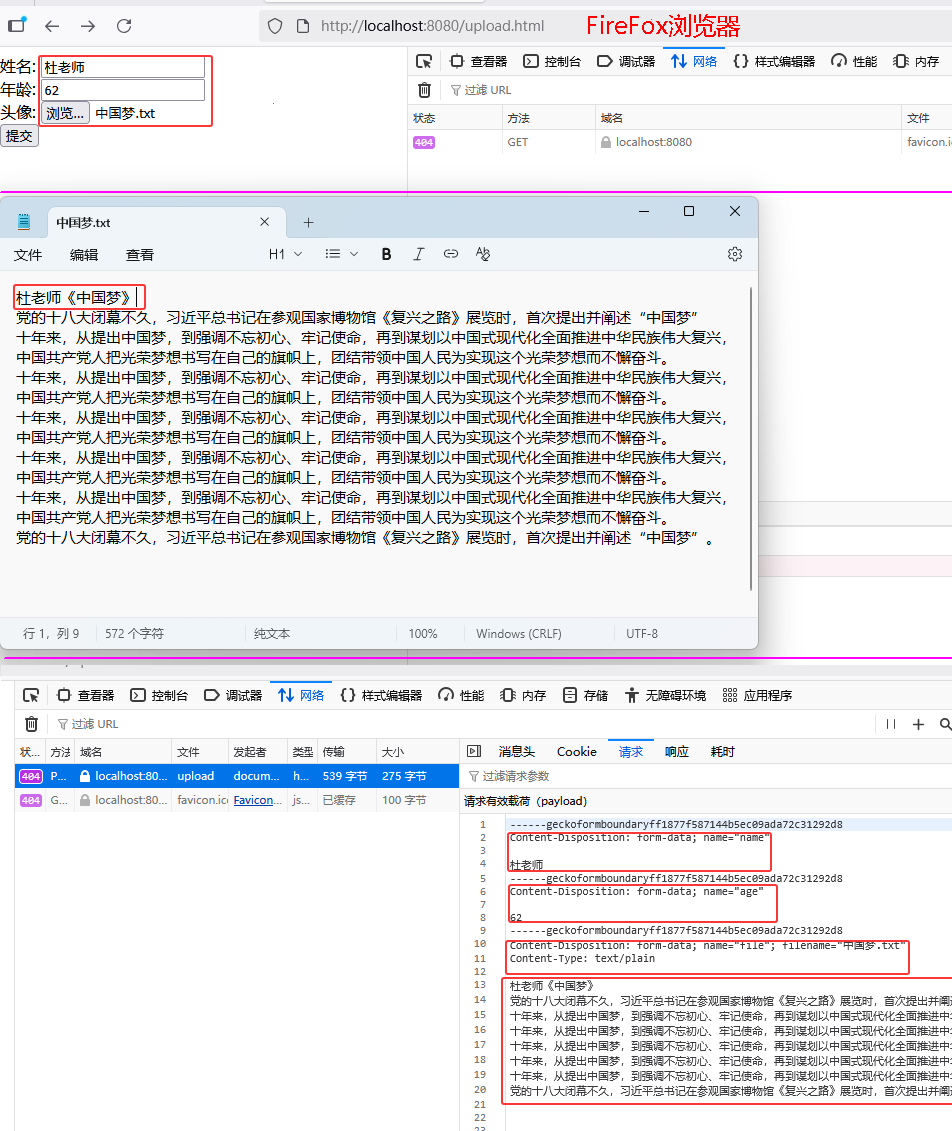 图32 前端multipart/form-data提交的内容
##### src/main/resources/static/upload.html 去掉enctype="multipart/form-data
```html
上传文件
```
图32 前端multipart/form-data提交的内容
##### src/main/resources/static/upload.html 去掉enctype="multipart/form-data
```html
上传文件
```
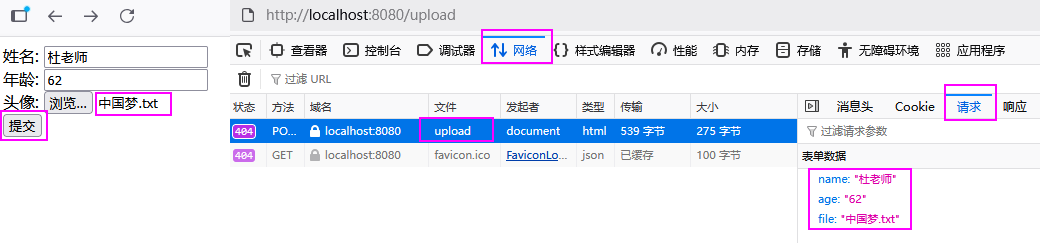 图33 前端没有multipart/form-data提交的内容
##### cn/dzj/controller/UploadController.java
```java
package cn.dzj.controller;
import cn.dzj.pojo.Result;
import lombok.extern.slf4j.Slf4j;
import org.springframework.web.bind.annotation.PostMapping;
import org.springframework.web.bind.annotation.RestController;
import org.springframework.web.multipart.MultipartFile;
@Slf4j
@RestController
public class UploadController{
@PostMapping("/upload")
public Result upload(String name, Integer age, MultipartFile file) {
log.info("接收参数:{},{},{}",name,age,file);
return Result.success();
}
}
```
图33 前端没有multipart/form-data提交的内容
##### cn/dzj/controller/UploadController.java
```java
package cn.dzj.controller;
import cn.dzj.pojo.Result;
import lombok.extern.slf4j.Slf4j;
import org.springframework.web.bind.annotation.PostMapping;
import org.springframework.web.bind.annotation.RestController;
import org.springframework.web.multipart.MultipartFile;
@Slf4j
@RestController
public class UploadController{
@PostMapping("/upload")
public Result upload(String name, Integer age, MultipartFile file) {
log.info("接收参数:{},{},{}",name,age,file);
return Result.success();
}
}
```
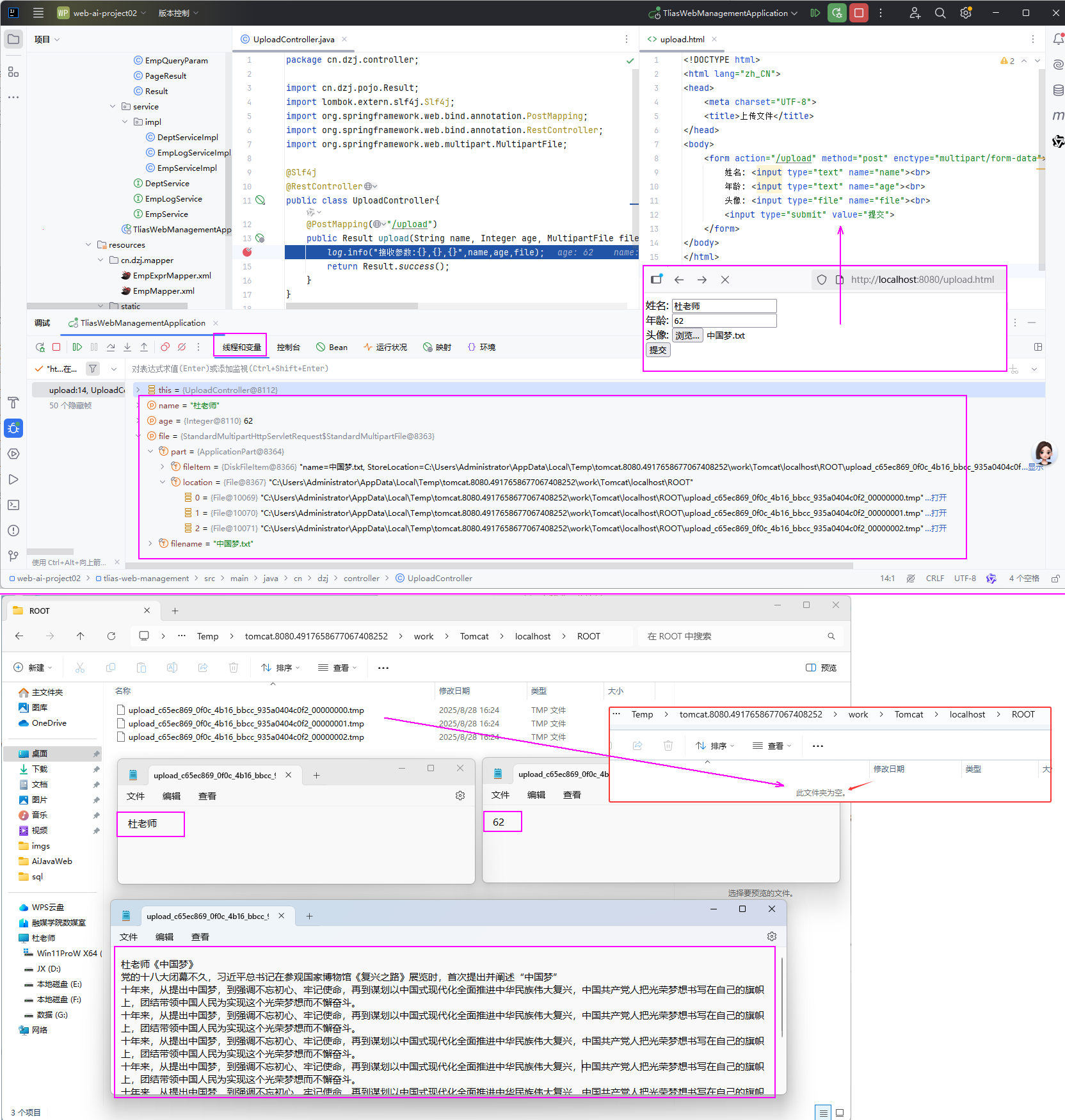 图34 后端接受测试/mark>
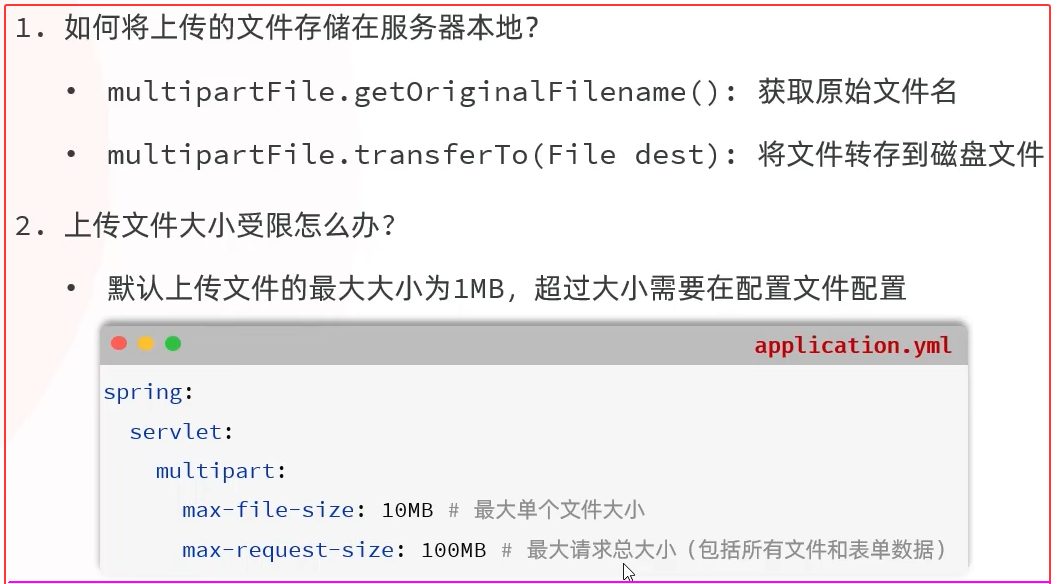 图35 文件上传小结
#### 3.2 本地存储
##### src/test/java/cn/dzj/UUIDTest.java
```java
import org.junit.jupiter.api.Test;
import java.util.UUID;
public class UUIDTest {
@Test
public void testUuid() {
for (int i = 0; i < 10000; i++) {
System.out.println(UUID.randomUUID().toString());
}
}
}
```
##### cn/dzj/controller/UploadController.java
```java
package cn.dzj.controller;
import cn.dzj.pojo.Result;
import lombok.extern.slf4j.Slf4j;
import org.springframework.web.bind.annotation.PostMapping;
import org.springframework.web.bind.annotation.RestController;
import org.springframework.web.multipart.MultipartFile;
@Slf4j
@RestController
public class UploadController{
@PostMapping("/upload")
public Result upload(String name, Integer age, MultipartFile file) {
log.info("接收参数:{},{},{}",name,age,file);
// 获取原始文件名
String originalFilename =file.getOriginalFilename();
// 新的文件名
// String extension = originalFilename.substring(originalFilename.lastIndexOf("."));
// String newFileName = UUID.randomUUID().toString()+ extension;
String newFileName = UUID.randomUUID().toString() +"_" + originalFilename; // uuid_原始文件名
// 保存文件
file.transferTo(new File("D:/images/" + newFileName));
// return Result.success();
return Result.success(newFileName); // 返回文件名 uuid_原始文件名
}
}
// 备忘
@PostMapping("/upload")
public Result handleFileUpload(MultipartFile file) throws Exception {
log.info("文件上传:{}", file);
// 生成唯一文件名
String uniqueFileName = generateUniqueFileName(file.getOriginalFilename());
// 保存文件
image.transferTo(new File("D:/images/" + uniqueFileName));
return Result.success();
}
private String generateUniqueFileName(String originalFilename) {
String randomStr = UUID.randomUUID().toString().replaceAll("-", "");
String extension = originalFilename.substring(originalFilename.lastIndexOf("."));
return randomStr + extension;
}
```
##### MaxUploadSizeExceededException:Maximum upload size exceeded]
##### application.yml
```yaml
spring:
servlet:
multipart:
max-file-size:10MB # 最大单个文件大小
max-request-size:100MB # 最大请求总大小(包括所有文件和表单数据)
```
图35 文件上传小结
#### 3.2 本地存储
##### src/test/java/cn/dzj/UUIDTest.java
```java
import org.junit.jupiter.api.Test;
import java.util.UUID;
public class UUIDTest {
@Test
public void testUuid() {
for (int i = 0; i < 10000; i++) {
System.out.println(UUID.randomUUID().toString());
}
}
}
```
##### cn/dzj/controller/UploadController.java
```java
package cn.dzj.controller;
import cn.dzj.pojo.Result;
import lombok.extern.slf4j.Slf4j;
import org.springframework.web.bind.annotation.PostMapping;
import org.springframework.web.bind.annotation.RestController;
import org.springframework.web.multipart.MultipartFile;
@Slf4j
@RestController
public class UploadController{
@PostMapping("/upload")
public Result upload(String name, Integer age, MultipartFile file) {
log.info("接收参数:{},{},{}",name,age,file);
// 获取原始文件名
String originalFilename =file.getOriginalFilename();
// 新的文件名
// String extension = originalFilename.substring(originalFilename.lastIndexOf("."));
// String newFileName = UUID.randomUUID().toString()+ extension;
String newFileName = UUID.randomUUID().toString() +"_" + originalFilename; // uuid_原始文件名
// 保存文件
file.transferTo(new File("D:/images/" + newFileName));
// return Result.success();
return Result.success(newFileName); // 返回文件名 uuid_原始文件名
}
}
// 备忘
@PostMapping("/upload")
public Result handleFileUpload(MultipartFile file) throws Exception {
log.info("文件上传:{}", file);
// 生成唯一文件名
String uniqueFileName = generateUniqueFileName(file.getOriginalFilename());
// 保存文件
image.transferTo(new File("D:/images/" + uniqueFileName));
return Result.success();
}
private String generateUniqueFileName(String originalFilename) {
String randomStr = UUID.randomUUID().toString().replaceAll("-", "");
String extension = originalFilename.substring(originalFilename.lastIndexOf("."));
return randomStr + extension;
}
```
##### MaxUploadSizeExceededException:Maximum upload size exceeded]
##### application.yml
```yaml
spring:
servlet:
multipart:
max-file-size:10MB # 最大单个文件大小
max-request-size:100MB # 最大请求总大小(包括所有文件和表单数据)
```
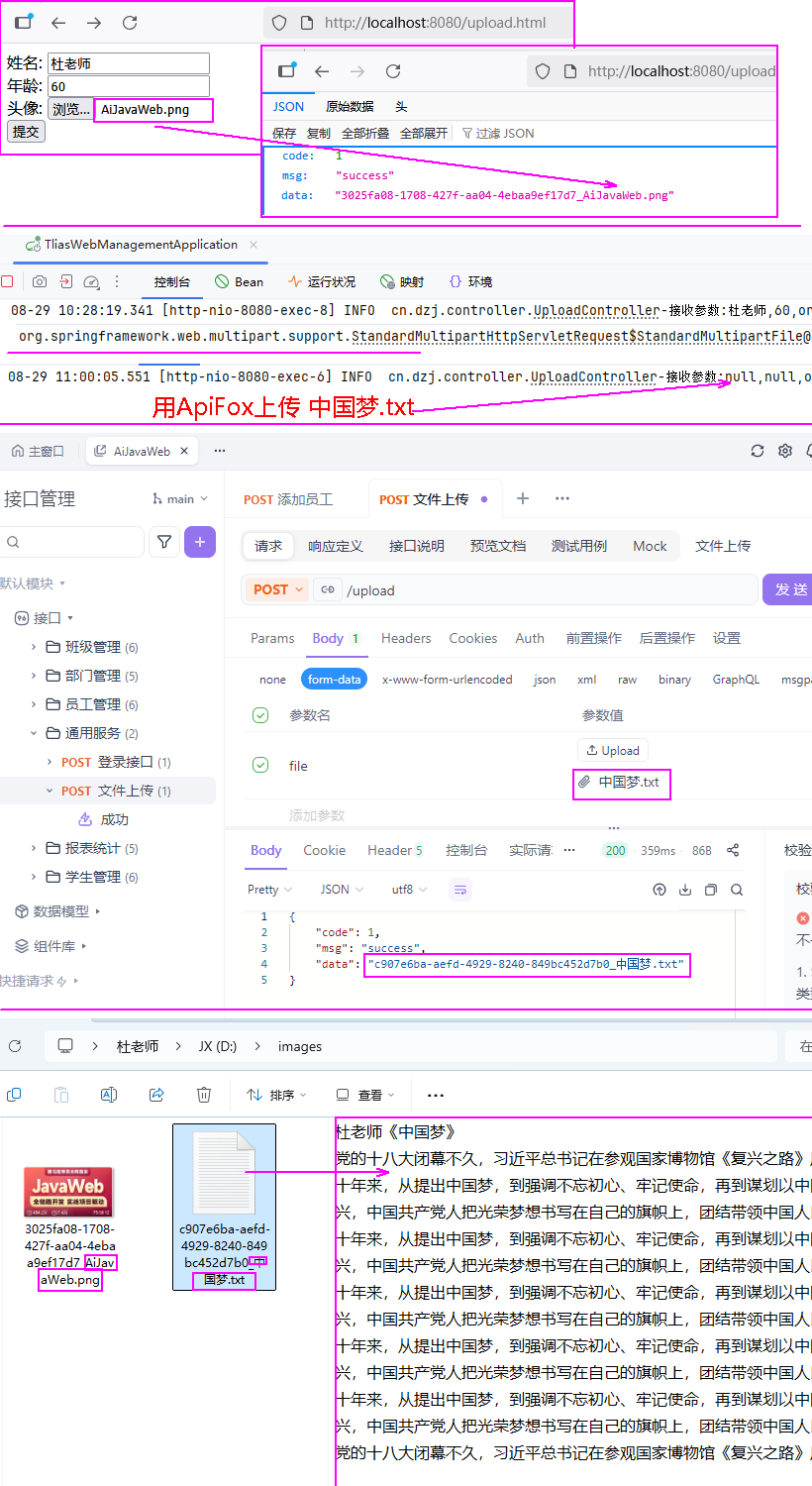 图36 文件上传到本地验证
#####
图36 文件上传到本地验证
#####
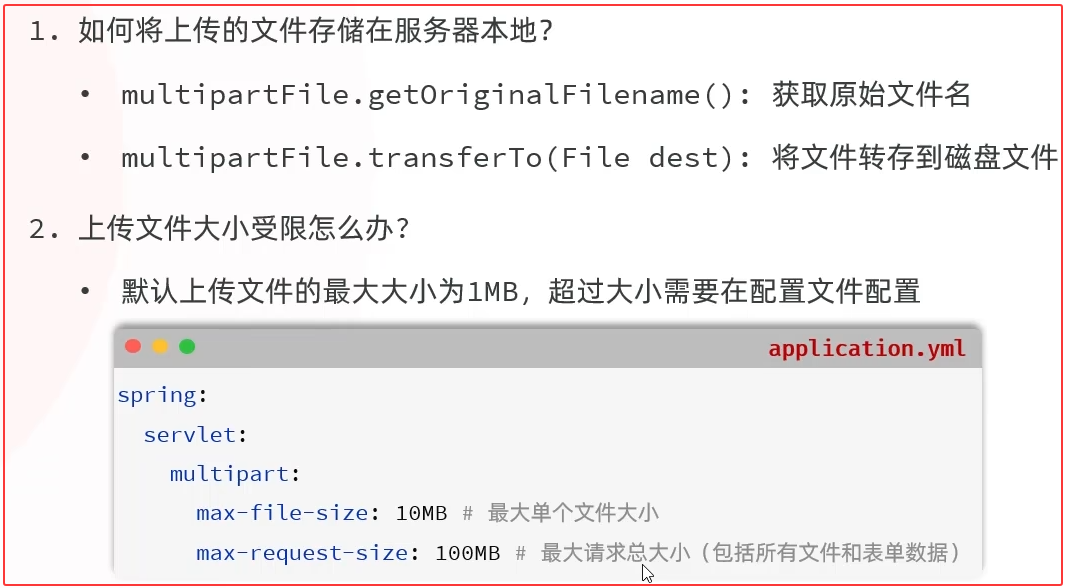 图37 文件上传到本地小结
#### 3.3 阿里云OSS
##### 问题的提出
图37 文件上传到本地小结
#### 3.3 阿里云OSS
##### 问题的提出
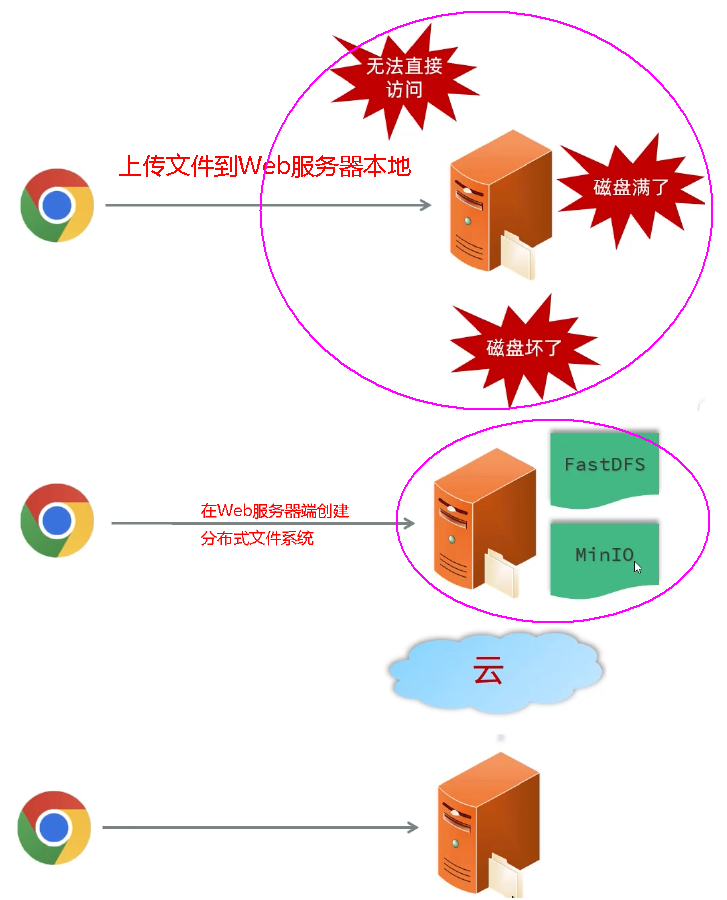 图38 问题的提出
#### 阿里云
阿里云是阿里巴巴集团旗下全球领先的云计算公司,也是国内最大的云服务提供商。(全球第4大云服务供应商,前三:亚马逊、微软、谷歌)
图38 问题的提出
#### 阿里云
阿里云是阿里巴巴集团旗下全球领先的云计算公司,也是国内最大的云服务提供商。(全球第4大云服务供应商,前三:亚马逊、微软、谷歌)
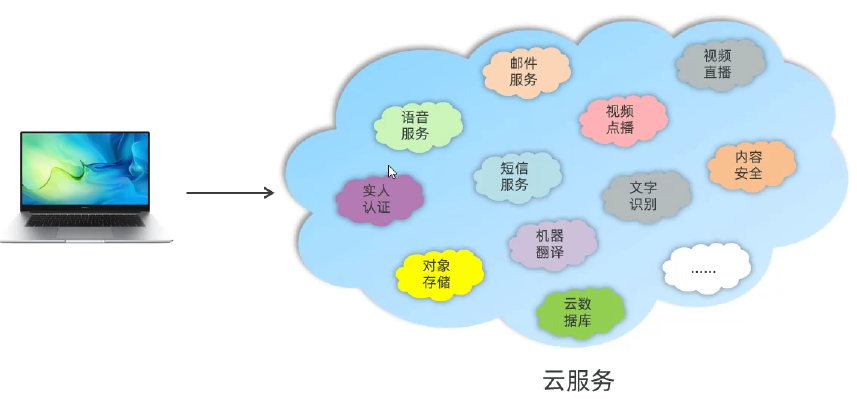 图39 云服务
#### 阿里云OSS
阿里云对象存储OSS(Object Storage Service),是一款海量、安全、低成本、高可靠的云存储服务。使用OSS,您可以通过网络随时存储和调用包括文本、图片、音频和视频等在内的各种文件。
图39 云服务
#### 阿里云OSS
阿里云对象存储OSS(Object Storage Service),是一款海量、安全、低成本、高可靠的云存储服务。使用OSS,您可以通过网络随时存储和调用包括文本、图片、音频和视频等在内的各种文件。
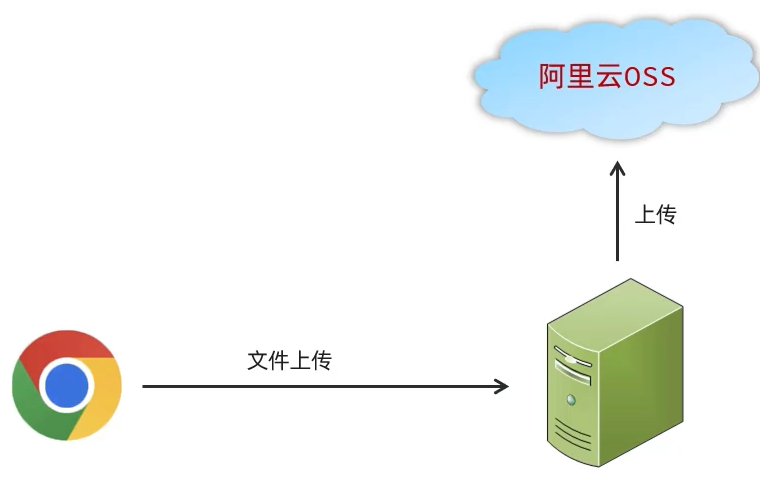 图40 云服务:对象存储
#### 第三方服务一通用思路
* 准备工作 -->> 参照官方SDK编写入门程序 -->> 集成使用
* SDK:SoftwareDevelopmentKit的缩写,软件开发工具包,包括辅助软件开发的依赖(jar包)、代码示例等,都可以叫做SDK。
#### ① 准备工作
* 注册阿里云、开通OSS服务、创建bucket、获取并配置AccessKey(注意保管好你的AccessKey)。
##### 阿里云OSS-使用步骤
* 注册阿里云(实名认证)->充值->开通对象存储服务(OSS)->创建bucket:java-ai->获取并配置AccessKey(秘钥)->参照官方SDK编写入门程序->案例集成OSS
* 官网:aliyun.com
* bucket:du-java-ai 公共读 个性化bucket名
* Bucket:存储空间是用户用于存储对象(Object,就是文件)的容器,所有的对象都必须隶属于某个存储空间。
图40 云服务:对象存储
#### 第三方服务一通用思路
* 准备工作 -->> 参照官方SDK编写入门程序 -->> 集成使用
* SDK:SoftwareDevelopmentKit的缩写,软件开发工具包,包括辅助软件开发的依赖(jar包)、代码示例等,都可以叫做SDK。
#### ① 准备工作
* 注册阿里云、开通OSS服务、创建bucket、获取并配置AccessKey(注意保管好你的AccessKey)。
##### 阿里云OSS-使用步骤
* 注册阿里云(实名认证)->充值->开通对象存储服务(OSS)->创建bucket:java-ai->获取并配置AccessKey(秘钥)->参照官方SDK编写入门程序->案例集成OSS
* 官网:aliyun.com
* bucket:du-java-ai 公共读 个性化bucket名
* Bucket:存储空间是用户用于存储对象(Object,就是文件)的容器,所有的对象都必须隶属于某个存储空间。
 图41 阿里云OSS准备工作
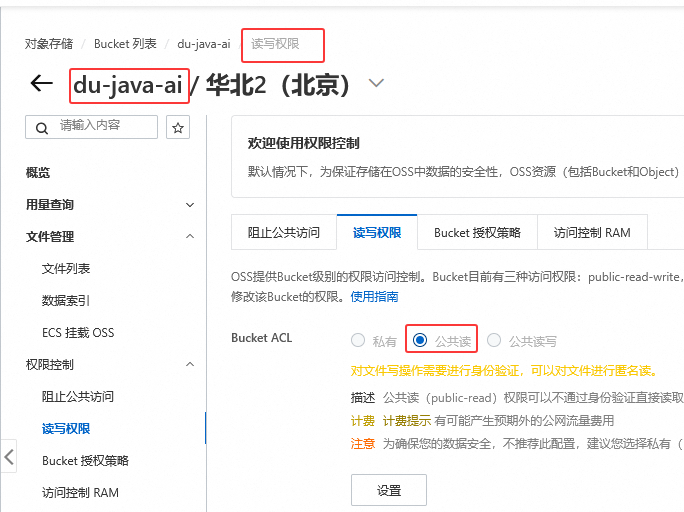 图42 创建个性化bucket验证
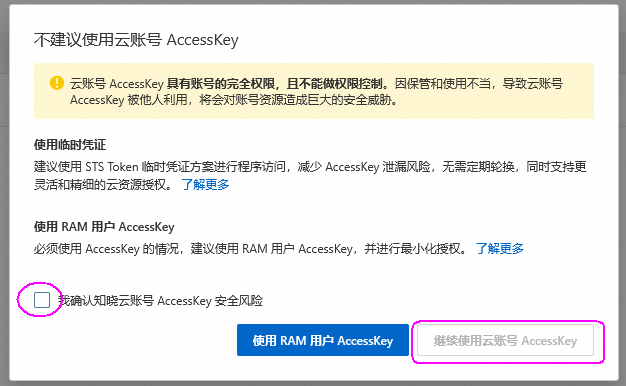 图43 创建AccessKey
##### 配置AccessKey
以**管理员身份**打开CMD命令行,执行如下命令。
```shell
# 配置系统的环境变量
set OSS_ACCESS_KEY_ID=xxxxxxxxxxxxxxxxxxxxxxxxxxxxxxxxxxxxxxxxxxxx
set OSS_ACCESS_KEY_SECRET=xxxxxxxxxxxxxxxxxxxxxxxxxxxxxxxxxxxxxxxxxx
# 执行如下命令,让更改生效。
setx OSS_ACCESS_KEY_ID "%OSS_ACCESS_KEY_ID%"
setx OSS_ACCESS_KEY_SECRET "%OSS_ACCESS_KEY_SECRET%"
# 验证环境变量是否生效。
echo %OSS_ACCESS_KEY_ID%
echo %OSS_ACCESS_KEY_SECRET%
```
注意:将上述的ACCESS_KEY_ID 与 ACCESS_KEY_SECRET 的值一定要替换成自己的、一定要保存好自己的密钥 。
#### ② 阿里云OSS-入门程序
oss.console.aliyun.com/sdk
##### Demo程序网址
https://help.aliyun.com/zh/oss/developer-reference/simple-upload-11?spm=a2c4g.11186623.help-menu-31815.d_19_2_1_1_0_0.69f47d8bcegdlc&scm=20140722.H_84781._.OR_help-T_cn~zh-V_1#p-f7c-tn1-r5n
图43 创建AccessKey
##### 配置AccessKey
以**管理员身份**打开CMD命令行,执行如下命令。
```shell
# 配置系统的环境变量
set OSS_ACCESS_KEY_ID=xxxxxxxxxxxxxxxxxxxxxxxxxxxxxxxxxxxxxxxxxxxx
set OSS_ACCESS_KEY_SECRET=xxxxxxxxxxxxxxxxxxxxxxxxxxxxxxxxxxxxxxxxxx
# 执行如下命令,让更改生效。
setx OSS_ACCESS_KEY_ID "%OSS_ACCESS_KEY_ID%"
setx OSS_ACCESS_KEY_SECRET "%OSS_ACCESS_KEY_SECRET%"
# 验证环境变量是否生效。
echo %OSS_ACCESS_KEY_ID%
echo %OSS_ACCESS_KEY_SECRET%
```
注意:将上述的ACCESS_KEY_ID 与 ACCESS_KEY_SECRET 的值一定要替换成自己的、一定要保存好自己的密钥 。
#### ② 阿里云OSS-入门程序
oss.console.aliyun.com/sdk
##### Demo程序网址
https://help.aliyun.com/zh/oss/developer-reference/simple-upload-11?spm=a2c4g.11186623.help-menu-31815.d_19_2_1_1_0_0.69f47d8bcegdlc&scm=20140722.H_84781._.OR_help-T_cn~zh-V_1#p-f7c-tn1-r5n
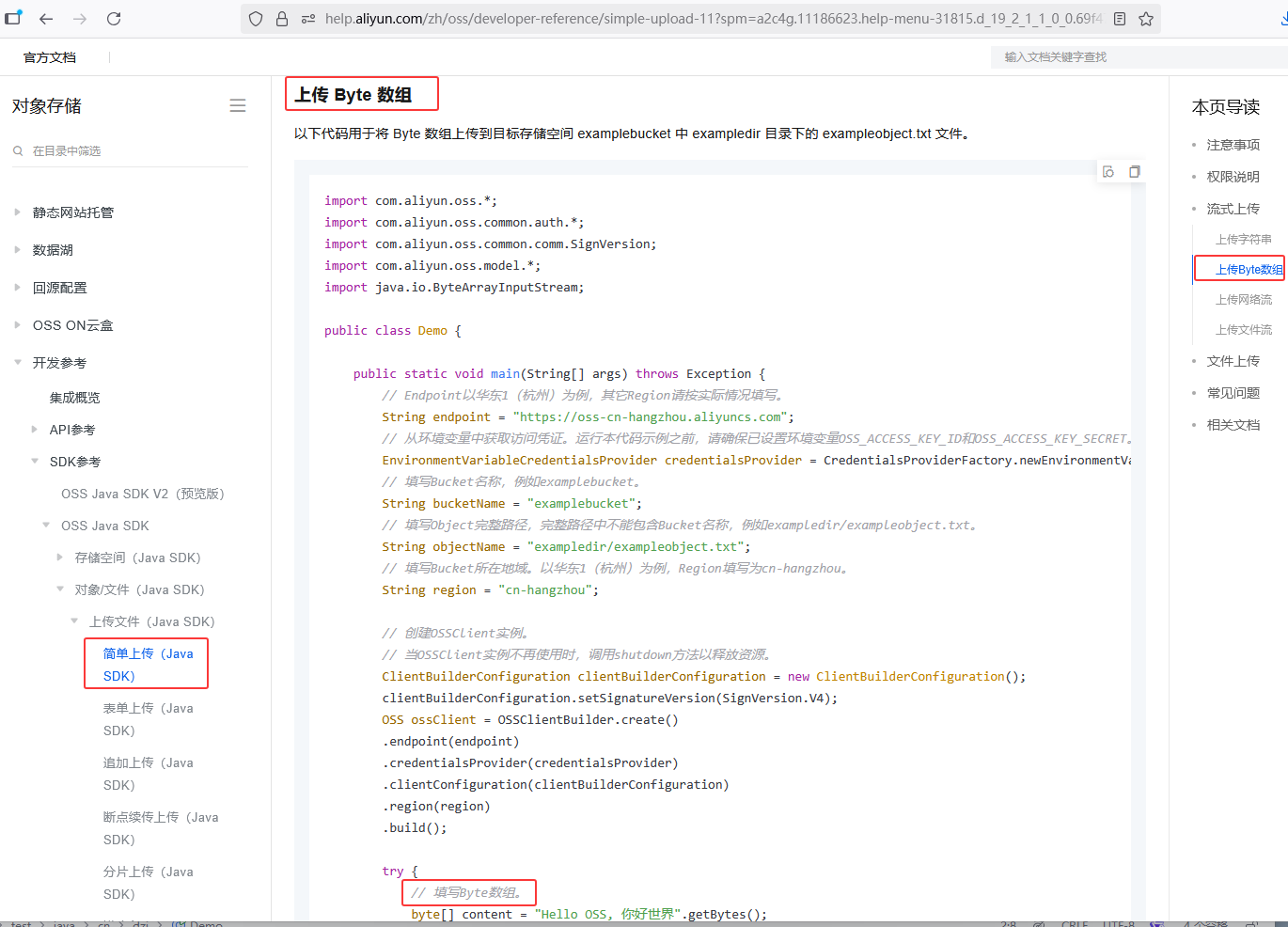 图44 上传字节数组Demo
##### src/test/java/cn/dzj/Demo.java
```java
package cn.dzj;
import com.aliyun.oss.*;
import com.aliyun.oss.common.auth.*;
import com.aliyun.oss.common.comm.SignVersion;
import com.aliyun.oss.model.*;
import java.io.ByteArrayInputStream;
import java.io.File;
import java.nio.file.Files;
public class Demo { // 修改成自己的参数
public static void main(String[] args) throws Exception {
// Endpoint以华东1(杭州)为例,其它Region请按实际情况填写。
String endpoint = "https://oss-cn-beijing.aliyuncs.com";
// 从环境变量中获取访问凭证。运行本代码示例之前,请确保已设置环境变量OSS_ACCESS_KEY_ID和OSS_ACCESS_KEY_SECRET。
EnvironmentVariableCredentialsProvider credentialsProvider = CredentialsProviderFactory.newEnvironmentVariableCredentialsProvider();
// 填写Bucket名称,例如examplebucket。
String bucketName = "du-java-ai";
// 填写Object完整路径,完整路径中不能包含Bucket名称,例如exampledir/exampleobject.txt。
String objectName = "dzj.jpg";
// 填写Bucket所在地域。以华东1(杭州)为例,Region填写为cn-hangzhou。
String region = "cn-beijing";
// 创建OSSClient实例。
// 当OSSClient实例不再使用时,调用shutdown方法以释放资源。
ClientBuilderConfiguration clientBuilderConfiguration = new ClientBuilderConfiguration();
clientBuilderConfiguration.setSignatureVersion(SignVersion.V4);
OSS ossClient = OSSClientBuilder.create()
.endpoint(endpoint)
.credentialsProvider(credentialsProvider)
.clientConfiguration(clientBuilderConfiguration)
.region(region)
.build();
try {
File file =new File("D:\\images\\dzj.jpg");
byte[] content = Files.readAllBytes(file.toPath());
// 创建PutObjectRequest对象。
PutObjectRequest putObjectRequest = new PutObjectRequest(bucketName, objectName, new ByteArrayInputStream(content));
// 创建PutObject请求。
PutObjectResult result = ossClient.putObject(putObjectRequest);
} catch (OSSException oe) {
System.out.println("Caught an OSSException, which means your request made it to OSS, "
+ "but was rejected with an error response for some reason.");
System.out.println("Error Message:" + oe.getErrorMessage());
System.out.println("Error Code:" + oe.getErrorCode());
System.out.println("Request ID:" + oe.getRequestId());
System.out.println("Host ID:" + oe.getHostId());
} catch (ClientException ce) {
System.out.println("Caught an ClientException, which means the client encountered "
+ "a serious internal problem while trying to communicate with OSS, "
+ "such as not being able to access the network.");
System.out.println("Error Message:" + ce.getMessage());
} finally {
if (ossClient != null) {
ossClient.shutdown();
}
}
}
}
```
图44 上传字节数组Demo
##### src/test/java/cn/dzj/Demo.java
```java
package cn.dzj;
import com.aliyun.oss.*;
import com.aliyun.oss.common.auth.*;
import com.aliyun.oss.common.comm.SignVersion;
import com.aliyun.oss.model.*;
import java.io.ByteArrayInputStream;
import java.io.File;
import java.nio.file.Files;
public class Demo { // 修改成自己的参数
public static void main(String[] args) throws Exception {
// Endpoint以华东1(杭州)为例,其它Region请按实际情况填写。
String endpoint = "https://oss-cn-beijing.aliyuncs.com";
// 从环境变量中获取访问凭证。运行本代码示例之前,请确保已设置环境变量OSS_ACCESS_KEY_ID和OSS_ACCESS_KEY_SECRET。
EnvironmentVariableCredentialsProvider credentialsProvider = CredentialsProviderFactory.newEnvironmentVariableCredentialsProvider();
// 填写Bucket名称,例如examplebucket。
String bucketName = "du-java-ai";
// 填写Object完整路径,完整路径中不能包含Bucket名称,例如exampledir/exampleobject.txt。
String objectName = "dzj.jpg";
// 填写Bucket所在地域。以华东1(杭州)为例,Region填写为cn-hangzhou。
String region = "cn-beijing";
// 创建OSSClient实例。
// 当OSSClient实例不再使用时,调用shutdown方法以释放资源。
ClientBuilderConfiguration clientBuilderConfiguration = new ClientBuilderConfiguration();
clientBuilderConfiguration.setSignatureVersion(SignVersion.V4);
OSS ossClient = OSSClientBuilder.create()
.endpoint(endpoint)
.credentialsProvider(credentialsProvider)
.clientConfiguration(clientBuilderConfiguration)
.region(region)
.build();
try {
File file =new File("D:\\images\\dzj.jpg");
byte[] content = Files.readAllBytes(file.toPath());
// 创建PutObjectRequest对象。
PutObjectRequest putObjectRequest = new PutObjectRequest(bucketName, objectName, new ByteArrayInputStream(content));
// 创建PutObject请求。
PutObjectResult result = ossClient.putObject(putObjectRequest);
} catch (OSSException oe) {
System.out.println("Caught an OSSException, which means your request made it to OSS, "
+ "but was rejected with an error response for some reason.");
System.out.println("Error Message:" + oe.getErrorMessage());
System.out.println("Error Code:" + oe.getErrorCode());
System.out.println("Request ID:" + oe.getRequestId());
System.out.println("Host ID:" + oe.getHostId());
} catch (ClientException ce) {
System.out.println("Caught an ClientException, which means the client encountered "
+ "a serious internal problem while trying to communicate with OSS, "
+ "such as not being able to access the network.");
System.out.println("Error Message:" + ce.getMessage());
} finally {
if (ossClient != null) {
ossClient.shutdown();
}
}
}
}
```
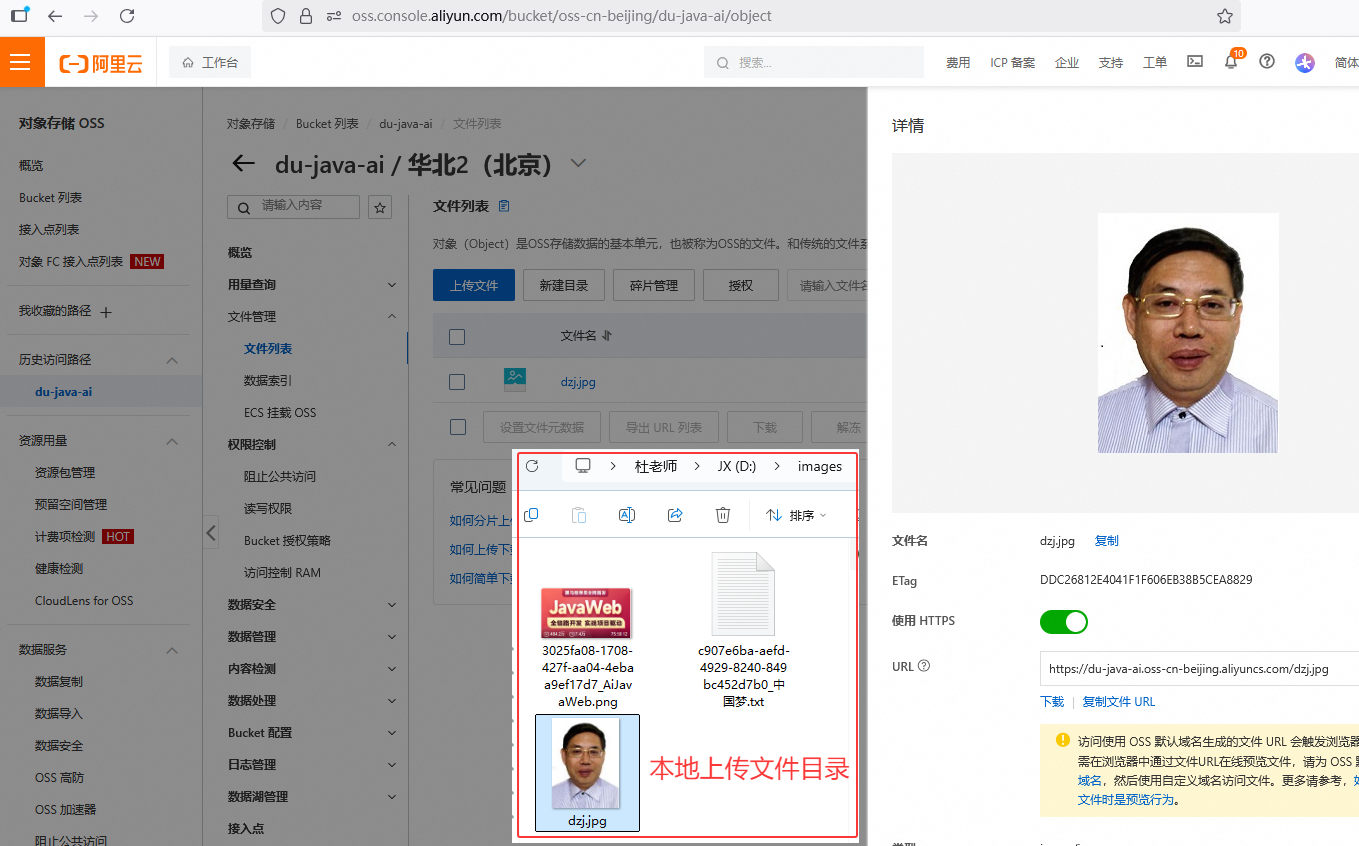 图45 阿里OSS入门程序验证
#### 注意:
在使用第三方提供的云服务或技术时,一定要参照对应的官方文档进行开发和测试。
#### ③ 阿里云OSS-案例集成
##### 需求
图45 阿里OSS入门程序验证
#### 注意:
在使用第三方提供的云服务或技术时,一定要参照对应的官方文档进行开发和测试。
#### ③ 阿里云OSS-案例集成
##### 需求
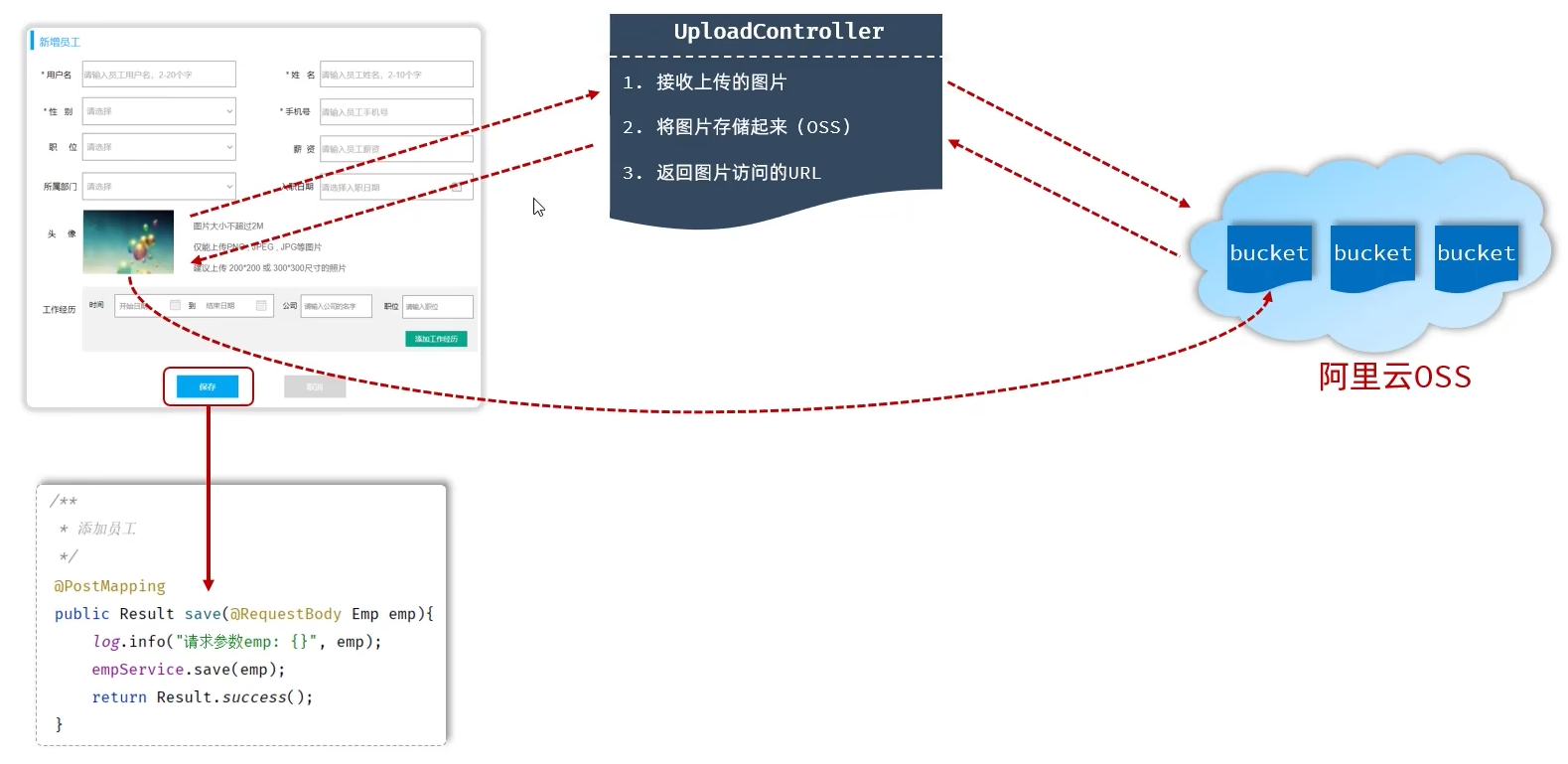 图46 上传头像需求
步骤:
* 引入阿里云OSS文件上传工具类(由官方的示例代码改造而来)
##### cn/dzj/utils/AliyunOSSOperator.java
```java
package cn.dzj.utils;
import com.aliyun.oss.*;
import com.aliyun.oss.common.auth.CredentialsProviderFactory;
import com.aliyun.oss.common.auth.EnvironmentVariableCredentialsProvider;
import com.aliyun.oss.common.comm.SignVersion;
import org.springframework.stereotype.Component;
import java.io.ByteArrayInputStream;
import java.time.LocalDate;
import java.time.format.DateTimeFormatter;
import java.util.UUID;
@Component
public class AliyunOSSOperator {
private String endpoint = "https://oss-cn-beijing.aliyuncs.com";
private String bucketName = "du-java-ai"; //修改为你自己的bucketName
private String region = "cn-beijing";
public String upload(byte[] content, String originalFilename) throws Exception {
// 从环境变量中获取访问凭证。运行本代码示例之前,请确保已设置环境变量OSS_ACCESS_KEY_ID和OSS_ACCESS_KEY_SECRET。
EnvironmentVariableCredentialsProvider credentialsProvider = CredentialsProviderFactory.newEnvironmentVariableCredentialsProvider();
// 填写Object完整路径,例如202406/1.png。Object完整路径中不能包含Bucket名称。
//获取当前系统日期的字符串,格式为 yyyy/MM
String dir = LocalDate.now().format(DateTimeFormatter.ofPattern("yyyy/MM"));
//生成一个新的不重复的文件名
String newFileName = UUID.randomUUID() + originalFilename.substring(originalFilename.lastIndexOf("."));
String objectName = dir + "/" + newFileName;
// 创建OSSClient实例。
ClientBuilderConfiguration clientBuilderConfiguration = new ClientBuilderConfiguration();
clientBuilderConfiguration.setSignatureVersion(SignVersion.V4);
OSS ossClient = OSSClientBuilder.create()
.endpoint(endpoint)
.credentialsProvider(credentialsProvider)
.clientConfiguration(clientBuilderConfiguration)
.region(region)
.build();
try {
ossClient.putObject(bucketName, objectName, new ByteArrayInputStream(content));
} finally {
ossClient.shutdown();
}
return endpoint.split("//")[0] + "//" + bucketName + "." + endpoint.split("//")[1] + "/" + objectName;
}
}
```
* 上传文件接口开发
##### UploadController.java 修改upload方法
```java
@Autowired
private AliyunOSSOperator aliyunOSSOperator;
/**
* 文件上传,上传到阿里云oss
*/
@PostMapping("/upload")
public Result upload(MultipartFile file) throws Exception {
log.info("文件上传:{}", file);
String url = aliyunOSSOperator.upload(file.getBytes(), file.getOriginalFilename());
log.info("文件上传oss,url:{}", url);
return Result.success(url);
}
```
图46 上传头像需求
步骤:
* 引入阿里云OSS文件上传工具类(由官方的示例代码改造而来)
##### cn/dzj/utils/AliyunOSSOperator.java
```java
package cn.dzj.utils;
import com.aliyun.oss.*;
import com.aliyun.oss.common.auth.CredentialsProviderFactory;
import com.aliyun.oss.common.auth.EnvironmentVariableCredentialsProvider;
import com.aliyun.oss.common.comm.SignVersion;
import org.springframework.stereotype.Component;
import java.io.ByteArrayInputStream;
import java.time.LocalDate;
import java.time.format.DateTimeFormatter;
import java.util.UUID;
@Component
public class AliyunOSSOperator {
private String endpoint = "https://oss-cn-beijing.aliyuncs.com";
private String bucketName = "du-java-ai"; //修改为你自己的bucketName
private String region = "cn-beijing";
public String upload(byte[] content, String originalFilename) throws Exception {
// 从环境变量中获取访问凭证。运行本代码示例之前,请确保已设置环境变量OSS_ACCESS_KEY_ID和OSS_ACCESS_KEY_SECRET。
EnvironmentVariableCredentialsProvider credentialsProvider = CredentialsProviderFactory.newEnvironmentVariableCredentialsProvider();
// 填写Object完整路径,例如202406/1.png。Object完整路径中不能包含Bucket名称。
//获取当前系统日期的字符串,格式为 yyyy/MM
String dir = LocalDate.now().format(DateTimeFormatter.ofPattern("yyyy/MM"));
//生成一个新的不重复的文件名
String newFileName = UUID.randomUUID() + originalFilename.substring(originalFilename.lastIndexOf("."));
String objectName = dir + "/" + newFileName;
// 创建OSSClient实例。
ClientBuilderConfiguration clientBuilderConfiguration = new ClientBuilderConfiguration();
clientBuilderConfiguration.setSignatureVersion(SignVersion.V4);
OSS ossClient = OSSClientBuilder.create()
.endpoint(endpoint)
.credentialsProvider(credentialsProvider)
.clientConfiguration(clientBuilderConfiguration)
.region(region)
.build();
try {
ossClient.putObject(bucketName, objectName, new ByteArrayInputStream(content));
} finally {
ossClient.shutdown();
}
return endpoint.split("//")[0] + "//" + bucketName + "." + endpoint.split("//")[1] + "/" + objectName;
}
}
```
* 上传文件接口开发
##### UploadController.java 修改upload方法
```java
@Autowired
private AliyunOSSOperator aliyunOSSOperator;
/**
* 文件上传,上传到阿里云oss
*/
@PostMapping("/upload")
public Result upload(MultipartFile file) throws Exception {
log.info("文件上传:{}", file);
String url = aliyunOSSOperator.upload(file.getBytes(), file.getOriginalFilename());
log.info("文件上传oss,url:{}", url);
return Result.success(url);
}
```
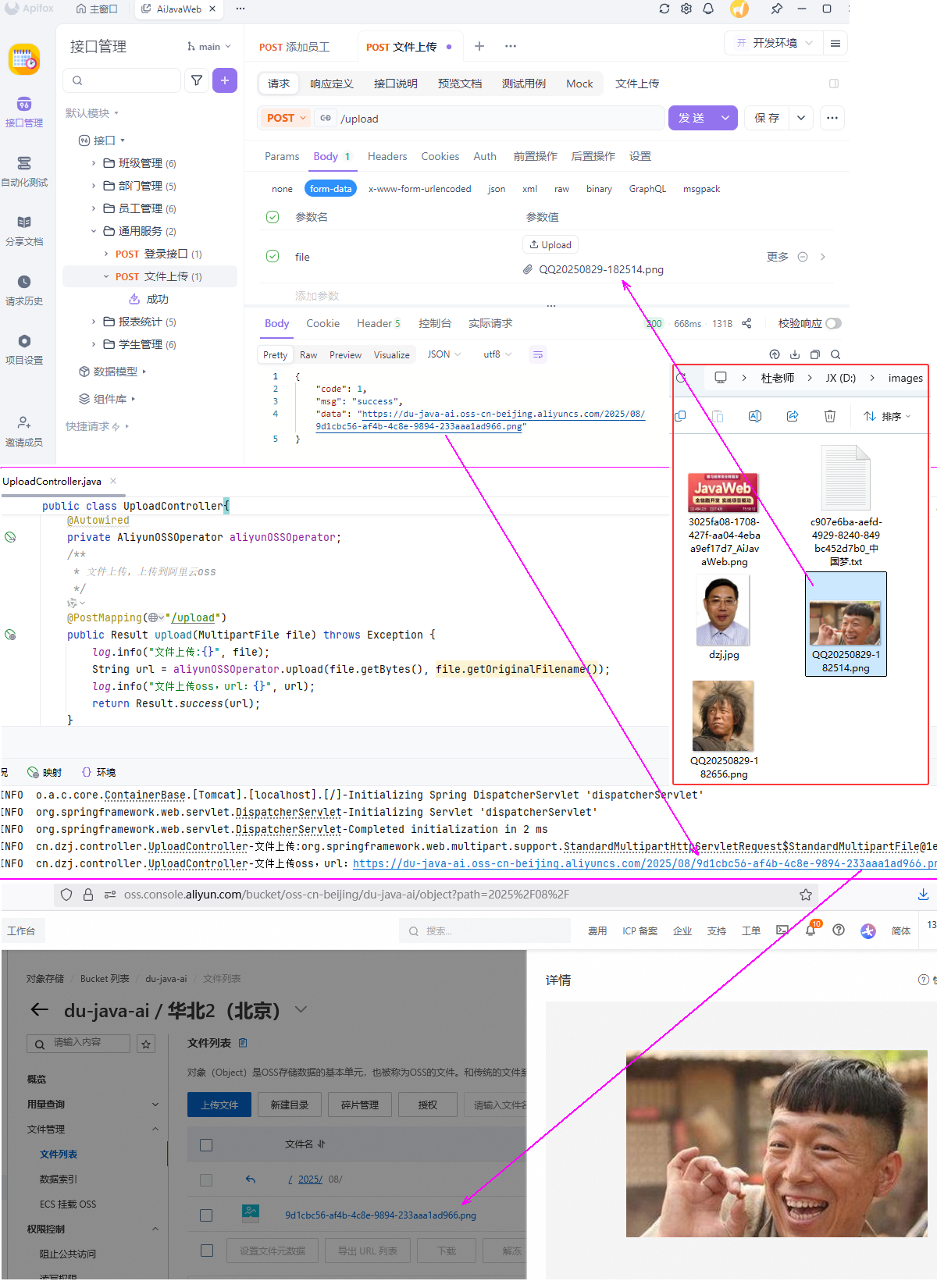 图47 上传阿里OSS验证1
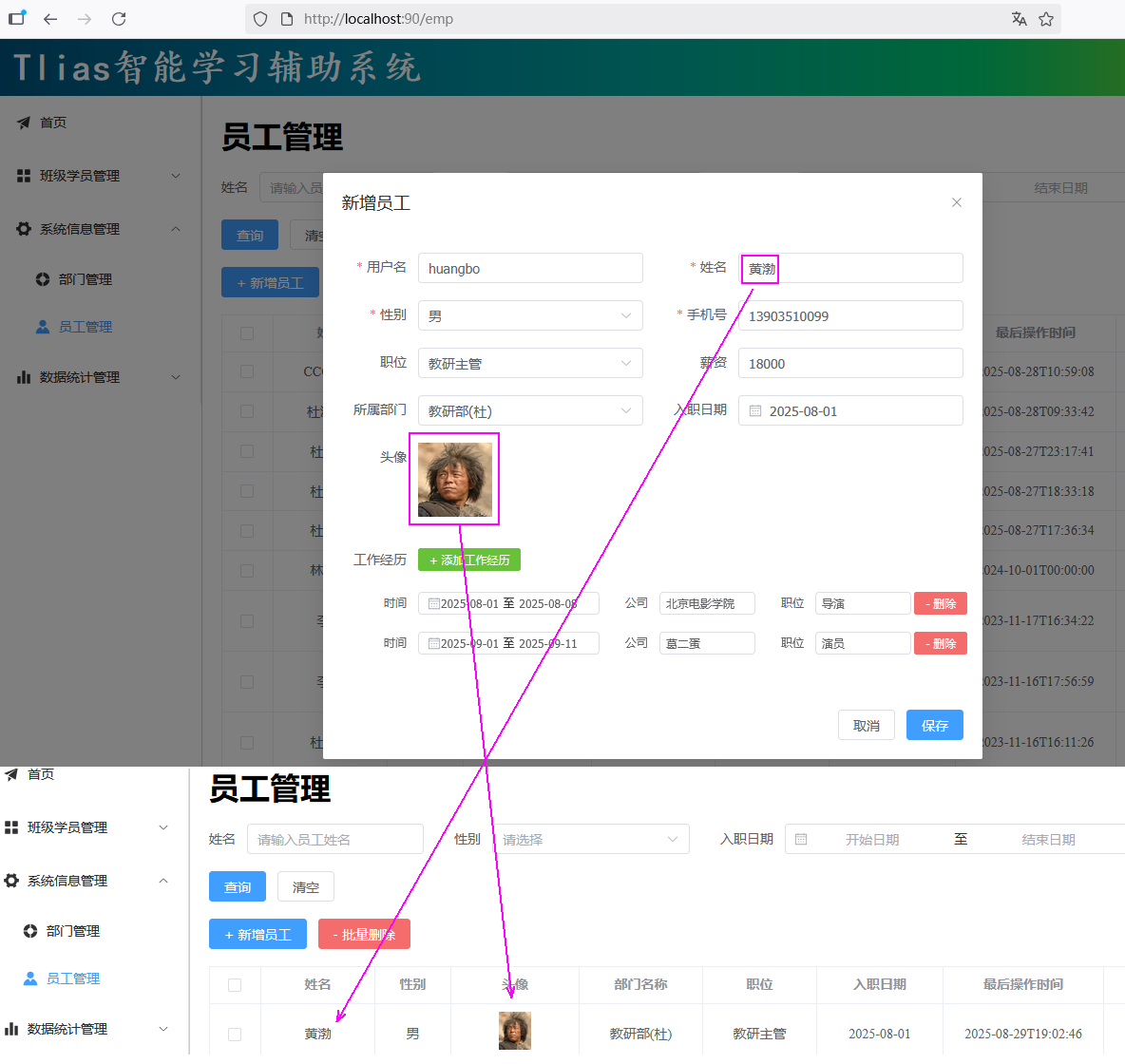 图48 上传阿里OSS验证2
#### 参数配置化
* 指将一些需要灵活变化的参数,配置在配置文件中,然后通过@Value注解来注入外部配置的属性。
图48 上传阿里OSS验证2
#### 参数配置化
* 指将一些需要灵活变化的参数,配置在配置文件中,然后通过@Value注解来注入外部配置的属性。
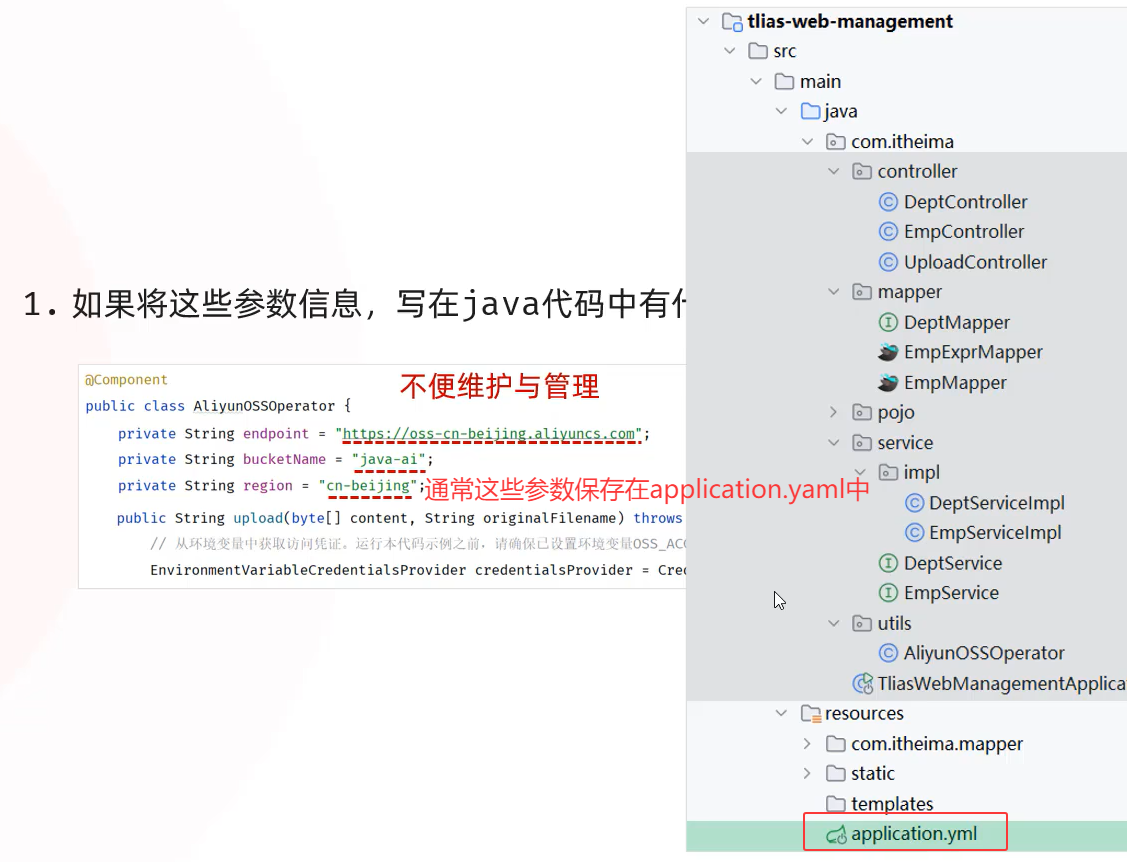 图49 参数配置化需求
##### application.yml
```yaml
aliyun:
oss:
endpoint: https://oss-cn-beijing.aliyuncs.com
bucketName: java-ai
region: cn-beijing
```
##### AliyunOSSOperator
```java
import org.springframework.beans.factory.annotation.Value;
@Component
public class AliyunOSSOperator {
@Value("${aliyun.oss.endpoint}")
private String endpoint;
@Value("${aliyun.oss.bucketName}")
private String bucketName;
@Value("${aliyun.oss.region}")
private String region;
}
```
图49 参数配置化需求
##### application.yml
```yaml
aliyun:
oss:
endpoint: https://oss-cn-beijing.aliyuncs.com
bucketName: java-ai
region: cn-beijing
```
##### AliyunOSSOperator
```java
import org.springframework.beans.factory.annotation.Value;
@Component
public class AliyunOSSOperator {
@Value("${aliyun.oss.endpoint}")
private String endpoint;
@Value("${aliyun.oss.bucketName}")
private String bucketName;
@Value("${aliyun.oss.region}")
private String region;
}
```
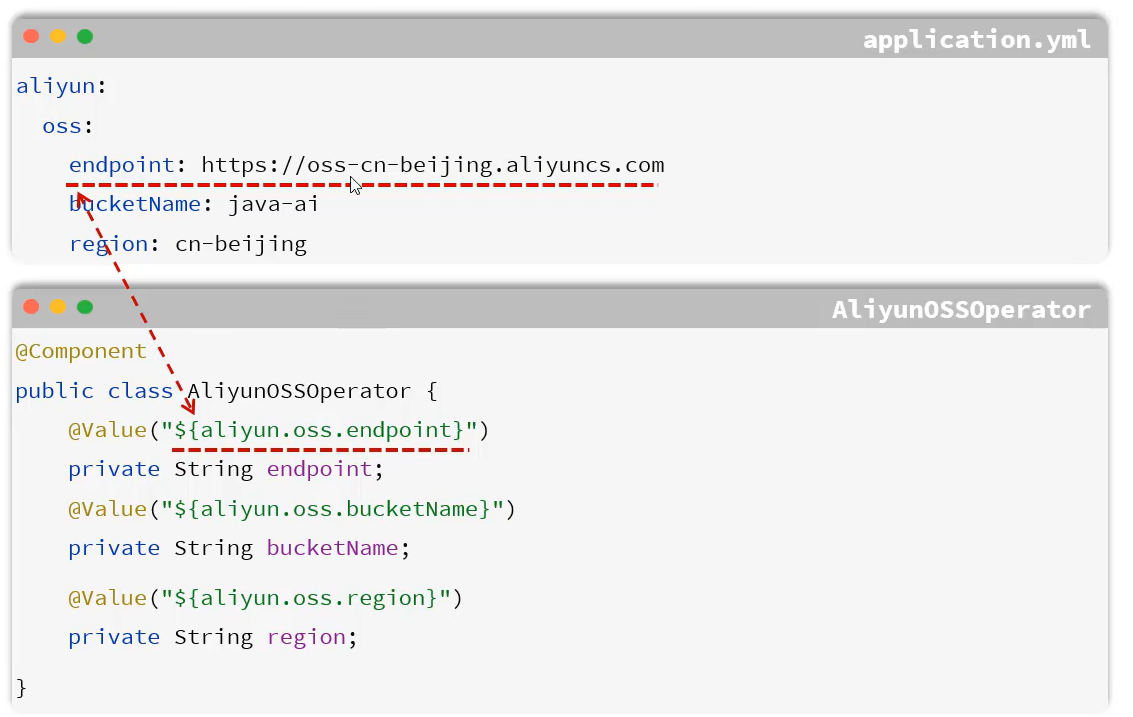 图50 解决方法
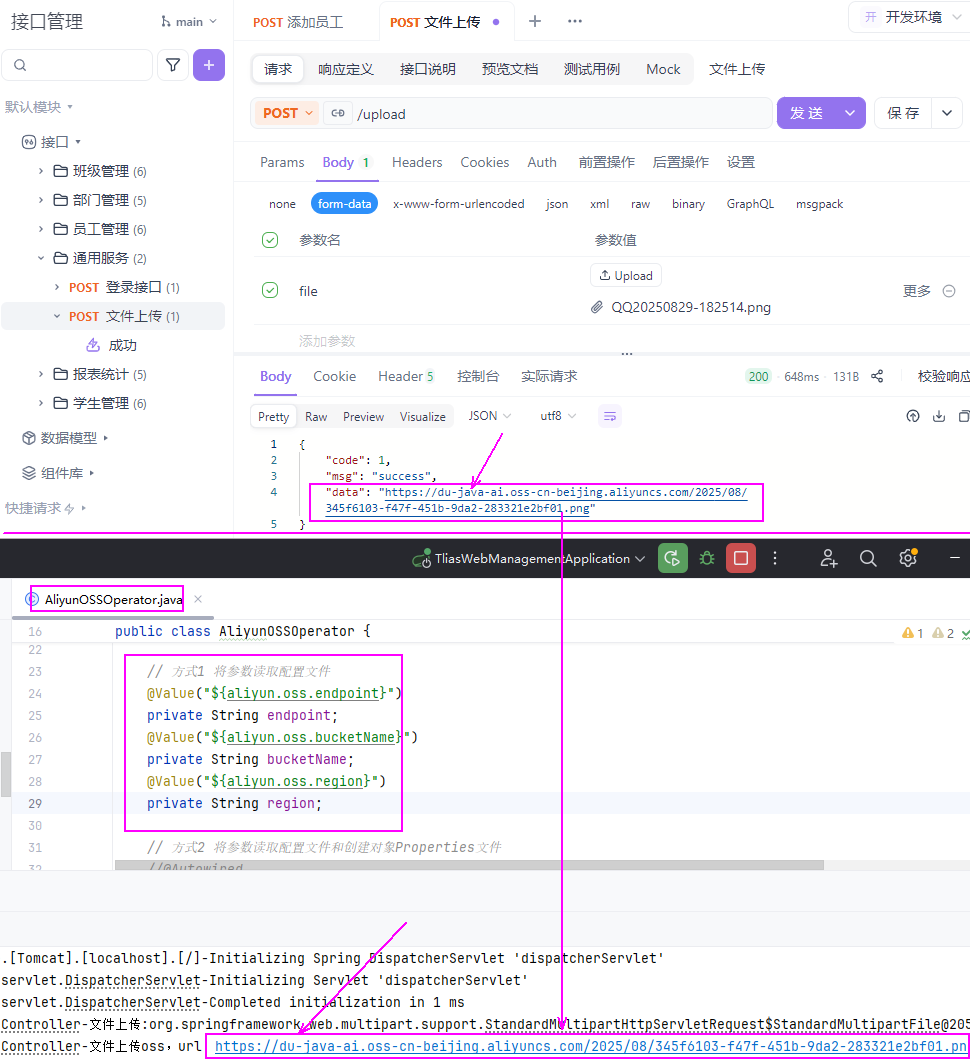 图51 @Value验证
#### @ConfigurationProperties
图51 @Value验证
#### @ConfigurationProperties
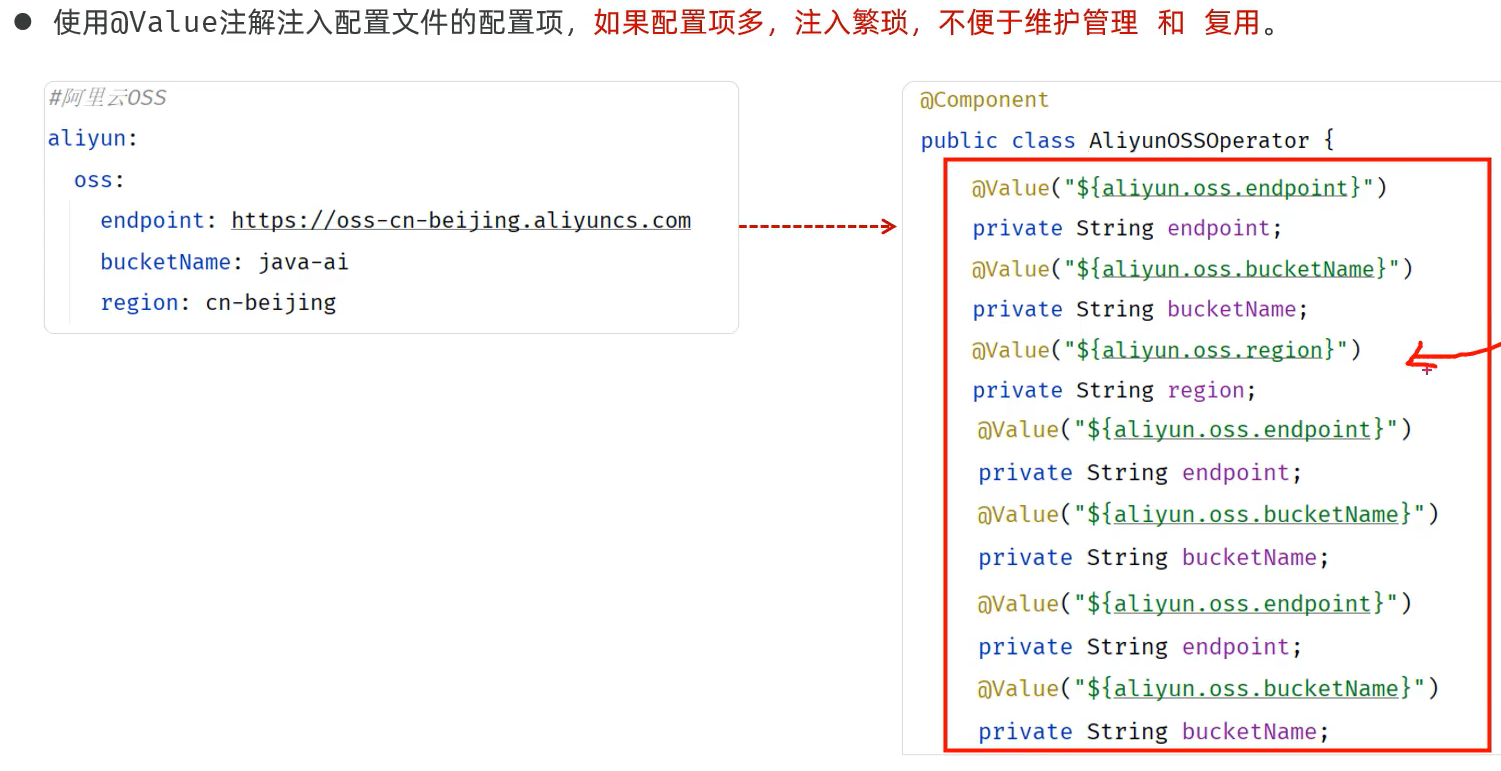 图52 需求
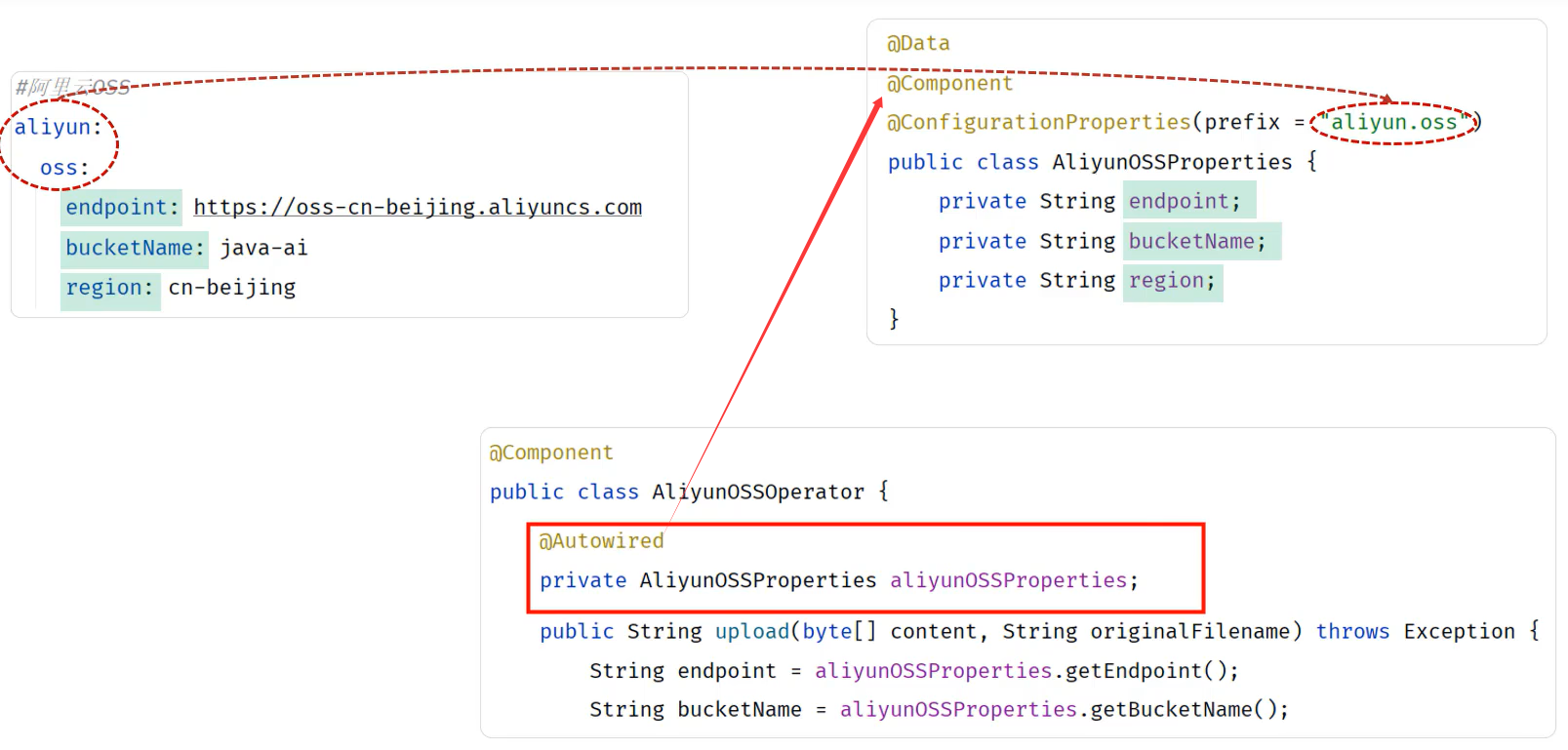 图53 解决方法
##### cn/dzj/utils/AliyunOSSProperties.java
```java
package cn.dzj.utils;
import lombok.Data;
import org.springframework.boot.context.properties.ConfigurationProperties;
import org.springframework.stereotype.Component;
@Data
@Component
@ConfigurationProperties(prefix = "aliyun.oss")
public class AliyunOSSProperties {
private String endpoint;
private String bucketName;
private String region;
}
```
##### cn/dzj/utils/AliyunOSSOperator.java
```java
package cn.dzj.utils;
import com.aliyun.oss.*;
import com.aliyun.oss.common.auth.CredentialsProviderFactory;
import com.aliyun.oss.common.auth.EnvironmentVariableCredentialsProvider;
import com.aliyun.oss.common.comm.SignVersion;
import org.springframework.beans.factory.annotation.Autowired;
import org.springframework.beans.factory.annotation.Value;
import org.springframework.stereotype.Component;
import java.io.ByteArrayInputStream;
import java.time.LocalDate;
import java.time.format.DateTimeFormatter;
import java.util.UUID;
@Component
public class AliyunOSSOperator {
// 将参数写入代码 中
// private String endpoint = "https://oss-cn-beijing.aliyuncs.com";
// private String bucketName = "du-java-ai"; //修改为你自己的bucketName
// private String region = "cn-beijing";
// 方式1 将参数读取配置文件
/*@Value("${aliyun.oss.endpoint}")
private String endpoint;
@Value("$[aliyun.oss.bucketName}")
private String bucketName;
@Value("$[aliyun.oss.region}")
private String region;*/
// 方式2 将参数读取配置文件和创建对象Properties文件
@Autowired
private AliyunOSSProperties aliyunOSSProperties;
public String upload(byte[] content, String originalFilename) throws Exception {
// 方式2
String bucketName = aliyunOSSProperties.getBucketName();
String region = aliyunOSSProperties.getRegion();
String endpoint = aliyunOSSProperties.getEndpoint();
//.....
}
}
```
图53 解决方法
##### cn/dzj/utils/AliyunOSSProperties.java
```java
package cn.dzj.utils;
import lombok.Data;
import org.springframework.boot.context.properties.ConfigurationProperties;
import org.springframework.stereotype.Component;
@Data
@Component
@ConfigurationProperties(prefix = "aliyun.oss")
public class AliyunOSSProperties {
private String endpoint;
private String bucketName;
private String region;
}
```
##### cn/dzj/utils/AliyunOSSOperator.java
```java
package cn.dzj.utils;
import com.aliyun.oss.*;
import com.aliyun.oss.common.auth.CredentialsProviderFactory;
import com.aliyun.oss.common.auth.EnvironmentVariableCredentialsProvider;
import com.aliyun.oss.common.comm.SignVersion;
import org.springframework.beans.factory.annotation.Autowired;
import org.springframework.beans.factory.annotation.Value;
import org.springframework.stereotype.Component;
import java.io.ByteArrayInputStream;
import java.time.LocalDate;
import java.time.format.DateTimeFormatter;
import java.util.UUID;
@Component
public class AliyunOSSOperator {
// 将参数写入代码 中
// private String endpoint = "https://oss-cn-beijing.aliyuncs.com";
// private String bucketName = "du-java-ai"; //修改为你自己的bucketName
// private String region = "cn-beijing";
// 方式1 将参数读取配置文件
/*@Value("${aliyun.oss.endpoint}")
private String endpoint;
@Value("$[aliyun.oss.bucketName}")
private String bucketName;
@Value("$[aliyun.oss.region}")
private String region;*/
// 方式2 将参数读取配置文件和创建对象Properties文件
@Autowired
private AliyunOSSProperties aliyunOSSProperties;
public String upload(byte[] content, String originalFilename) throws Exception {
// 方式2
String bucketName = aliyunOSSProperties.getBucketName();
String region = aliyunOSSProperties.getRegion();
String endpoint = aliyunOSSProperties.getEndpoint();
//.....
}
}
```
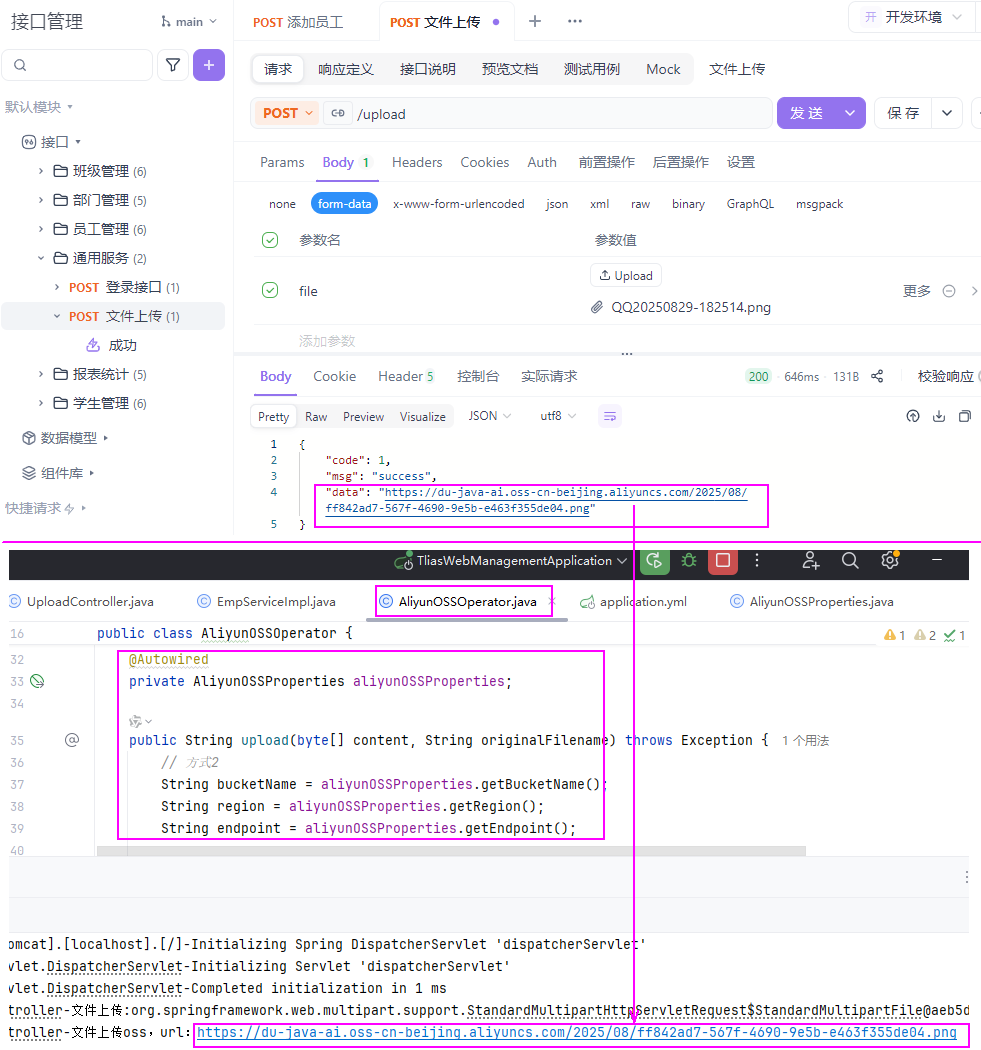 图54 ConfigurationProperties验证
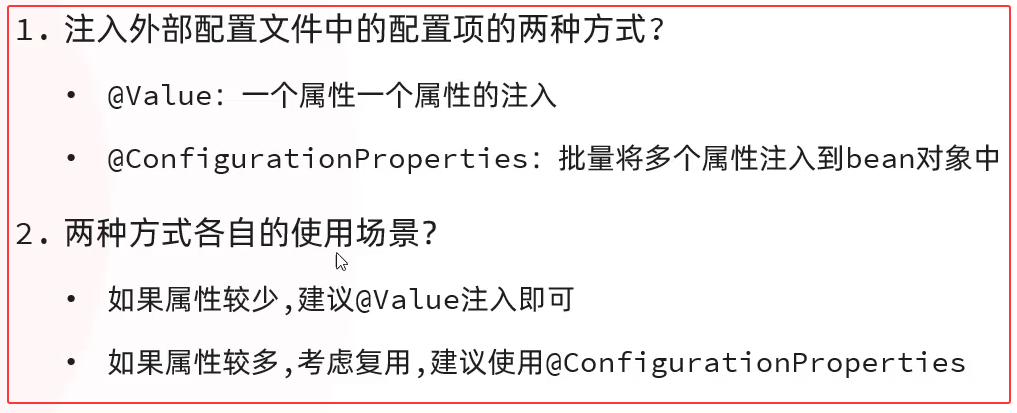 图55 小结
①②③④⑤⑥⑦⑧⑨⑩
图55 小结
①②③④⑤⑥⑦⑧⑨⑩